
Tag: Atlassian

Atlassian Team ’26 Europe: What Cloud Leaders Asked and Why Tools Alone Don’t Change Outcomes 

Cprime team at the Atlassian Team ‘26 Europe booth in Amsterdam

One question kept coming up in Amsterdam 

The licences are bought, the data has moved, and people have logged in. So why does the business case still feel like a promise? We heard some version of that question at the Cprime booth during Atlassian Team ’26 Europe (6 to 8 October 2026, RAI Amsterdam). For years, the hard part was the Atlassian Cloud migration. Now leaders want to know when the return shows up. 

Key takeaways from Atlassian Team ’26 Europe 

  • Rovo AI: start with two or three repetitive tasks, such as the weekly status report, and track the hours saved before scaling. 
  • Ways of working: treat the Atlassian Cloud migration as day one. Simplify workflows, agree what “done” means, and give leaders one dashboard they trust. 
  • Usage-based pricing: audit licences and apps, remove dormant accounts and duplicate apps, and link remaining spend to outcomes. 
  • Apps and Data Center: Atlassian Cloud now handles much of what custom apps did. Rebuild only the logic that sets your business apart on Atlassian Forge. 
  • Jira Service Management: connect JSM to Jira and Confluence early so service, engineering, and knowledge work from the same picture. 

From migration to momentum 

The leaders we met at the event have already moved to Atlassian Cloud and are curious to know what comes next. Our answer is simple: tools alone don’t change outcomes. The platform creates the opportunity, and the value comes from how teams plan, collaborate, and deliver on it every day. When ways of working evolve alongside the technology, the return follows. 

Five themes stood out. Each one shows where that shift is already happening, and where the biggest opportunities are waiting. 

1. From access to adoption: making Rovo AI count 

Many teams already have Rovo AI (Atlassian’s AI for search, chat, and agents), and the leaders we met are eager to make the most of it. Their questions were practical. What should we automate first? Which Rovo use cases are worth the effort, and how do we prioritise? How do we show the business it’s paying off? 

We’ve found that teams who see results start small and stay focused. Rolling Rovo out to everyone at once makes it hard to build new habits or measure impact. A few targeted use cases build momentum quickly. 

Where to start: pick two or three time-consuming, repetitive tasks. The weekly status report is a great example. Someone in the PMO often spends half a morning pulling updates from Jira and Confluence. A Rovo agent can draft it in minutes, and the project lead reviews it and hits send. Track the hours saved for a month, share the results, then take on the next task. 

2. Atlassian Cloud has changed the platform, but not the way of working 

Most leaders we spoke to moved to Cloud for faster releases, better visibility, and less overhead. A lot of them haven’t seen those yet. It’s a familiar pattern. A company lifts dozens of Jira projects into Cloud, complete with the custom fields, workflows, and five-step approvals someone built ten years ago. The clutter comes along for the ride, so reports stay slow and planning still lives in spreadsheets. 

What helps: treat migration as day one, because the value comes from what you change after go-live. Strip back the workflows, agree on what “done” means, and give leaders one dashboard they trust.  

The same thinking applies at portfolio level. With its Strategy Collection, Atlassian is moving beyond work management by connecting strategy and investment to delivery. Its portfolio management capabilities are becoming a real alternative to traditional platforms. At Cprime, we’re exploring this with customers now and working closely with Atlassian’s Strategy Collection team as the offering evolves. 

Underneath it all sits the Teamwork Graph, the connected layer that links goals, people, knowledge, and work across Atlassian. The intelligence is already there. The opportunity is to use it better by keeping strategy, knowledge, and execution aligned. Our System of Work Accelerator, which we demonstrated to customers in Amsterdam, is a practical place to start. It shows how you’re using your Teamwork Graph today and where to strengthen your data and connections to support Rovo and your strategic goals. Pair that with the right skills and habits, and leaders can see how work contributes to their objectives and show what AI is really delivering.  

3. Atlassian usage-based pricing puts every licence in the spotlight 

The shift to Atlassian usage-based pricing has put cost firmly on the agenda. When you pay for what you use, every app and automation needs a reason to exist. Finance spots the gaps fast, and “Are we getting value?” stops being a feeling and becomes a number someone has to stand behind. 

A practical first step: audit what you’re paying for, check who actually uses it, and cut what nobody needs. Dormant accounts and two apps doing the same job are the usual quick wins. Then link what’s left to the outcomes it supports, so your next budget meeting starts with evidence. Our System of Work Accelerator FAQs go deeper. 

4. Moving from Data Center to Cloud: your apps may not be the blocker you think they are 

For teams still on Data Center, the biggest worry about moving to Cloud is their apps. Years of ScriptRunner scripts and custom apps now support critical processes, and rebuilding them feels risky, expensive, and disruptive. The good news is that Atlassian Cloud now handles much of that work out of the box. The custom logic that truly sets your business apart can be rebuilt on Atlassian Forge, Atlassian’s cloud app development platform, allowing you to keep what matters, simplify what doesn’t, and open the door to Cloud capabilities like Rovo along the way. 

Before you decide: take a fresh look at your apps. Our Cloud Migration Blueprint maps what can move as is, what Cloud already handles, and what’s worth rebuilding, so you can reduce your migration scope and your licence bill in one go. 

5. Beyond the help desk: Jira Service Management steps up for IT service 

Interest in Jira Service Management (JSM) went far past basic ticketing. Leaders want one connected IT service management (ITSM) platform for incidents, changes, problems, and assets, so their teams can resolve issues faster and see what’s really driving them. 

Picture a bank’s mobile app going down. The incident in JSM links to the Jira ticket for the fix, and the fix links to the Confluence page that explains what happened. Everyone works from the same picture, and Rovo can surface answers faster because the knowledge is already connected. 

Make it count: connect JSM to the rest of your Atlassian tools early. The sooner service, engineering, and knowledge sit together, the faster your teams can move from firefighting to improving. We’ve seen what this makes possible. For one Fortune 50 technology company, we built a JSM solution that cut average handling time by 15 minutes per issue and is forecast to save millions of dollars a year. 

A theme to watch: developer experience 

Developer experience came up again and again at the event. Engineering leaders want a clearer view of how their teams deliver, and whether their growing AI investment is paying off. It’s the same question behind all five themes: are your tools changing how work actually gets done? For product and engineering teams, Rovo-augmented product development is how we help answer it, by bringing AI into planning, building, and shipping so leaders can see the impact. 

How Cprime turns Atlassian investment into impact 

Our insights come from more than 20 years of helping organisations change how they work. When PayPal moved to Atlassian Cloud, we helped rework its workflows and improve the developer experience for more than 35,000 active users, as part of the largest Atlassian Cloud migration in history. It’s also why Atlassian named us its Partner of the Year for Cloud Transformation Services. 

If you want your Atlassian investment to pay back, here’s where we’d put your energy: 

  • Changing how teams work: Treat Cloud as an operating model shift and plan for it that way. Plenty of partners can move your data, but the bigger gains come from rethinking how teams plan, track, and deliver once they’re there. That’s why large organisations often migrate with one partner, then bring Cprime in for this part. 
  • Adoption that sticks: Put as much effort into your people as into the platform. Atlassian has made adoption a top priority, and it should be yours too. Rovo and Cloud only pay off when teams know how to use what they already have, so start with a few proven use cases, train the people who’ll use them, and keep building new habits around them. 
  • Going deep where it counts: Resist the urge to fix everything at once. Pick the few areas where value is leaking most and get those right first. For the leaders we met, that meant getting more value from Atlassian Cloud, driving Rovo AI adoption, or expanding JSM across IT service. It’s the same focus we apply to our own work. 

Ready to get more from Atlassian Cloud?

On Cloud but not seeing the return yet? Book a System of Work Accelerator conversation. We’ll look at how AI-ready your setup is and show you where to act first.

Frequently asked questions (FAQs) 

What were the main themes at Atlassian Team ‘26 Europe?
Leaders who had already moved to Atlassian Cloud wanted to know when the return shows up. Five themes stood out: making Rovo AI adoption count, changing ways of working after migration, managing cost under usage-based pricing, rethinking apps when moving from Data Center, and expanding Jira Service Management for IT service. Developer experience was a theme to watch.

How should teams get started with Rovo AI?
Start small and stay focused. Pick two or three time-consuming, repetitive tasks, such as the weekly status report. A Rovo agent can draft it in minutes for a project lead to review. Track the hours saved for a month, share the results, then take on the next task.

Why isn’t Atlassian Cloud delivering a return yet?
Often the old ways of working moved with the data, including legacy custom fields, workflows, and approvals. The value comes from what you change after go-live: strip back the workflows, agree on what “done” means, and give leaders one dashboard they trust.

How does Atlassian usage-based pricing change licence management?
When you pay for what you use, every app and automation needs a reason to exist. Audit what you’re paying for, check who actually uses it, and cut what nobody needs. Then link what’s left to the outcomes it supports.

Are apps a blocker for moving from Data Center to Atlassian Cloud?
Not always. Atlassian Cloud now handles much of the work that ScriptRunner scripts and custom apps once did, and the custom logic that sets your business apart can be rebuilt on Atlassian Forge. Cprime’s Cloud Migration Blueprint maps what can move as is, what Cloud already handles, and what’s worth rebuilding.

How does Jira Service Management improve IT service?
Jira Service Management brings incidents, changes, problems, and assets onto one connected platform. When an incident links to the Jira ticket for the fix and the Confluence page that explains it, everyone works from the same picture, and Rovo can surface answers faster. For one Fortune 50 company, Cprime’s JSM solution cut average handling time by 15 minutes per issue.

What is the Cprime System of Work Accelerator?
The System of Work Accelerator shows how you’re using your Teamwork Graph today and where to strengthen your data and connections to support Rovo and your strategic goals. Cprime demonstrated it to customers in Amsterdam, and it’s a practical place to start if you’re on Cloud but not seeing the return yet.


The Hidden Cost of a Drifting Targetprocess Environment 

AdobeStock_1930309210

Picture the quarterly investment review. The portfolio report shows one number. A business leader quotes another from a spreadsheet. Everyone turns to the one administrator who knows how the report is built. 

If that sounds familiar, your platform may have drifted. Drift is common in Targetprocess environments because the platform is so flexible. It adapts to how each team and portfolio work. But without a shared operating model to guide that flexibility, small and reasonable changes add up, and the leaders accountable for investment decisions end up paying for it. 

To help Apptio Targetprocess customers get more value from their platform, Cprime hosted an IBM Targetprocess webinar led by Solutions Advisor Carollyn Gehrke. Drawing on nearly 30 years in technology business management (TBM), portfolio, and product management, she explained how drift happens and how to reverse it. 

How platforms drift 

Carollyn compares a Targetprocess environment to a growing city. In her analogy, roads are the workflows and fields that move work through the system. Neighborhoods are the teams and portfolios that use it. Street signs are the views and reports people rely on to find their way. Detours are the exceptions added to meet an urgent need. 

No city decides to become hard to navigate. It happens one road at a time, until residents know where they want to go but not how to get there. Targetprocess grows the same way. An urgent report gets a new field, one team gets its own workflow, and one leader gets a custom view. Over time, the configuration reflects years of requests more than the strategy it was built to serve. 

When people get lost, it is easy to blame the tool. However, the real causes are usually unclear ownership, inconsistent processes, undocumented decisions, and unmanaged change. 

Targetprocess may be where the problem becomes visible. It is rarely where the problem begins. 

Why one fix is never enough 

Three problems drain value from portfolio platforms, and each one fuels the next. 

  1. Complexity comes first. Flexibility turns into risk when fields, workflows, and reports stop working as one system. 
  1. Adoption follows. If leaders quote numbers the system does not show, the platform is being worked around. 
  1. Key person dependency completes the set. The environment becomes fragile when one person holds every shortcut and hidden connection. 

For TBM leaders, the impact is concrete. When the data behind funding decisions is uncertain, every investment call carries more risk. 

If your Targetprocess expert left tomorrow, what would be at risk? 

Most Targetprocess environments have one person who knows every shortcut, exception, and workaround. Four questions show how exposed you are. Who understands why the configuration works the way it does? Where are decisions and exceptions recorded? Who can fix a broken report or integration? How quickly could someone else take over? 

If every answer points to the same name, you have a key person dependency. These experts are extremely valuable, so the goal is to turn what they know into something the whole organization owns. 

Treat the platform as a product 

TBM leaders already manage technology spend as a portfolio. The platform behind enterprise agile planning deserves the same discipline. 

Start with strategy, then decide what to fund, change, continue, and stop. Design the data, workflows, and views those decisions need, plan for adoption, and measure whether the investment delivers. Most organizations start by asking what the tool can do. A better first question is which decisions the business needs to make. 

Targetprocess best practices 

You do not need to start over. A five-step framework fixes what you already have. 

  • Stabilize by finding the problems that matter most. 
  • Standardize how changes are approved, documented, and managed. 
  • Enable people with documentation and training they can actually use. 
  • Align platform priorities with your portfolio strategy. 
  • Sustain progress by tracking usage, technical health, and integration reliability. 

To make the gains last, document the intent behind each configuration decision and design views around the decisions people actually make. 

Start small. In the first 30 days, run a Targetprocess configuration health check to find your biggest risks, dependencies, and most valuable use cases. Over the next quarter, set clear ownership, governance, and support. After that, share the platform roadmap openly and keep improving with intent. 

The cost of waiting 

Invest 10 to 15 percent annually in user adoption and understanding. It may sound high. But count what complexity already costs. Leaders stop trusting reports. Administrators lose weeks to exceptions. Teams build workarounds. The organization changes while the system stands still. 

Complexity carries a cost. It just never appears on the budget. 

Stabilizing the platform protects what you have already invested. Leaders get numbers they can trust, knowledge stays inside the organization, and more people use the system. 

Building a platform leaders trust 

Picture the end state. Configuration is simple. Decision rights are clear. Leaders trust the data enough to fund from it. No single person holds all the keys. 

Getting there starts with a new question: how will the platform keep supporting growth, governance, and investment decisions as the organization changes? 

When ownership is clear and every change connects to strategy, Targetprocess becomes a trusted view of where the organization stands and where its investments should go. 

Watch the on-demand webinar for practical steps to simplify your Targetprocess environment and strengthen adoption. 

How can Cprime help 

Cprime works alongside technology finance and portfolio leaders to assess platform health, establish the operating model, and build the internal capability to sustain it. Your team keep ownership of the decisions. If your environment feels harder to manage each quarter, a Targetprocess configuration health check is a practical place to start

Frequently asked questions (FAQs) 

Why do Targetprocess environments drift? 

Targetprocess is flexible enough to adapt to how each team and portfolio works. Without a shared operating model guiding that flexibility, small and reasonable changes, such as a new field for an urgent report, a team-specific workflow, or a custom view for one leader, add up until the configuration reflects years of requests more than the strategy it was built to serve. 

Is Targetprocess itself the cause of configuration problems? 

Rarely. The real causes are usually unclear ownership, inconsistent processes, undocumented decisions, and unmanaged change. Targetprocess may be where the problem becomes visible, but it is rarely where the problem begins. 

What three problems draining value from portfolio platforms like Targetprocess? 

Complexity, adoption, and key person dependency. Complexity turns flexibility into risk when fields, workflows, and reports stop working as one system. Low adoption shows up when leaders quote numbers, the system does not show. Key person dependency makes the environment fragile when one person holds every shortcut. Each problem fuels the next. 

How do you know if your Targetprocess environment has a key person dependency? 

Ask four questions: Who understands why the configuration works the way it does? Where are decisions and exceptions recorded? Who can fix a broken report or integration? How quickly could someone else take over? If every answer points to the same name, you have a key person’s dependency. 

What are the Targetprocess best practices for fixing a drifting environment? 

Use a five-step framework: Stabilize by finding the problems that matter most; Standardize how changes are approved, documented, and managed; Enable people with usable documentation and training; Align platform priorities with portfolio strategy; and Sustain progress by tracking usage, technical health, and integration reliability. 

Where should you start when fixing Targetprocess configuration drift? 

Start small. In the first 30 days, run a Targetprocess configuration health check to find your biggest risks, dependencies, and most valuable use cases. Over the next quarter, set clear ownership, governance, and support. After that, share the platform roadmap openly and keep improving with intent. 

How much should organizations invest in Targetprocess adoption? 

Invest 10 to 15 percent annually in user adoption and understanding. Without it, complexity carries a hidden cost: leaders stop trusting reports; administrators lose weeks to exceptions, and teams build workarounds. 

Jira Service Management Won’t Fix a Broken ITSM Process. ITIL Can

IT service team mapping ITIL practices before configuring Jira Service Management

Many IT leaders believe the right platform will fix their service desk. Swap the old ticket log for a modern suite, and efficiency should follow. 

It won’t. Software is an amplifier. Digitize a chaotic process, and you get automated chaos. ITIL practices give the process its shape before the platform scales it. 

Cprime sees this pattern often in service management engagements. In a recent onboarding review, the lead of a specialized healthcare IT team described the starting point plainly: 

“The team’s processes are very far from being matured. There is very little documentation… A lot of the ITIL stuff they hadn’t heard of ITIL until I turned up.” 

Much of the team’s knowledge lived in people’s heads rather than in documented processes. That detail separates a high-return transformation from an expensive one. Improving service management is more than a technology project. It is a chance to establish a better way of working. 

What happens when ITSM processes aren’t mature? 

A new service desk can expose process gaps, but it won’t resolve them on its own. The same is true of an existing platform carrying years of configuration and workarounds. 

When teams lack consistent ITIL-aligned practices, three problems tend to emerge: 

  1. Tribal knowledge replaces standard workflows. Issues get resolved based on who answers the phone, rather than a defined incident management practice. 
  1. Root causes stay hidden. Without formal problem management, teams spend most of their bandwidth fighting the same fires. 
  1. Process feels like an uphill struggle. As the team lead noted, introducing service management into an unstandardized environment is hard. Resistance is high when process has never been taught. 

The result isn’t necessarily a bad service desk. It’s a service management operation without a consistent operating model behind it. 

Jira Service Management is a force multiplier for good process 

Jira Service Management gives organizations a flexible platform that connects service teams, development, operations, and the wider business. Flexibility, however, is different from process maturity. 

If workflows, ownership, escalation paths, and service definitions are unclear, configuration alone won’t solve the problem. Think of it this way: 

  • Immature processes + modern technology = faster execution of inconsistent processes 
  • Defined ITSM practices + modern technology = scalable service management 

The technology matters. What you choose to standardize, automate, measure, and improve matters just as much. 

Start with ITIL practices, then configure the platform 

The most important work in a JSM implementation happens before configuration begins. The same principle applies when you improve an existing service management environment. 

1. Define how work should flow 

Start with the core ITIL practices that matter most to your organization. Then answer the operating questions behind them. How should incidents be classified and prioritized? What qualifies as a service request? When does an incident become a problem? Who owns each stage? Which changes need review or approval? 

These decisions form the foundation for effective service management. They apply whether you are implementing JSM for the first time or improving an existing environment. 

2. Standardize before you customize 

It’s tempting to recreate every workflow and workaround from a legacy service desk. Resist that instinct. 

Use proven ITSM and ITIL best practices as your starting point. Then decide where your organization has legitimate reasons to vary. The goal is to build a better service desk, rather than reproduce the old one on a new platform. 

3. Build capability alongside the technology 

Process maturity doesn’t come from configuration alone. Teams need to understand the practices they’re adopting and why those practices matter. 

That means giving service teams the knowledge to manage incidents, problems, changes, and requests consistently. It also means building workflows that make those practices easier to follow. For teams that need stronger internal ITIL knowledge, Cprime offers ITIL 5 Foundation training alongside transformation work. 

Questions to answer before you configure JSM 

Before you build workflows, automation, or custom fields, make sure your team can answer these questions: 

  • What does good incident management look like for our organization? 
  • How do we distinguish an incident, a problem, and a service request? 
  • Who owns each stage of the service management process? 
  • What is our change enablement process? 
  • Which processes should be standardized across teams? 
  • Where do we genuinely need to customize? 
  • What should we automate, and what still requires human judgment? 
  • How will we measure whether service delivery is improving? 

If these questions lack clear answers, configuration shouldn’t be the first step. 

What an ITIL-aligned service management environment looks like 

An effective service management transformation brings process and technology together in three layers. 

Establish the foundation: Define and align core ITSM practices using ITIL as the framework. Account for your organization’s specific services, teams, and operating model. 

Configure for the way work should happen: Translate those practices into JSM workflows, request types, queues, SLAs, automation, and reporting. Avoid over-customizing the platform. 

Enable the people who run it: Give teams the training to use new processes well and keep improving them after go-live. 

For organizations with more complex needs, this can extend into broader service management transformation. JSM then connects development, operations, and business teams into a more consistent service experience across the enterprise. 

How Cprime brings ITIL expertise to service management 

As an Atlassian Platinum Solution Partner with an ITSM specialization, Cprime applies deep ITIL expertise across its service management work. Whether you’re implementing JSM, migrating from a legacy desk, or fixing an underperforming operation, we start with the process. 

Our teams bring practical ITIL knowledge to assessments, process design, workflow development, JSM implementations, migrations, and ongoing optimization. We help you find where service management is breaking down and establish more effective practices. Then we use technology to make those practices scalable and measurable. 

As a result, you don’t have to choose between process expertise and technology expertise. Cprime brings both together, so service management works for the people who run it and the business they support. 

To go deeper, read Cprime and ITIL: The Key to Unlock Optimized ITSM. 

Ready to fix the process before you configure the platform?

Talk to Cprime’s service management experts about where your ITSM practices stand today. We’ll help you define ITIL-aligned processes first, then configure Jira Service Management to scale them.

Frequently asked questions (FAQs) 

Can Jira Service Management fix a broken ITSM process? 

Not on its own. Jira Service Management amplifies the process you give it. If workflows, ownership, and service definitions are unclear, configuration only speeds up inconsistency. Define ITIL-aligned practices first, then configure JSM to make them scalable. 

What is the difference between ITIL and ITSM? 

ITSM (IT service management) is how an organization designs, delivers, and supports IT services. ITIL is the most widely used framework of best practices for doing ITSM well. It covers practices such as incident, problem, change, and service request management. 

Does Jira Service Management support ITIL practices? 

Yes. JSM supports ITIL-aligned practices such as incident management, problem management, change enablement, and service request management. It does this through workflows, request types, queues, SLAs, and automation. Your team still needs to define how those practices should work. 

What should we define before configuring Jira Service Management? 

Define how incidents are classified and prioritized, what counts as a service request, and when an incident becomes a problem. Also agree who owns each stage, which changes need approval, and how you will measure service delivery. 

What is the difference between an incident, a problem, and a service request? 

An incident is an unplanned interruption or drop in quality of a service. A problem is the underlying cause of one or more incidents. A service request is a user asking for something standard, such as access or new equipment. 

Should we recreate our legacy service desk workflows in JSM? 

Usually not. Recreating every legacy workflow carries old workarounds into the new platform. Start from proven ITIL best practices instead, then customize only where your organization has a legitimate reason to vary. 

Do service teams need ITIL training for a JSM implementation? 

Training works best alongside the implementation. Teams follow practices more consistently when they understand why each one matters. Cprime offers ITIL 5 Foundation training to help service teams build that knowledge during their transformation. 

Why Atlassian Rovo Alone Doesn’t Improve Delivery (and What Closes the Gap) 

Delivery leader reviewing Atlassian Rovo sprint insights connected to Jira and DevOps signals

Key takeaways 

  • Atlassian Rovo improves delivery only when it is designed into sprint, release, and dependency workflows. 
  • DORA’s 2025 research finds that AI amplifies an organization’s existing strengths and weaknesses. 
  • Four gaps stall delivery impact: design, integration, validation, and adoption. 
  • Closing those gaps turns Rovo from AI search into delivery intelligence that leaders can measure. 

For delivery leaders, the next question is how that capability translates into measurable improvements in delivery. 

Are teams identifying risks earlier? Are sprints becoming more predictable? Is less time spent assembling status updates? 

Access to AI tools alone doesn’t guarantee these outcomes. Realizing value depends on how teams use Rovo within their existing delivery processes and workflows. 

This article explores the gap between AI access and delivery impact, what recent research suggests, and how organizations can better connect Rovo to the work of planning, coordinating, and delivering.  

Why doesn’t Atlassian Rovo improve delivery on its own? 

Atlassian Rovo improves delivery only when it is built into the workflows where delivery decisions happen. Out of the box, Rovo offers AI search, chat, and general-purpose agents. Delivery gains need more: custom agents, connected DevOps signals, validated outputs, and routines that use them. 

Most rollouts stop at activation. Teams use Rovo Search to find a Confluence page or ask Rovo Chat to summarize a Jira epic. That saves time for individuals. Yet it does not tell a release manager whether Friday’s release is at risk. 

In other words, Rovo AI becomes a faster way to find information. Delivery intelligence still has to be designed, integrated, and adopted. Our guide to getting started with Atlassian Rovo agents covers the activation stage in more detail. 

What the research says about AI and software delivery performance 

This pattern extends well beyond Rovo. Google Cloud’s DORA program surveyed nearly 5,000 technology professionals for its 2025 State of AI-assisted Software Development report. Its central finding is that AI acts as an amplifier. It magnifies the strengths and weaknesses an organization already has. 

DORA also found that AI is now linked to higher delivery throughput. At the same time, AI continues to increase delivery instability. Teams have sped up, while the systems around them have not caught up. 

Atlassian’s 2025 State of Developer Experience research shows the same tension. Sixty-eight percent of developers save more than 10 hours a week with AI. Meanwhile, half of developers lose more than 10 hours a week to organizational inefficiencies. 

Developers also spend only about 16% of their time coding. Their biggest time drains are finding information, adapting to new technology, and switching between tools. 

This is the AI productivity paradox in delivery terms. Time saved in one step gets absorbed by friction in the next. Without deliberate design, extra AI output can bury the signal leaders need under more noise. 

The four gaps between Rovo activation and delivery impact 

Across Atlassian environments, the same four gaps keep Rovo from changing delivery outcomes. 

1. The design gap 

Agile coaches and delivery leads usually know which insights teams need. Examples include sprint health, carryover risk, blocked dependencies, and release readiness. However, that knowledge rarely becomes working Rovo agents. 

Rovo Studio makes agent creation more accessible. Still, production-grade Rovo Actions often require Forge development skills that many delivery teams lack. 

2. The integration gap 

Delivery signals live in many places, including Jira, Bitbucket, CI/CD pipelines, and testing platforms. When those signals stay disconnected, Rovo agents cannot reason about readiness or risk. 

Atlassian’s Teamwork Graph links work, people, and knowledge into shared context, as our Atlassian Team ’26 recap explains. Even so, delivery data from outside tools has to be connected and structured deliberately. 

3. The validation gap 

Teams act on AI insights only when they trust them. Trust is already a hurdle for AI in software teams. In DORA’s 2025 research, 30% of respondents reported little or no trust in AI-generated code. 

Delivery insights face the same test. If a sprint summary misstates carryover once, teams stop reading it. Validating agent outputs against real delivery data keeps that trust intact. 

4. The adoption gap 

Insights change outcomes only when they appear where decisions happen. Those moments include stand-ups, sprint reviews, release go/no-go calls, and portfolio check-ins. 

If agent outputs live in a separate chat window, usage fades within weeks. Adoption has to be designed into team routines and reinforced over time. Structured AI adoption and change coaching provides that continuity, so the gains last. 

What closes the gap: from AI search to delivery intelligence 

Delivery intelligence turns live work and DevOps data into trusted insights inside delivery workflows. On Atlassian, it combines Rovo agents, connected signals, validation, and adoption design. Organizations that close the gap tend to follow four moves. 

Start with delivery decisions 

Identify the decisions that slow delivery today. Common examples are sprint commitments, release readiness, and cross-team dependency calls. Then define the insight each decision needs and who acts on it. 

Connect the signals 

Integrate Jira, Bitbucket, CI/CD, and test data into the context Rovo agents use. As a result, agents gain the evidence they need to flag risk early in the sprint. 

Build and validate focused agents 

Build agents for high-value workflows first, such as automated sprint summaries or release notes drafted from merged pull requests. Test each output against real delivery data before teams rely on it. 

Embed, measure, and expand 

Place agent outputs inside existing ceremonies and dashboards. Baseline delivery KPIs first, then track change over several sprints. Once the first agents prove their value, expand to new workflows. 

The result is faster decision flow. Teams spend fewer hours assembling status and see earlier signal on the risks that matter. 

How do you measure whether Atlassian Rovo is improving delivery? 

Measure delivery outcomes, and treat usage data as a leading indicator only. Useful metrics include reporting effort per sprint, cycle time, sprint carryover, delay frequency, and time to answer status requests. 

DORA metrics add a stability lens. Change failure rate and deployment rework rate show whether faster delivery is also safe delivery. 

Set a baseline before the first pilot. Then compare results sprint by sprint, so leaders gain value visibility in delivery terms they already use. 

How Cprime helps 

Cprime helps engineering and delivery leaders make Atlassian Rovo operational through Rovo-Augmented Product Development. As Atlassian’s largest solution partner for more than 12 years, Cprime brings Atlassian, Agile delivery, and AI implementation expertise together. 

Every engagement starts with a Rovo delivery workflow assessment. It identifies where agents can generate actionable insights, where DevOps signals are disconnected, and which validation risks affect accuracy. 

From there, Cprime designs, builds, and validates Rovo agents inside sprint, release, and dependency workflows. The work runs as an ongoing program, so adoption holds as teams and priorities change. 

Clients typically see 70% less sprint reporting effort and 40 to 60% fewer delivery delays. Teams also recover more than five hours per sprint for delivery work. Explore our broader Atlassian Rovo services to see how this connects to enterprise-wide AI adoption. 

Turn Atlassian Rovo into Delivery Intelligence

Most teams activate Rovo and stop at search. Cprime’s Rovo-Augmented Product Development starts with a Rovo delivery workflow assessment, then designs, builds, and validates agents inside your sprint, release, and dependency workflows, so leaders see earlier risk signals and teams spend less time assembling status.

Frequently asked questions (FAQs) 

Does Atlassian Rovo improve software delivery performance? 

It can, when it is designed into delivery workflows. Out of the box, Rovo offers AI search, chat, and general agents. Delivery gains come from custom agents, connected DevOps signals, validated outputs, and adoption inside sprint and release routines. 

Why are most teams only using Rovo for search? 

Search works immediately, with no design effort required. Delivery use cases need defined insights, integrated data from Jira, Bitbucket, and CI/CD pipelines, and often Forge development skills. Without that work, Rovo stays a search tool. 

What is delivery intelligence in Atlassian? 

Delivery intelligence turns live work and DevOps data into trusted insights inside delivery workflows. Examples include automated sprint summaries, release notes from merged pull requests, dependency alerts, and real-time status visibility. 

Do we need Forge developers to build Rovo agents for delivery? 

Simple agents can be built in Rovo Studio without code. Production-grade Rovo Actions that read or update delivery data often require Forge development. Many teams partner with Atlassian specialists to fill that skills gap. 

How do you measure the ROI of Atlassian Rovo? 

Baseline delivery KPIs before a pilot, then track change sprint by sprint. Useful measures include reporting effort, cycle time, carryover, delay frequency, and DORA stability metrics. Usage counts alone do not prove delivery impact. 

Is Atlassian Rovo included with Jira Cloud? 

Rovo is available on Standard, Premium, and Enterprise Cloud plans of Jira, Confluence, and Atlassian collections. Usage is measured in Rovo credits, and allowances vary by plan. Check current packaging in Atlassian Administration. 

How long does it take to see delivery impact from Rovo? 

Most organizations start with a focused assessment and a pilot in one workflow. Working agents are typically delivered within weeks. Validation and expansion across additional workflows follow over the next few sprints. 

What Is Agentic SDLC? How Rovo Agents Are Reshaping the Software Delivery Lifecycle 

Agentic SDLC with Rovo agents coordinating work across the software delivery lifecycle

Most software teams already use AI. Developers accept code suggestions, and product managers draft user stories from a prompt. Yet delivery rarely gets faster in a way leadership can measure. 

The reason is simple. Coding was never the only bottleneck. Instead, delays pile up in the handoffs: refining requirements, chasing dependencies, reviewing code, writing release notes, and assembling status updates. 

Agentic SDLC targets exactly those gaps. Rather than helping one person type faster, it puts AI agents to work across the whole software delivery lifecycle. In the Atlassian ecosystem, those agents are Rovo agents. 

Below, we explain what agentic SDLC means, how Rovo agents reshape each stage of delivery, and what it takes to make them produce real results. 

What is agentic SDLC? 

Agentic SDLC is a software delivery model where AI agents plan, execute, and coordinate work across the lifecycle. Humans set direction, review outputs, and own the decisions. 

Traditional SDLC relies on people to move work between phases. AI-assisted development speeds up individual tasks inside those phases. Agentic SDLC goes further, because agents also carry work across the boundaries between phases. 

 DimensionAI-assisted development Agentic SDLC 
Scope One task, one user Multi-step workflows across teams 
Trigger A person writes a prompt A prompt, a workflow event, or an automation rule 
Context The open file or chat window Work items, docs, code, and pipeline signals 
Output A suggestion to accept or reject Actions: updated tickets, reviews, summaries, release notes 
Human role Operator Director and approver 

Why the software delivery lifecycle needs agents now 

Generative AI software development tools made coding faster. However, a faster coder doesn’t guarantee a faster release. Work still waits on refinement, reviews, approvals, and reporting. 

Meanwhile, the context teams need is scattered. Requirements sit in Confluence, work sits in Jira, and code sits in Bitbucket or GitHub. Pipeline signals live somewhere else again. As a result, people spend hours stitching that context together by hand. 

Agents change the economics of that stitching. Because they can read across systems and act on what they find, they absorb the coordination work that slows delivery. Engineers and product leaders then get time back for design, judgment, and problem-solving. 

Where Rovo agents fit in an agentic SDLC 

Atlassian Rovo is the AI layer built into the Atlassian Cloud platform. It powers search, chat, and agents across Jira, Confluence, and connected tools. Four parts matter most for agentic SDLC. 

  • Teamwork Graph. Rovo draws on Atlassian’s Teamwork Graph to connect context across Jira, Confluence, Bitbucket, Compass, and more. Agents therefore understand how work connects, not just what a single ticket says. 
  • Rovo agents. These task-specific assistants handle workflows like issue triage, backlog grooming, and documentation edits, and teams can trigger them via chat, automation rules, or the /ai command. 
  • Rovo Studio. Studio is a no-code/low-code workspace for defining agent behavior, knowledge sources, and actions, while developers can go deeper with Forge. 
  • Rovo Dev. Atlassian positions Rovo Dev as a context-aware agent that handles planning, coding, and reviews, available in the terminal, the IDE, and beyond. 

Together, these pieces give teams the raw material for an agentic SDLC. Still, raw material isn’t a working system, as the later sections explain. 

How Rovo agents reshape each stage of delivery 

1. Planning and requirements 

Backlog refinement is often where velocity stalls first. Rovo agents can turn a rough idea or Confluence brief into structured Jira work items. They can also suggest acceptance criteria, subtasks, and likely dependencies. 

Product managers still decide what matters. However, they start from a solid draft instead of a blank ticket. Refinement sessions then focus on trade-offs rather than typing. 

2. Design and code planning 

Before writing code, developers often ramp up across five or six tools. Rovo Dev shortens that ramp with code plans that pull knowledge from across the Atlassian platform. 

Consequently, new team members onboard faster. Experienced engineers, meanwhile, spend less time hunting for context. 

3. Build 

During implementation, Rovo Dev can generate code aligned to the approved plan, including refactoring, new tests, and docs. It works in the terminal and IDE, so developers stay in their normal flow. 

The real difference from generic coding assistants is context. Because Rovo Dev draws on the Teamwork Graph, it knows why a change exists, not just what the file contains. 

4. Code review and quality 

Review queues are a classic bottleneck. Rovo Dev can analyze code, suggest improvements, and validate changes against acceptance criteria in Jira. 

This shifts quality left. Reviewers focus on architecture and risk, while the agent handles consistency checks and obvious gaps. 

5. Release and documentation 

Release notes rarely get anyone’s full attention, yet they can hold up deployments. Custom Rovo agents can draft notes from merged pull requests and completed work items. Similarly, they can assemble readiness summaries for change approvals. 

Teams still sign off on every release. Nevertheless, the documentation is ready when the code is. 

6. Delivery intelligence and status reporting 

The final stage closes the loop. Custom agents can generate sprint summaries from live delivery data and flag cross-team dependencies. They can also surface risk before a commitment slips. 

Leaders get current answers without calling another status meeting. Over time, each sprint becomes a feedback loop that improves predictability. This is where agentic SDLC meets value stream management and software delivery management. 

What an agentic SDLC requires to work 

Organizations are rapidly enabling Rovo after moving to Atlassian Cloud, and leadership expects it to improve delivery visibility. Yet most teams use it mainly for search. On its own, that won’t change delivery performance. Four gaps usually stand in the way. 

Insight design: Agents need a clearly defined job. Someone has to decide which sprint, release, and dependency insights actually help teams decide faster. 

Integration: Delivery signals live in Jira, Bitbucket, CI/CD pipelines, and testing tools. If those signals never reach Rovo, agents can’t produce meaningful insights. 

Engineering capability: Rovo Actions require Forge development expertise many teams do not have. Without it, agents stay limited to reading rather than acting. 

Validation and trust: AI outputs must be checked against real delivery data. Otherwise, teams quietly stop trusting the agent, and then stop using it. 

Governance runs across all four. Clear approval points, audit trails, and access policies keep agents accountable. Helpfully, Rovo only accesses data a user is already permitted to see. 

Humans stay in charge 

Agentic doesn’t mean unsupervised. The strongest implementations keep people accountable for priorities, architecture, and release decisions. Agents take on repetitive, context-heavy work, so humans can apply judgment where it counts. 

That balance also drives adoption. When engineers see agents removing toil rather than second-guessing them, usage grows on its own. 

From Rovo features to delivery outcomes 

None of these capabilities are out of reach. Rovo agents, Rovo Studio, and Rovo Dev are available on the Atlassian platform today. Still, they only reshape delivery when someone designs, connects, and validates them inside real workflows. 

That’s why so many teams stall after the pilot. Production-grade agents require Atlassian, Agile, DevOps, and AI skills that rarely sit in one team. 

Introducing Rovo-Augmented Product Development 

Rovo-Augmented Product Development is Cprime’s approach to turning Rovo into a working delivery intelligence layer. We design, build, and validate Rovo agents inside sprint, release, and DevOps workflows. 

Every engagement begins with a Rovo delivery workflow assessment. It identifies workflows where agents can generate actionable insights, gaps in DevOps signal integration, data and validation risks, and initial agents that can show measurable impact. 

The outcomes are concrete: 

  • Sprint intelligence: 70% less reporting effort, with more than five hours freed per team per sprint. 
  • Release documentation: Release notes produced from merged pull requests and completed work, accelerating documentation cycles by 90%. 
  • Dependency detection: Clients typically see 40 to 60 percent fewer delivery delays. 
  • Real-time status: Status response accelerates by up to 95 percent, and meetings shorten. 

As an Atlassian Platinum Solution Partner, Cprime brings the Forge, DevOps, and adoption expertise that turns Rovo from a search tool into a delivery advantage. 

Put Rovo Agents to Work Across Your Delivery Lifecycle

Most teams enable Rovo and stop at search. Cprime’s Rovo-Augmented Product Development starts with a delivery workflow assessment, then designs, builds, and validates Rovo agents inside your sprint, release, and DevOps workflows, so they deliver measurable gains in reporting, documentation, and delivery predictability.

Frequently asked questions (FAQs) 

What is agentic SDLC? 

Agentic SDLC is a delivery model where AI agents plan, execute, and coordinate work across the software lifecycle. Humans set direction and approve outcomes. 

How is agentic SDLC different from AI-assisted development? 

AI-assisted development speeds up single tasks for one person. Agentic SDLC uses agents to run multi-step workflows across tools, teams, and lifecycle phases. 

What are Rovo agents? 

Rovo agents are AI agents built into Atlassian Cloud. They use Teamwork Graph context to act inside Jira, Confluence, and connected tools. 

What is the difference between Rovo agents and Rovo Dev? 

Rovo agents handle focused jobs across teams, such as triage or summaries. Rovo Dev is Atlassian’s agent for engineers, covering code planning, generation, and review. 

Do AI agents replace developers? 

No. Agents absorb repetitive, context-heavy work. Developers keep ownership of architecture, design decisions, and final approvals. 

Do we need Forge to build Rovo agents? 

Not always. Rovo Studio supports low-code agents. However, custom Rovo Actions that act on other systems typically require Forge development. 

How do we start with agentic SDLC on Atlassian? 

Begin with a delivery workflow assessment. Then pilot one or two high-value agents, validate them against real data, and expand from there. 

Atlassian Rovo FAQ

Feature_Atlassian

PLEASE NOTE: Atlassian Rovo is evolving rapidly as Atlassian expands AI capabilities across Jira, Confluence, and connected enterprise tools. Features, integrations, availability, and workflows may vary based on your Atlassian products, subscription tier, admin configuration, and current Atlassian releases. 

Getting started with Atlassian Rovo 

What is Atlassian Rovo? 

Atlassian Rovo is Atlassian’s AI solution for enterprise search, chat, agents, and workflow assistance. It helps teams find knowledge across Atlassian and connected third-party tools, ask questions in natural language, summarize information, and use AI agents to support work inside tools like Jira and Confluence. 

How do I access Atlassian Rovo in my Atlassian Cloud instance? 

Users can access Atlassian Rovo through supported Atlassian Cloud products when Rovo is available and activated for their site. Once enabled, users can open Rovo Chat via the chat icon in the bottom-right corner, search from the top navigation bar, or utilize Rovo Studio. Access depends on your organization’s Atlassian plan, admin settings, product availability, and permissions. 

Is Atlassian Rovo included in my Jira or Confluence subscription plan? 

Yes. Rovo in all its forms is automatically included in every paid Cloud plan, including Jira, Confluence, and Jira Service Management. The range of features depends on your Atlassian Cloud plan, product configuration, and Atlassian’s current packaging. Organizations should verify eligibility through Atlassian Administration or current Atlassian documentation. 

What is the difference between Rovo AI Search, Rovo Chat, and Rovo Agents? 

Rovo AI Search helps users find information across Atlassian and connected third-party tools. Rovo Chat lets users ask natural-language questions, summarize information, and get contextual assistance. Rovo Agents are configurable AI teammates designed to help users complete specific tasks, support workflows, and take action based on defined instructions and knowledge sources. 

What is the difference between Atlassian Intelligence and Atlassian Rovo? 

Atlassian Intelligence and Atlassian Rovo are closely related, but they are not the same thing. Atlassian Intelligence is the underlying AI capability embedded within Jira, Confluence, and other Atlassian products, while Rovo is Atlassian’s broader AI solution for enterprise search, chat, agents, and cross-platform workflow assistance across both Atlassian and connected third-party tools. 

Rovo AI Search and knowledge discovery 

How does Rovo AI Search work? 

Rovo AI Search uses natural-language search to help users find information across Atlassian products and connected third-party apps. It draws from indexed sources, permissions, relevance signals, and work context to surface results that are more useful than keyword matching alone. 

How is Atlassian Rovo different from Jira or Confluence search? 

Jira and Confluence search are primarily focused on content within those individual products, and will generally locate exact text matches with limited search operators. Atlassian Rovo uses natural language and semantic understanding to provide a broader AI-powered search experience that can connect knowledge across Jira, Confluence, and approved third-party tools, helping users find information across a larger work context. 

Why can’t I find all Jira issues or Confluence pages in Rovo AI Search? 

Rovo AI Search only surfaces information the user is allowed to access and that has been indexed or connected properly. Missing results may be caused by permissions, connector configuration, indexing delays, product availability, deleted content, or content that is outside the connected knowledge sources. 

How does Atlassian Rovo decide what content appears in search results? 

Atlassian Rovo uses factors such as search intent, content relevance, user permissions, available connectors, and indexed knowledge sources to determine which results appear. It leverages the Teamwork Graph—Atlassian’s proprietary data layer—to surface the most relevant information based on context. Users should only see content they are authorized to access under existing Atlassian and connected-app permissions. 

How often does Atlassian Rovo refresh or index content? 

Atlassian Rovo continuously indexes content across Atlassian tools like Jira and Confluence. For connected third-party platforms such as Google Drive, SharePoint, and Slack, Rovo uses admin-configured connectors to regularly sync and update searchable content. 

Can Atlassian Rovo connect to Slack, Google Drive, SharePoint, or other external tools? 

Yes. Atlassian Rovo can connect to approved third-party tools through Rovo connectors and the Atlassian Teamwork Graph. Supported connections include tools such as Google Drive, SharePoint, Slack, GitHub, Microsoft Teams, and other enterprise apps. If you find that a connector is available from Atlassian, but not in your instance, check with your Atlassian Cloud admin. 

Rovo security, permissions, and governance 

Does Atlassian Rovo respect Jira and Confluence permissions? 

Yes. Atlassian Rovo is designed to respect existing permissions in Jira, Confluence, and connected tools. Users should only see content they already have permission to access, which makes permissions hygiene an important part of any Rovo rollout. 

Is company data used to train Atlassian Rovo or Atlassian Intelligence models? 

Atlassian states that customer data sent to AI models through Rovo is used to generate a response, not to train third-party AI models. Organizations should still review Atlassian’s current data handling, privacy, and residency documentation to confirm how their data is processed in their specific environment. 

What security and compliance considerations should organizations understand before using Atlassian Rovo? 

Organizations should review permissions, connected data sources, admin controls, AI usage policies, data residency requirements, and compliance obligations before deploying Rovo broadly. Rovo respects existing permissions, and customer data is never used to train LLMs. It’s important to note that the Atlassian Cloud Platform complies with SOC 2 and ISO 27001, but is not HIPAA compliant at this time. 

How can enterprises govern AI usage in Atlassian Rovo? 

Enterprises can govern Atlassian Rovo through admin controls, permissions management, and AI governance settings within Atlassian Administration and Rovo Studio. Organizations can control access to AI features, manage who can create Rovo Agents, and align Rovo usage with existing security and compliance policies. 

Rovo Chat, AI responses, and reliability 

What is Rovo Chat and how does it work? 

Rovo Chat is an AI assistant built into Atlassian tools that functions like other popular GenAI chatbots like ChatGPT and Claude, so the learning curve should be short. Rovo Chat uses available work context from Atlassian and connected third-party apps. Users can ask questions, summarize information, draft content, find relevant work, and get help based on content they are permitted to access. 

How accurate are Atlassian Rovo responses? 

Rovo responses depend on the quality, freshness, and completeness of the information it can access. While useful for fast discovery and drafting, Rovo struggles with complex counting tasks and deterministic, multi-step workflows. Like other AI systems, Rovo should be used with human review, especially for business-critical, compliance-sensitive, or customer-facing decisions. 

Why does Atlassian Rovo sometimes generate incomplete or outdated information? 

Rovo may generate incomplete or outdated answers when source content is incomplete, stale, poorly structured, not yet indexed, or unavailable because of permissions or connector limitations. Better knowledge hygiene, current documentation, and well-managed permissions can improve answer quality. And, Atlassian Rovo is subject to the same occasional issues other natural language AI engines face, including hallucinations. 

Can Atlassian Rovo execute actions in Jira or only provide answers? 

Rovo can support actions and workflow assistance in Jira through supported agents, automations, and configured workflows. Depending on your organization’s security and governance requirements, Rovo Agents can either operate autonomously or require human approval before executing sensitive or irreversible actions. 

How does Jira Intelligence work with Atlassian Rovo? 

Rovo extends AI-powered capabilities inside Jira (Jira Intelligence) by going beyond immediate issue-level tasks to help users search across systems, summarize information, automate routine tasks, and connect work across Jira, Confluence, and other integrated tools. 

How does Confluence Intelligence work with Atlassian Rovo? 

Atlassian Rovo powers many of the AI capabilities within Confluence, including intelligent search, content generation, and workflow assistance. By connecting knowledge across Confluence, Jira, and integrated third-party tools, Rovo helps teams surface relevant information and act on it more efficiently. 

Rovo Agents and automation 

What are Atlassian Rovo Agents? 

Rovo Agents are configurable AI teammates that help teams reduce repetitive work, automate tasks, and move work forward more efficiently. They can assist with activities like summarizing information, creating or updating Jira issues and Confluence pages, supporting workflows, and surfacing insights across Atlassian and connected third-party tools. 

How do I create a Rovo Agent? 

Users with the right permissions can create a Rovo Agent by opening Atlassian Studio from the app switcher, selecting Agents, and choosing Create Agent. From there, define the agent’s purpose, configure its instructions and knowledge sources, and add skills to support specific workflows and tasks. 

What are the best real-world use cases for Rovo Agents? 

Common Rovo Agent use cases include summarizing Jira issues, generating Confluence updates, assisting with support triage, preparing release notes, analyzing customer feedback, creating test cases, answering internal knowledge questions, and helping teams reduce repetitive coordination work. 

Can Rovo Agents take actions in Jira or only provide recommendations? 

Rovo Agents can support actions in Jira when configured through supported workflows, skills, plugins, or Atlassian Automation. These can include organizing backlogs, creating epics, updating trackers, and logging work, for example. The specific actions available depend on agent configuration, permissions, product capabilities, and admin settings. 

How does Rovo Automation work in Jira Service Management and Jira Software? 

Rovo Automation connects AI capabilities to Jira Software and Jira Service Management workflows, helping teams reduce repetitive work and automate common tasks. Organizations can use Rovo actions and AI agents to summarize issues, support ticket workflows, generate updates, assist with software delivery, and build automation rules using natural-language prompts. 

What are the current limitations of Atlassian Rovo and Rovo Agents? 

Atlassian Rovo and Rovo Agents are designed to improve search, automation, and workflow efficiency across the Atlassian ecosystem, but they still require human oversight and well-structured data. Organizations may encounter limitations around complex cross-platform automations, large-scale data processing, advanced customization, and governance as AI usage expands across teams. 

Atlassian Rovo adoption and enterprise use cases 

What are the best Atlassian Rovo use cases for software development teams? 

Software development teams can use Atlassian Rovo to accelerate planning, reduce repetitive engineering work, lessen costly context switching, and surface knowledge across tools like Jira, Confluence, Bitbucket, and VS Code. Common use cases include implementation planning, code generation assistance, automated pull request reviews, release note creation, backlog organization, and contextual search across connected systems. 

How are organizations using Atlassian Rovo for IT support or incident management? 

Organizations can use Atlassian Rovo to summarize incidents, support ticket triage, surface relevant knowledge articles, assist service agents, automate repetitive updates, and help teams connect support activity with related Jira, Confluence, and third-party information. 

How can organizations improve adoption of Atlassian Rovo across teams? 

Organizations can improve Atlassian Rovo adoption by integrating AI into existing workflows, establishing clear governance, and focusing on practical, high-value use cases. Successful rollouts typically combine executive support, hands-on Rovo onboarding training, clean and well-structured data, internal AI champions, and ongoing feedback to help teams use Rovo effectively in their daily work. 

What does a successful Atlassian Rovo rollout look like? 

A successful Atlassian Rovo rollout typically starts with targeted, high-value use cases before expanding across teams and workflows. The most effective deployments combine executive sponsorship, practical training, clear governance, measurable adoption goals, and ongoing feedback to help teams integrate Rovo naturally into their daily work. Working with an experienced Atlassian Partner can make for a quick and successful Rovo rollout.  

What Atlassian Team ’26 revealed about the future of AI-native execution 

Atlassian-Team-General-promo-2-1

Many enterprises already possess significant AI capability. 

Across the enterprise, the larger barrier to scalable AI value is disconnected execution. 

Work still moves through disconnected systems, fragmented workflows, siloed teams, duplicated processes, and operational handoffs that slow decisions long before AI enters the equation. Knowledge sits inside tools, threads, recordings, pages, tickets, and dashboards that rarely function as one operational system. 

Atlassian Team 2026 made that problem strategically important. 

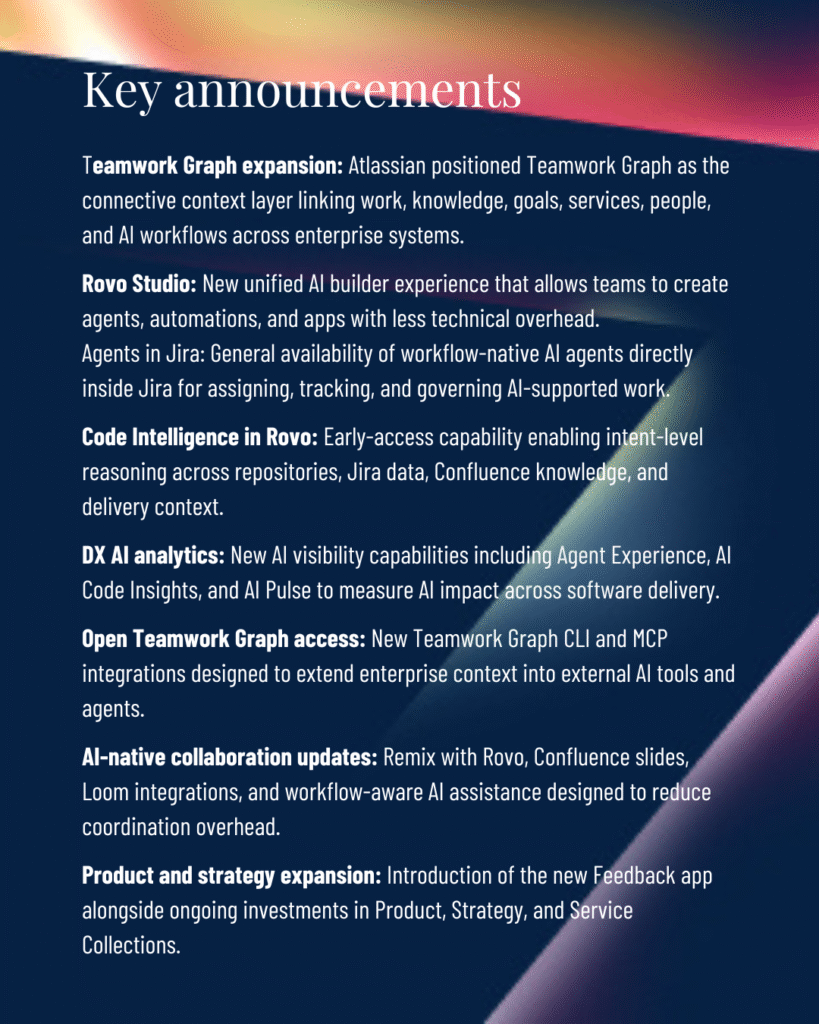
Key announcements AI Control Tower Real-time governance and oversight for AI agents, workflows, runtime policy enforcement, and operational accountability across the enterprise. ServiceNow Otto A  (1)

The strongest signal from the event centered on connected operational context, workflow-native AI, and execution visibility grounded in real enterprise work. 

That is why Teamwork Graph deserves executive attention. Operationally, it functions as an enterprise context layer connecting work, knowledge, teams, goals, services, dependencies, decisions, and delivery history so people and AI can operate with clearer visibility across the business. 

Nearly every major theme at Team ’26 pointed back to the same idea: AI becomes more useful when enterprise work becomes more connected. 

Teamwork Graph revealed the next competitive layer in enterprise AI 

Most enterprise AI conversations still focus on models, copilots, agents, prompts, and automation. Those capabilities matter, but Atlassian Team 2026 emphasized a different layer: the relationships between work. 

Why context quality matters 

The event repeatedly reinforced a broader operational reality. AI becomes substantially more useful when it can operate within connected, high-quality context. 

AI tools can generate responses, summarize activity, recommend next steps, and automate repetitive tasks. But in enterprise environments, the usefulness of those outputs depends on the quality of the surrounding context. An AI assistant that cannot understand how a Jira ticket connects to a Confluence decision, how that decision connects to a product goal, how that goal connects to a service dependency, or how that dependency affects delivery risk will remain limited. It may still save time, but it will struggle to support execution at scale. 

Teamwork Graph points to a broader answer. Operationally, it attempts to connect projects, tickets, documentation, conversations, goals, services, decisions, people, dependencies, and work history into a usable enterprise context layer. That context layer matters because work rarely breaks down inside one tool. It breaks down between teams, systems, decisions, and handoffs. 

AI systems struggle when work is disconnected, context is incomplete, and operational relationships remain invisible. Teamwork Graph represents Atlassian’s attempt to address that fragmentation problem at the level where enterprise work actually happens. 

From tools to operational systems 

This direction also reflects a broader platform shift. Jira, Confluence, Loom, Rovo, Atlas, Focus, and Service Collection are increasingly positioned as connected operational systems rather than isolated tools. 

Each product still serves a clear function, but the larger value emerges when work, knowledge, communication, planning, service delivery, and AI assistance reinforce each other. 

Conversations and demonstrations surrounding Team ’26 reinforced the same pattern. Teamwork Graph repeatedly surfaced as more than an abstract platform concept. Customers responded strongly to practical workflow demonstrations because they could see connected work functioning in real time. The strongest moments were often the moments when attendees connected the demonstration back to familiar visibility gaps inside their own organizations. 

The same pattern appeared around the System of Work Accelerator. When customers saw outputs connected to workflow maturity, collaboration patterns, and operational visibility, the discussion moved quickly from product interest to organizational diagnosis. The question became less about what Atlassian can do in theory and more about where disconnected execution is already limiting the enterprise today. 

One of the clearest shifts emerging from Team ’26 is the market conversation moving beyond the rise of AI agents alone. Enterprise AI value increasingly depends on connected operational context. 

Why disconnected execution is limiting enterprise AI value 

Many enterprises already struggle with: 

  • disconnected workflows 
  • duplicated effort 
  • inconsistent documentation 
  • fragmented service operations 
  • siloed delivery teams 
  • weak execution visibility 

These problems create friction before AI enters the workflow. 

AI does not automatically remove that friction. In many cases, it exposes and amplifies it. 

Connected workflows give AI better operational context. Fragmented workflows force AI to operate around gaps, incomplete relationships, and inconsistent knowledge. That affects trust, usefulness, and adoption scalability. 

The core challenge now centers on whether the operating environment gives AI enough context to support meaningful work. 

Why Rovo reflects the broader shift 

The shift toward connected execution also explains why Rovo generated so much attention throughout Team ’26. 

Rovo is often discussed in relation to enterprise search, agents, summarization, and workflow support. But its strategic relevance is broader than chatbot-style interaction. Rovo becomes more important when it functions as a context-aware workflow layer that helps people find knowledge, understand activity, coordinate execution, and move through work with less friction. 

The highest-value use cases are not limited to individual productivity. They emerge when AI supports the way teams coordinate, plan, deliver, resolve issues, and make decisions across shared systems of work. 

The customer conversations at Team ’26 reinforced this point. Attendees asked practical questions about Rovo usage, adoption, governance, and workflow fit. Interest centered less on AI novelty and more on operational applicability. Demonstrations resonated when they showed AI functioning inside real workflows rather than sitting beside them as another disconnected tool. 

The “make AI real in 90 days” message appears to have resonated for the same reason. It translated AI from an abstract ambition into a near-term operational challenge. Leaders want to know where to start, what workflows to prioritize, what governance must be in place, and how to connect AI to work people already do. 

The organizations that realize the most value from enterprise AI will likely be the organizations that reduce operational fragmentation first. That makes workflow visibility and connected execution increasingly strategic. 

Atlassian is shifting from work management toward execution visibility 

Atlassian began as a platform for organizing and tracking work. Team ’26 revealed how far that positioning has evolved. 

That shift changes the executive conversation. The company is increasingly focused on connecting strategic goals, project delivery, service operations, documentation, communication, AI assistance, and workflow coordination into a more visible operational system. 

The cost of coordination overhead 

That shift reflects a broader enterprise problem: organizations lose significant execution capacity to coordination overhead. Teams spend time searching for information, reconstructing decisions, reconciling reports, and managing dependencies across fragmented systems. Leaders often lack consistent visibility into how work connects across the business. 

Atlassian’s broader System of Work narrative speaks directly to that challenge. The emphasis on connected teamwork, shared visibility, and alignment between strategy and execution reflects where enterprise platform value is moving. 

The same pattern appeared in booth and theater conversations as well. The System of Work Accelerator generated strong engagement because it gave teams a concrete way to examine the maturity of their Atlassian environment. Customers related quickly to identified workflow gaps because those gaps reflected known operating challenges: unclear ownership, fragmented visibility, disconnected workstreams, inconsistent collaboration patterns, and difficulty translating platform usage into business value. 

Theater conversations around operationalizing connected execution also pointed to a broader market need. Leaders are trying to understand how AI fits into real workflows without creating more complexity. They want AI to reduce coordination friction, improve visibility, and support better decisions. They do not want another layer of disconnected experimentation. 

The strongest response at Team ’26 often came from conversations that translated AI into workflow visibility, coordination improvement, and connected execution. This appears to reflect where the market conversation is heading next. 

The next evolution of enterprise platforms will likely center on making enterprise execution more visible, connected, and context-aware. 

Why cloud modernization is becoming a connected execution decision 

Cloud modernization has often been framed as an infrastructure decision. For many Atlassian customers, that framing is becoming too narrow. 

At Team ’26, cloud conversations increasingly centered on: 

  • operational interoperability 
  • governance continuity 
  • AI scalability 
  • ecosystem readiness 
  • execution visibility 

Those concerns extend well beyond hosting. 

For organizations still operating in legacy or highly customized environments, operational fragmentation often persists through outdated integrations, inconsistent workflows, local workarounds, and limited visibility across systems. As AI-enabled workflows become more important, those limitations become harder to ignore. 

Why AI increases modernization pressure 

Rovo and broader AI adoption may accelerate cloud decision-making because AI value depends on connected, governed, and current operational context. If work remains fragmented across outdated systems, AI adoption becomes more difficult to scale and govern effectively. 

This is especially important in regulated industries, where leaders must evaluate accountability, transparency, permissions, data access, human oversight, and operational continuity alongside technical readiness. 

The cloud discussion increasingly centers on operational connectivity, AI-enabled workflows, scalable execution visibility, enterprise interoperability, and future operational capability. 

For many enterprises, cloud modernization increasingly reflects a decision about how connected and operationally visible the organization can become. 

What enterprise leaders should focus on next 

Enterprise leaders should avoid treating AI adoption as a standalone technology initiative. The more strategic move is to improve the operational systems surrounding execution itself. 

Enterprise leaders should focus on: 

  • visibility across execution 
  • coordination friction 
  • workflow governance 
  • operational connectivity 

Atlassian Team 2026 made that priority clearer. AI-native execution requires workflows, knowledge, teams, services, goals, and governance to operate with enough connection for AI to support human judgment inside real work. 

1. Identify visibility gaps across execution 

Leaders should begin by assessing where work loses visibility across the organization. 

Disconnected workflows, siloed operational data, fragmented knowledge systems, duplicated work, and dependency blind spots directly affect AI usefulness, workflow efficiency, operational trust, and adoption scalability. 

The priority is to identify where the organization lacks shared context. Which teams cannot see related work? Which decisions are difficult to trace? Which reports require manual reconciliation before leaders can trust them? 

AI will inherit the quality of the environment around it. If operational visibility remains inconsistent, AI-supported execution will remain inconsistent as well. 

2. Reduce coordination friction inside high-impact workflows 

Enterprise leaders should prioritize workflows where coordination friction slows meaningful work. 

These are often workflows where cross-functional dependencies create delays, visibility is inconsistent, operational handoffs slow execution, or coordination overhead remains high. Product delivery, service operations, onboarding, portfolio planning, and enterprise change initiatives are common examples. 

The objective is to connect work in ways that reduce unnecessary effort and improve decision flow. Leaders should look beyond tool adoption alone and focus on whether teams and AI systems can clearly understand the relationships between goals, decisions, dependencies, risks, and outcomes. 

When those relationships become clearer, AI can support execution with greater reliability and context awareness. 

3. Build governance into connected workflows early 

AI governance cannot remain separate from the workflows where AI will be used. It must be built into the way work moves. 

This requires organizations to define accountability, workflow transparency, operational governance, adoption enablement, human oversight, and sustainable operating practices early. 

Leaders need clear guidance on where AI can support work, where human judgment remains required, and how AI-enabled workflows will be reviewed and measured over time. 

When governance is embedded into connected workflows, adoption becomes more scalable, trustworthy, and sustainable. 

The enterprises that realize the greatest value from AI-native execution will likely be the organizations that build the clearest operational visibility and strongest workflow connectivity first. 

The clearest signal from Atlassian Team 2026 

Atlassian Team 2026 reinforced a broader shift toward connected execution and AI systems grounded in real operational work. 

The next competitive advantage in enterprise AI may come from building operational environments where work, knowledge, decisions, goals, and workflows are connected clearly enough for AI to participate meaningfully inside execution. 

That was the clearest strategic signal emerging from Atlassian Team ’26. 


See where disconnected work is limiting execution visibility

The System of Work Accelerator helps organizations uncover workflow fragmentation, identify operational visibility gaps, evaluate collaboration maturity, and prepare Atlassian Cloud environments for AI-native workflows. 

Use the free assessment to understand how connected your Atlassian workflows really are and where better visibility could improve execution. 


Frequently asked questions about Atlassian Team 2026 

What happened at Atlassian Team 2026? 

Atlassian Team 2026 focused heavily on AI-native execution, connected workflows, and operational visibility. Major announcements highlighted Teamwork Graph, Atlassian Rovo, workflow-native AI agents, and new approaches for connecting enterprise knowledge, services, goals, and delivery workflows into a shared operational context. 

What is Atlassian Teamwork Graph? 

Teamwork Graph is Atlassian’s connected enterprise context layer that links work, people, knowledge, goals, services, and operational history across systems. It helps AI and human teams operate with better context, visibility, and relationship awareness across enterprise workflows. 

Why is Teamwork Graph important for enterprise AI? 

Enterprise AI systems perform better when they can access connected operational context. Teamwork Graph helps AI tools understand relationships between projects, documentation, goals, dependencies, and workflows, which improves coordination, search, summarization, governance, and execution support. 

What is Atlassian Rovo? 

Atlassian Rovo is an AI-powered enterprise search and workflow assistance platform designed to help teams find knowledge, summarize activity, coordinate work, and support execution across Atlassian products and connected enterprise systems. 

How does Atlassian Rovo support enterprise workflows? 

Rovo supports enterprise workflows by helping teams retrieve operational knowledge, surface relevant context, summarize activity, identify relationships between work items, and coordinate execution more efficiently across connected systems and teams. 

Why are connected workflows important for AI adoption? 

Connected workflows improve AI usefulness by giving AI systems access to more complete operational context. Fragmented systems, inconsistent documentation, and disconnected workflows reduce trust, limit visibility, and make enterprise AI harder to scale effectively. 

How is Atlassian changing from work management to execution visibility? 

Atlassian is increasingly positioning its platform around connected execution, shared operational visibility, workflow coordination, and alignment between strategy and delivery. The focus is shifting toward helping enterprises understand how work connects across teams, systems, services, and goals. 

Why does cloud modernization matter for AI-native execution? 

Cloud modernization increasingly affects operational connectivity, interoperability, governance, and AI readiness. Organizations operating in fragmented or heavily customized environments may struggle to scale AI-enabled workflows because disconnected systems limit visibility, context quality, and governance continuity. 


Atlassian System of Work Accelerator FAQs

AdobeStock_1930309210

The Atlassian System of Work Accelerator is a data-driven AI-powered assessment that analyzes how work actually flows across your Atlassian Cloud environment, identifying where value is being lost and what to do about it. 

It connects directly to your platform, measures real usage and behavior across key system of work pillars, and translates those insights into a prioritized path to improve alignment, delivery intelligence, knowledge, and AI readiness. Then, going forward, it serves as a health check as you work through the recommended improvements. 

The questions below address how the Accelerator works, what it measures, and how organizations use it to move from cloud adoption to measurable business outcomes.

Security and data access

How is my data accessed, and what security measures are in place?

The Accelerator connects to your Atlassian instance using read-only API tokens, the same credential mechanism used by any Marketplace app. No data is stored, exported, or retained after the assessment session. All signal collection happens in-memory and the output is delivered as a structured report. We do not request admin-level access, write to your instance, or access individual user credentials or personally identifiable information.

What level of access is required to run the Atlassian System of Work Accelerator?

A read-only API token with access to your Jira, Confluence, and Atlas instances is sufficient. No admin access is required. The token needs standard user-level read permissions: issue data, project metadata, space content, and Atlas goal structures. Your Atlassian administrator can generate this token in under five minutes, and it can be revoked immediately after the assessment is complete.

Scope and coverage

What tools and data sources does the Atlassian System of Work Accelerator analyze?

The Accelerator analyzes four interconnected parts of the Atlassian platform as part of a structured Atlassian system of work assessment: Jira (work item quality, workflow health, WIP, blockers, epic linkage), Confluence (content freshness, discoverability, space structure, label usage), Atlas (goal linkage, goal freshness, strategic alignment across projects), and AI Readiness signals (description richness, automation adoption, Rovo usage patterns). In total, 97 discrete signals are measured across these four pillars.

Does this work across multiple teams, products, or business units?

Yes. The Accelerator operates at the instance level, which means it captures signals across all teams, projects, and spaces within your Atlassian environment, not just a single team or product area, giving you a complete view across the Atlassian platform. This is one of its primary strengths: it surfaces systemic patterns (like low goal alignment or stale content) that only become visible when you look across the whole platform rather than project by project.

Can it assess both technical delivery and strategic alignment?

Yes. This is what distinguishes it from standard platform reporting. The Accelerator measures both dimensions simultaneously: technical delivery health (work item hygiene, WIP, blocker age, dependency tracking) and strategic alignment (whether work connects to goals, whether goals are time-bound and measurable, whether roadmap items are linked to in-progress work). Most organizations find the strategic alignment gaps more surprising and more expensive.

For information about Rovo-augmented product delivery

Process and timing

How long does it take to run the Atlassian System of Work Accelerator?

The assessment runs in approximately 20 minutes once an API token is connected. No team involvement is required during this time. The readout and discussion of findings typically takes 30–60 minutes depending on the depth of issues surfaced. From first conversation to delivered report, the entire process can be completed in a single half-day session.

What is required from our team to get started?

Very little. You need to provide a read-only API token for your Atlassian instance and a site URL. An Atlassian administrator can generate the token in under five minutes. No team preparation, no surveys, no stakeholder interviews, and no workshop facilitation is required. The assessment runs entirely from platform data.

Will this disrupt our current workflows or operations?

No. The Accelerator is entirely read-only and runs in the background. Teams will not be notified, no tickets will be created or modified, and no configurations will change. Your instance continues to operate normally throughout the assessment. There is no perceptible impact on platform performance.

Who should be involved from our side?

At minimum: an Atlassian administrator (to provide the API token) and a sponsor or stakeholder who will receive and act on the findings. This typically includes a VP of Engineering, IT Director, PMO Director, or platform owner. We recommend including whoever owns the conversation about AI readiness, delivery velocity, or Atlassian ROI, as the findings speak directly to those priorities.

Insights and interpretation

How accurate are the insights and recommendations provided by the Atlassian System of Work Accelerator?

All findings are derived directly from your platform data, not estimates, surveys, or interviews, giving you an accurate baseline for Atlassian ROI and adoption. If the assessment reports that 68% of in-progress work is unlinked to goals, that figure reflects the actual state of your Jira and Atlas instance at the time of assessment. Recommendations follow a consistent diagnostic framework applied across dozens of Atlassian Cloud environments, which means the patterns we flag are well-understood and the service recommendations are calibrated to real-world impact, not theory.

How should I interpret the insights and scores from the assessment?

Each of the four pillars is scored on a 0–100 scale based on how your platform data compares against healthy adoption thresholds and overall platform maturity. Scores below 40 typically indicate systemic issues requiring structured intervention. Scores between 40–70 reflect partial adoption with clear improvement paths. Scores above 70 indicate strong foundations. The focus then shifts to optimization and AI readiness. The report will highlight your top-priority issues by business impact, not just the lowest scores.

How are findings presented and to whom?

Findings are delivered as a structured report with an executive summary (suitable for VP or C-suite presentation), a detailed issue list ranked by business impact, and a service roadmap with specific recommendations. The executive summary is designed to be shared upward without requiring the recipient to understand Atlassian internals. It speaks in terms of strategic leakage, cycle time, AI readiness, and cost of inaction.

How is the scoring or benchmarking determined?

Scoring thresholds are calibrated against healthy Atlassian Cloud adoption patterns observed across enterprise deployments. We do not compare you against other clients or industries. The benchmark is what ‘good’ looks like on an Atlassian platform that is functioning as a connected delivery system rather than a collection of individual tools. Each signal has a defined threshold (e.g., >80% of work items linked to an epic, <20% stale content in active spaces) and the pillar score reflects how many signals are above or below their respective thresholds.

Deliverables and outputs

What deliverables will I receive after the Atlassian System of Work Accelerator is completed?

Six concrete deliverables are produced from every assessment: (1) Platform Scorecard — a 0–100 score across all four pillars; (2) Ranked Issue List — 25+ issues ordered by business impact, all evidence-based; (3) Solution Map — one specific fix defined per issue, framed as outcomes not features; (4) Service Roadmap — which of 14 Cprime services address your highest-priority gaps, sequenced and ready to scope; (5) AI Readiness Score — a dedicated 0–100 score with a 90-day action plan; (6) Executive Summary — top 3–5 findings with quantified business impact, ready to present to leadership.

Do you provide benchmarks or comparisons as part of the output?

The report includes industry benchmarks for the outcomes associated with closing each gap. For example, 15–25% cycle time reduction from process alignment improvements, or 40% reduction in expert interruptions from better knowledge management. These benchmarks are drawn from DORA research, VSM research, and Lean methodologies. We do not compare you against other Cprime clients or provide competitive benchmarking. The focus is on your specific gaps and the value of closing them.

Value and outcomes

What business problems does the Atlassian System of Work Accelerator solve?

The Accelerator quantifies three categories of hidden cost that accumulate silently in Atlassian environments, helping quantify gaps in Atlassian ROI: strategic leakage (work not connected to goals, typically 30–40% of effort), delivery drag (stale WIP, untracked dependencies, missing escalation paths), and AI inaccessibility (data quality gaps that prevent Atlassian Intelligence and Rovo from functioning). Organizations don’t typically know the scale of these problems because the data exists in the platform but is never surfaced in this way.

What kind of results or ROI can we expect after running the Atlassian System of Work Accelerator?

Based on industry research and Cprime engagement outcomes: 15–25% reduction in delivery cycle time from process alignment work; 30–40% reduction in strategic leakage from goal-to-work linking; 40% reduction in expert interruptions from knowledge management improvements; 40–60% reduction in blocked time through dependency tracking and escalation workflows. These are the ranges we use in conversations. Actual results depend on the severity of gaps identified and the scope of remediation.

How is this different from standard reporting in Atlassian?

Standard Atlassian reporting (including Admin Insights) measures usage: logins, page views, issue throughput, active users, rather than effectiveness or adoption quality. The Accelerator measures effectiveness: is work connected to strategy? Is Confluence content trustworthy? Are teams using the platform in ways that make AI viable? Usage and effectiveness are different questions, and most organizations score well on usage while having significant effectiveness gaps. That is where the unrealized value sits.

How does this tie to executive priorities like cost, speed, and productivity?

Each finding in the assessment is mapped to one of four executive-facing business drivers, helping prioritize Atlassian Cloud optimization: faster cycle times (delivery speed and flow efficiency), team productivity (search time, rework reduction, expert load), AI readiness (whether the platform can support Atlassian Intelligence and Rovo), and strategic alignment (whether investment is going to the right work). The executive summary is structured around these drivers so findings land in terms leadership already uses.

Recommendations and next steps

What types of remediation frameworks or recommendations are typically provided?

Recommendations are mapped to 14 named Cprime services across two categories: Product Utilization services (coaching, SPM, VSM, process alignment, Rovo usage, Jira delivery) and Operating Model Transformation services (AI-first OM design, cloud optimization, AI adoption coaching, AI workflow orchestration, and enterprise AI learning). Each recommendation is tied to specific issues from the assessment, not a generic best-practice list.

How do you prioritize what to fix first?

Issues are ranked by business impact, specifically how much cost or risk the gap is generating, and how tractable it is to resolve. We weight strategic alignment gaps and AI readiness blockers heavily because they compound over time. The report groups recommendations into three horizons: Quick Wins (4–8 weeks, high impact, low complexity), Foundation Building (2–4 months), and Transformation (3–6 months).

What happens after we receive the results?

The assessment output is designed to flow directly into a scoping conversation. Each recommended service has defined deliverables, timelines, and expected outcomes. The report is not a slide deck, it is a scoped starting point. Most clients move from assessment to signed SOW within 2–4 weeks. For clients who want to validate findings before committing, we can scope a targeted pilot engagement against one or two high-priority issues.

Can this lead into a larger transformation or implementation effort?

Yes. The Accelerator is a diagnostic that establishes a data-driven baseline, identifies the highest-value interventions, and sequences them in a way that builds on each other. Clients who start with a Quick Win engagement and see results typically expand into Foundation and Transformation services within 6–12 months. The assessment makes every subsequent conversation evidence-based.

Adoption and ownership

Can we implement the recommendations on our own, or do we need support?

Some Quick Win recommendations — particularly around workflow standards, work item hygiene, and Confluence governance — can be implemented internally if you have experienced Atlassian administrators and delivery leads. Most organizations find that interpreting findings, sequencing interventions, and managing change to sustain improvements exceeds what internal teams can absorb alongside existing delivery commitments. Cprime services are scoped to accelerate and de-risk that process.

Why not just build this analysis internally?

You could write the JQL queries, CQL queries, and Atlas GraphQL calls that collect the underlying signals. The gap appears in two areas: knowing which signals matter and what thresholds indicate a real problem, and having a structured framework that maps findings to outcomes and services. Organizations that try to build this analysis internally typically spend 4–8 weeks producing a report that tells them less than the Accelerator produces in 20 minutes.

What makes this different from other assessments or audits?

Most Atlassian assessments focus on configuration: permissions, schemes, and project structure. Those questions matter for platform stability. The Accelerator focuses on adoption effectiveness — whether people are using the platform in ways that deliver business value. This produces findings that are directly actionable by business leaders.

AI and future readiness

How does the Atlassian System of Work Accelerator assess our readiness for AI capabilities like Rovo?

The AI Readiness pillar measures 28 signals related to whether your platform data and adoption patterns can support Atlassian Intelligence and Rovo. This includes description richness on work items, automation adoption rate, Rovo usage patterns, and data quality metrics that affect AI suggestion accuracy. The output is a 0–100 AI Readiness score with specific blockers called out.

What happens if our data is not ready for AI?

The assessment identifies what is blocking AI readiness and in what order to address it. Common blockers include sparse work item descriptions, inconsistent project structures, and low automation adoption. Targeted remediation services, typically 4–8 week engagements, address these blockers directly.

How does this help us get more value from our Atlassian investment?

Most organizations on Atlassian Premium or Enterprise are paying for capabilities that are underutilized. This System of Work assessment quantifies which features are delivering value and which are idle. For organizations with Rovo included, the AI Readiness score explains why AI outputs are not useful and identifies specific, fixable gaps.

Ongoing use

How often should the Atlassian System of Work Accelerator be run to track progress and improvement?

We recommend running the Accelerator quarterly for organizations actively improving platform maturity and post-migration performance. This typically occurs once before a service engagement, once at the midpoint, and once at completion to establish a measurable baseline. For steady-state organizations, a biannual cadence is sufficient to catch drift before it becomes systemic.

What breaks when moving Data Center to Cloud in Atlassian environments

Feature_Ambient 6

Organizations across industries are preparing for moving Data Center to Cloud as Atlassian timelines force critical platform decisions.

For engineering and platform teams, migration is often scoped as a technical project with a clear checklist: move the data, preserve uptime, and restore user access.

In many cases, those steps succeed.

Months after go-live, a different set of problems begins to surface.

Automation scripts fail. Integrations stop syncing. Dashboards slow down. Workflows begin behaving differently across teams and projects.

The platform remains operational, while delivery quality and consistency begin to degrade.

This pattern appears frequently in enterprise migrations. The cause is rarely the migration event itself. Cloud environments operate under a different architectural model than the systems many organizations have run for years.

When organizations begin moving Data Center to Cloud, they expose years of accumulated configuration decisions, integration shortcuts, and workflow variations that were previously contained within self-managed environments.

For engineering leaders evaluating migration, the more important question is not whether the move will succeed.

The more important question is what begins to break after migration completes.

Answering that question requires a clear understanding of the current environment before any migration work begins. Without a structured way to evaluate how systems, workflows, and integrations behave today, many risks only become visible after go-live.

Why Data Center habits collide with Cloud reality

Many organizations approach moving Data Center to Cloud as a hosting change. The goal is to replicate the current environment somewhere else with minimal disruption.

Platforms like Jira Cloud are designed around a different operating model.

Cloud platforms assume standardized identity, secure API-based integrations, consistent permission governance, and workflows structured for cross-team collaboration.

Most Data Center environments evolve through years of local optimization. Teams create custom scripts to automate tasks, build integrations quickly to connect tools, and modify workflows to match specific delivery needs.

Over time, these changes accumulate into highly customized environments.

When these environments move without redesign, they carry forward years of configuration complexity. What once enabled flexibility begins to introduce friction across teams.

This mismatch explains many of the issues organizations encounter after go-live.

Organizations that recognize this early often start by assessing their current environment in detail before migration begins. An objective view of workflows, integrations, identity patterns, and configuration complexity helps surface risks that are difficult to detect from within the platform itself. Without that visibility, migration planning tends to rely on assumptions rather than evidence.

Integration fragility and identity misalignment

One of the first areas where issues emerge during moving Data Center to Cloud involves integrations and identity.

In many Data Center environments, integrations rely on authentication patterns implemented years earlier. Service accounts may have broad permissions. Automation scripts may store credentials directly. Some integrations may depend on database-level access.

These methods function within controlled server environments.

Cloud platforms introduce stricter identity and security models. Authentication often relies on centralized identity providers, token-based access, and modern API security standards.

During a Jira Data Center to Cloud migration, these changes can disrupt integrations that previously operated quietly in the background. Automation pipelines may stop functioning. External tools may lose API access. Synchronization between systems may break unexpectedly.

Engineering teams often respond by patching integrations to restore operations quickly.

These short-term fixes increase architectural complexity and make the integration landscape more fragile over time.

Workflow drift and permission sprawl

Another major source of issues when moving Data Center to Cloud appears in workflow architecture.

Large enterprise platforms often contain years of accumulated configuration. New teams introduce workflow variations. Custom fields are added to support reporting. Permission exceptions are created to handle edge cases.

In Data Center environments, these changes often remain manageable because administrators have direct infrastructure control.

When these configurations move directly into Cloud, governance becomes harder to maintain at scale.

Teams may begin noticing that workflows vary dramatically between projects. Some processes contain dozens of states that no longer reflect how teams actually work. Administrators spend increasing time maintaining configurations instead of improving the platform.

Over time, workflow fragmentation affects how teams collaborate. Onboarding slows. Delivery practices diverge across departments. Leadership loses visibility into how work moves across teams and systems.

Performance assumptions that fail in Cloud

Performance is another area where organizations encounter unexpected behavior when moving Data Center to Cloud.

Teams frequently assume that cloud environments will behave exactly like their existing infrastructure. However, cloud platforms operate under different architectural constraints.

Highly customized environments that previously relied on server-level optimization may behave differently once infrastructure management is abstracted away.

Dashboards that once loaded instantly may take longer to render. Automation rules may experience delays when activity increases. Integrations may encounter API rate limits that never existed in server environments.

For large environments, these changes can feel significant.

These behaviors often reflect environments designed for infrastructure that allowed deeper customization. Aligning configuration patterns with cloud architecture typically resolves these issues over time.

AI capabilities reveal deeper platform problems

Many organizations expect moving Data Center to Cloud to unlock AI capabilities within Atlassian.

However, AI systems rely heavily on the structure and quality of platform data.

For AI capabilities to deliver meaningful insights, work artifacts must be structured consistently. Issue metadata should follow clear patterns. Documentation needs to be organized in ways that allow systems to interpret relationships between knowledge and tasks.

Legacy environments frequently lack this structure. Workflows differ across teams, issue fields vary widely, and documentation may be scattered across multiple locations.

When these patterns migrate directly into Cloud, AI systems struggle to generate reliable insights.

What appears to be an AI limitation often reflects data structure issues inherited from legacy configurations.

Preventing migration failures with a better strategy

Organizations that avoid these issues treat migration as a design decision, not a relocation exercise.

They address identity, integrations, workflows, and governance as part of a coordinated design effort before and during migration.

This preparation reduces the risk of post-migration instability and operational disruption.

It also prepares the platform to support automation, analytics, and AI-enabled workflows.

Migration as a strategic design moment

When approached intentionally, moving Data Center to Cloud becomes a structural decision about how work operates.

It becomes an opportunity to simplify systems that have grown overly complex over time.

Organizations that use migration as a design moment often achieve more resilient integrations, clearer workflow structures, and stronger governance across their platforms. Teams spend less time managing configuration complexity and more time delivering meaningful outcomes.

The result is a cloud environment prepared to support reliable execution, scalable collaboration, and AI-enabled workflows.


See what you’re actually migrating before you move

Most migration risk is hidden inside your current environment. The Atlassian Cloud Migration Blueprint reveals what you’re really moving, surfaces complexity, and translates it into a clear, executable plan. You gain visibility into risk, dependencies, and effort before they impact timelines or outcomes.


Frequently asked questions about moving Data Center to Cloud

What typically breaks after moving Data Center to Cloud?

Common issues include broken integrations, inconsistent workflows, identity mismatches, and performance changes. These problems surface after migration when legacy configurations conflict with cloud architecture, creating operational friction that impacts delivery speed, visibility, and system reliability.

Why do integrations fail during a Jira Data Center to Cloud migration?

Integrations often fail because they rely on outdated authentication methods, hardcoded credentials, or direct database access. Cloud environments enforce modern API and identity standards, which can disrupt existing connections and require redesign to ensure secure, reliable data exchange.

What are the biggest risks when migrating from Data Center to Cloud?

The biggest risks include hidden configuration complexity, workflow fragmentation, weak governance, and poor data structure. Without understanding these factors before migration, organizations often encounter post-go-live issues that affect performance, collaboration, and long-term scalability.

Does moving to Atlassian Cloud automatically improve performance?

Cloud platforms provide scalable infrastructure, but performance improvements are not guaranteed. Highly customized environments may experience slower dashboards, delayed automation, or API limits. Performance typically improves when configurations are aligned with cloud architecture and simplified.

How does cloud migration impact workflows and team collaboration?

Migration often exposes inconsistencies in workflows and permissions that were manageable in Data Center. In Cloud, these differences can slow onboarding, reduce visibility, and create coordination challenges across teams unless workflows are standardized and governed effectively.

Why doesn’t AI work as expected after moving to Cloud?

AI capabilities depend on structured, consistent data. When legacy environments with inconsistent workflows, fragmented documentation, and poor metadata are migrated, AI tools struggle to generate useful insights. Improving data quality and standardization is required to unlock value.

How can organizations reduce risk before migrating to Cloud?

Organizations reduce risk by evaluating their current environment before migration. Assessing integrations, workflows, identity models, and data structure helps identify issues early, allowing teams to address complexity and avoid reactive fixes after go-live.

Is moving Data Center to Cloud just a technical migration?

While migration includes technical steps, it also changes how systems operate. Cloud environments require different approaches to identity, integration, governance, and workflows. Treating migration as a design decision improves long-term outcomes and reduces operational disruption.

Atlassian Migration: What a Healthy Cloud Environment Looks Like

AdobeStock_934224388

The question leaders cannot answer

After an Atlassian migration, most organizations assume performance improves. But the fact is they cannot prove it.

The migration is complete. Teams are active. The platform is stable. Yet a more important question remains unresolved:

Are we working better?

Many leaders assume the answer should be yes. In practice, they lack the data to confirm it. Delivery speed, workflow efficiency, and AI readiness are rarely measured in a consistent, objective way. As a result, decisions about optimization rely on assumptions rather than evidence.

This gap carries real consequences. A significant portion of platform value often remains unrealized. Work is happening, but its connection to outcomes is unclear. AI capabilities are enabled, but adoption is limited. Leadership sees activity but struggles to see progress.

A healthy Atlassian Cloud environment is not defined by whether the system is running. It is defined by whether the organization can measure and improve how work gets done.

Redefining health as execution performance

Platform health is often defined in technical terms. Uptime, response time, and availability are important, but they do not determine whether teams deliver effectively.

Execution does.

A healthy environment changes how work flows across teams, how decisions move through the organization, and how consistently teams operate within shared standards.

In a typical environment, Jira functions as a task tracker. Work is created and completed, but it is not consistently tied to strategic goals. Confluence holds information, but it is not actively used to guide execution. Teams operate independently, optimizing locally while leadership struggles to see how effort connects to outcomes.

In a healthy environment, work is linked to measurable objectives. Decision paths are visible and move quickly. Knowledge is structured, current, and integrated into daily workflows. Teams operate within consistent patterns that reduce friction and improve coordination.

This shift matters because platform stability does not improve delivery on its own. Health must be defined by outcomes, not infrastructure.

Want a value-packed guide that dives deeper into the challenges impacting scaled Atlassian Cloud ROI, and solutions guaranteed to accelerate your success? Read it now.

The five indicators of a healthy Atlassian Cloud environment

A healthy environment can be identified through observable, measurable indicators. These indicators reflect how the platform supports execution rather than how it is configured.

License-to-value visibility

Leaders need to understand how platform investment translates into outcomes.

In a healthy environment, work is clearly connected to goals. Leadership can see how effort contributes to results. Usage patterns across teams are visible and consistent.

In an unhealthy environment, activity exists without alignment. Teams are busy, but their work is not tied to strategic priorities. Feature utilization is uneven, and the return on investment is difficult to explain.

One common signal is the proportion of work that is not linked to goals. When a large share of activity lacks this connection, leadership loses the ability to prioritize effectively.

Visibility creates the foundation for better decisions.

Workflow standardization vs. sprawl

Execution depends on how work moves across teams.

In a healthy environment, workflows are consistent. Handoffs are clear. Dependencies are visible. Teams follow shared patterns that reduce confusion and duplication.

In an unhealthy environment, workflows proliferate. Each team defines its own approach. Coordination requires manual effort. Delays increase as work moves between teams with different processes.

A simple example illustrates the difference. Jira can function as a structured delivery system that reflects how work flows across the organization. It can also function as a collection of disconnected task lists. The outcome depends on how workflows are designed and maintained.

Standardization enables predictable execution.

Governance embedded into execution

Governance determines how decisions move.

In a healthy environment, governance is built into workflows. Ownership is clear. Standards are defined. Decisions move quickly because the path is visible and understood.

In an unhealthy environment, governance either slows delivery or fails to guide it. Excessive approvals create delays. Lack of standards leads to inconsistency. Teams spend time navigating the system rather than progressing work.

Effective governance appears in daily execution. Workflow rules define how work progresses. Approval paths clarify responsibility. Escalation patterns make blockers visible. Configuration standards ensure consistency across teams.

When governance supports decision flow, execution becomes faster and more reliable.

AI readiness as a system outcome

AI capabilities depend on the quality of the underlying system.

In a healthy environment, data is structured and consistent. Issue descriptions contain meaningful context. Metadata is reliable. Automation is embedded in workflows. These conditions allow AI features to support decision-making and reduce manual effort.

In an unhealthy environment, data is incomplete or inconsistent. Automation is limited. AI features are enabled but rarely used because the system does not provide the inputs required for meaningful output.

AI readiness reflects the state of the system. It is not a standalone capability. It is the result of how well workflows, data, and governance are aligned.

When these elements are in place, AI can support execution. When they are not, AI remains underutilized.

Continuous measurement and improvement

Health is not static. It must be measured and improved over time.

In a healthy environment, performance is tracked continuously. Baselines exist across key dimensions such as alignment, workflow execution, knowledge quality, and AI readiness. Progress is visible and tied to outcomes.

In an unhealthy environment, success is defined by migration completion. There is no ongoing measurement. Leaders cannot determine whether performance is improving or declining.

A measurable environment uses scoring to create clarity. Each dimension of platform health is expressed in a way that can be tracked and compared over time. This turns improvement into a managed process rather than an assumption.

Without measurement, health remains subjective.

Why an Atlassian migration does not guarantee performance improvement

Most environments do not reach this level of health because migration does not change how organizations operate.

A common pattern emerges after go-live. Existing workflows are carried into the cloud without redesign. Teams continue to work as they did before. Adoption varies across functions. Governance is applied inconsistently. AI capabilities are introduced but not integrated into daily work.

The platform reflects these conditions. It does not correct them.

This is why many organizations experience the same outcome. Tools move. Behaviors remain unchanged. Execution challenges persist in a new environment.

Without objective measurement, these issues remain difficult to identify. Leadership sees symptoms but lacks a clear diagnosis.

From definition to diagnosis: making health measurable

Understanding what a healthy environment looks like is necessary. It is not sufficient.

Leaders need a way to measure it.

Effective measurement focuses on a defined set of dimensions. Alignment shows whether work connects to goals. Workflow execution reveals how efficiently work moves. Knowledge quality indicates whether information supports decision-making. AI readiness reflects whether the system can support advanced capabilities.

This measurement must be based on real data. Surveys and subjective assessments do not provide the level of accuracy required for decision-making. Signal-based analysis, drawn from how the platform is actually used, creates a reliable baseline.

A measurable approach produces concrete outputs. A platform scorecard establishes a baseline across key dimensions. An issue list identifies gaps and ranks them by impact. A prioritized roadmap defines what needs to change and in what order. This is the role of a structured, signal-based assessment such as Cprime’s System of Work Accelerator, which analyzes real platform usage to quantify performance and define a clear path to improvement.

Measurement transforms platform health from an abstract concept into a set of actionable insights.

Once the current state is visible, improvement becomes targeted and predictable.

What changes when the environment is healthy

When platform health improves, the impact shows up in execution.

Delivery cycles become shorter because work moves with fewer delays. Teams gain clear visibility into priorities and dependencies. Manual effort decreases as workflows and automation reduce rework. Coordination improves because teams operate within consistent structures.

AI becomes part of daily work. It supports decision-making, summarizes information, and reduces repetitive tasks because the system provides the context it needs.

These outcomes are not accidental. They result from deliberate design and continuous improvement across the indicators described earlier.

Assess before you optimize

Most organizations move directly from migration to optimization efforts without establishing a baseline.

This approach limits effectiveness. Without measurement, it is difficult to determine where to focus or how to evaluate progress.

An assessment provides a starting point. It creates a clear view of how the environment is performing across alignment, workflows, knowledge, and AI readiness. It identifies the gaps that matter most and defines a path to improvement. Approaches like the System of Work Accelerator make this process fast, objective, and grounded in how work actually happens across the platform.

This process does not require a large upfront commitment. It establishes the foundation for better decisions.

Leaders who want to understand the true impact of their Atlassian migration need a measurable definition of platform health. Without it, success remains assumed rather than proven.

Measure what your Atlassian Cloud is delivering

You have activity across Jira and Confluence. The question is whether it is driving outcomes. The System of Work Accelerator gives you a data-driven view of alignment, workflow execution, knowledge quality, and AI readiness, then translates that insight into a prioritized path to improvement.


Frequently Asked Questions

What is a healthy Atlassian Cloud environment?

A healthy Atlassian Cloud environment is one where work is consistently linked to goals, workflows are standardized, governance supports fast decision-making, and knowledge is current and usable. Performance is measured continuously, so leaders can track improvement in delivery, coordination, and AI readiness over time using objective, data-driven indicators.

How do you measure Atlassian Cloud performance?

Atlassian Cloud performance is measured using signal-based analysis drawn from real platform usage. This includes alignment of work to goals, workflow efficiency, knowledge quality, and AI readiness. Results are typically expressed as scores, issue lists, and prioritized roadmaps that show where improvement will have the greatest impact.

Why doesn’t Atlassian migration automatically improve performance?

Migration changes the platform, but it does not change how teams work. Without redesigning workflows, improving governance, and driving adoption, organizations often carry existing inefficiencies into the cloud. As a result, delivery challenges persist even though the underlying technology has improved.

What are common signs of an unhealthy Atlassian environment?

Common signs include work that is not linked to goals, inconsistent workflows across teams, outdated or unused knowledge in Confluence, low automation coverage, and limited adoption of AI features. These signals indicate gaps in alignment, execution, and data quality that limit overall performance.

How does AI readiness relate to Atlassian Cloud health?

AI readiness depends on the quality of workflows, data, and governance. When data is structured, workflows are consistent, and teams follow shared standards, AI can support decision-making and reduce manual effort. When these conditions are missing, AI features are enabled but rarely used effectively.

What is the Atlassian Cloud System of Work Accelerator?

The System of Work Accelerator is a signal-based assessment that analyzes how work happens across Jira, Confluence, and related tools. It produces a platform scorecard, identifies high-impact issues, and delivers a prioritized roadmap so organizations can improve alignment, execution, knowledge, and AI readiness in a structured way.

How long does an Atlassian Cloud assessment take?

A structured assessment can typically be completed in a short timeframe because it relies on automated analysis of platform data. Many approaches require only limited access and minimal team involvement, allowing organizations to establish a baseline quickly and begin identifying improvement opportunities without disrupting ongoing work.

What outcomes can organizations expect from improving platform health?

Organizations can expect faster delivery cycles, clearer visibility into work and priorities, reduced manual effort, improved coordination across teams, and stronger adoption of AI capabilities. These outcomes result from better alignment, standardized workflows, and consistent governance that supports efficient execution.

How often should Atlassian Cloud performance be measured?

Performance should be measured continuously or at regular intervals to track progress over time. Repeating assessments allows organizations to compare results, validate improvements, and identify new opportunities. This creates an ongoing improvement cycle rather than a one-time evaluation tied only to migration.

Do you need a tool to assess Atlassian Cloud health?

While basic analysis can be done manually, comprehensive assessment requires evaluating many signals across multiple tools and teams. A structured, automated approach provides more accurate insights, reduces effort, and delivers a clear, prioritized roadmap that helps organizations focus on the changes that will drive the most value.