Author: Elizabeth Walsh

“I Know Kung Fu” – the Power of Just-in-Time Learning

There’s a scene in the movie The Matrix. Trinity and Neo are on the top of a skyscraper trying to escape the Agents, and there’s a helicopter there, and Neo looks at Trinity and says, “Can you fly that thing?” And Trinity says, “Not yet.” She then contacts Tank back on the Nebuchadnezzar and asks him for the flying instructions for the helicopter, and he uploads them into her brain. Trinity opens her eyes and says, “Let’s go!” And they jump in the helicopter and Trinity flies it with extreme competence.

Wouldn’t it be great if we could have that just-in-time knowledge when we need it? We’re facing a challenge. We have a lack of knowledge, so we’re unconfident in tackling that challenge, and it would be amazing if we could just plug our brains into some knowledge hub and have just the right amount of knowledge to complete the task just when we need it. Just like Neo does when he first enters The Matrix – “I know Kung Fu!”

Traditional learning

How do we traditionally tackle the lack of knowledge? Well, we normally go on training courses. And training courses give us a lot of knowledge about a particular subject or domain over a day, maybe two. And training is great. It gives us an excellent overview and insights into techniques, frameworks, processes, and skills that we might not have.

The problem with traditional training is our retention of the knowledge we gain. Most of the knowledge we gain in training dissipates quickly. We can’t hold a lot of information in our brains. Maybe we have made notes, but again—as we’re not in the moment of training anymore they seem unclear and nebulous. You wish you could take that bit of training again, just now, when you actually need it. So traditional training is potentially more inspirational than educational.

In a 2022 study by CompTIA, 30% of companies state they want more training alignment with development goals. And most times, these companies are looking for more modern approaches to learning (such as eLearning, simulation style, autonomous, self-paced learning, etc.).

Introducing learning pathways

So Cprime learning experts have created pathways. Pathways are a new approach to learning, moving away from going on a traditional two-day or a three-day course, once or twice a year, and instead getting bite-sized pieces of learning, just in time—you can pull the learning when you really need it, delivered in various modes.

They’re designed around competencies and you learn skills in a sequential, progressive way. They enable and empower you to be better at what you are trying to do. So they provide a two-pronged approach to learning: small bite-size, just-in-time learning when you need it, curated to help you understand and embed the knowledge in a much more timely and consumable way.

Timely and consumable

Let’s say, for example, you want to be a team coach, an agile coach in an organization, or a scrum master. Well, of course, you could go to training courses that give you a two-day overview of basic scrum mastery, intermediate scrum mastery, and even advanced coaching. Some of that knowledge, you will forget quite quickly. And you won’t get a chance to practice much of what you retain. So the training becomes semi-redundant because you’ve forgotten the main essence of some of that training, and you want to go back and revisit it again.

Instead, a pathway will break down the aspects of those big chunky courses into smaller bite-sized, topics of learning. And because we can break them down, we can also deliver them differently.

Multimodal learning

Various lessons are best taught in various ways. Examples include:

  • Attending a face-to-face session with a trainer
  • Reading a book
  • Taking an eLearning module
  • Watching a video
  • Practicing something in your own context safely and getting some feedback on how that went.

And we can couple all of those different modes of experiential learning together to attain certain thresholds or outcomes, including a particular level of competence in the knowledge domain you are trying to master.

You can do all of this at your own pace, at your own time, aligned with your employer’s needs and desires, so they can endorse a pathway you’ve chosen and give you internal accreditation. Or you could simply take these pathways yourself as part of your own personal development, managing and monitoring your own progress.

Pathways will enable you to learn what you need to in real-time, in a much more practical and consumable way that will meet the demands of your journey, and make it more practical in terms of your time scales and timeframes. And, hopefully, a little bit less stressful for you.

For more information, contact the experts at Cprime.

Cprime and Asana: Building a Bridge of Agility Using Work Management Software

Talent shortages, budget constraints, and a constantly changing market highlight the need for agility across the board, starting with a collapse of siloed technology. And what’s the result if companies do this at scale? Greater predictability and quality, faster time to market, and the flexibility to pivot as things inevitably change.

We’re thrilled to announce that we’ve entered into a partnership with Asana, a top disruptive player in the competitive work management space.

Read the full press release here.

Combining Asana’s powerful software with Cprime’s expertise and guidance offers customers unparalleled visibility and insight into all the work, all the time. But, that’s not all.

For almost 20 years, Cprime has been a trusted strategic advisor to organizations undertaking Agile and digital transformation. Our coaching, training, and tooling expertise puts us in a unique position to help clients fully leverage Asana’s solution.

Asana helps teams execute 42% faster with easy-to-use features to organize, track, and manage work. The solution helps combat the silos that make teamwork more painful and enables organizations to bring work together in one shared space to stay organized and connected. The goal is to unify work around a single source of truth, save time and effort through efficiencies, and foster seamless collaboration through integration and automation.

Cprime’s and Asana’s dynamic solutions converge to solve for Enterprise Agility, enterprise technology, and learning challenges, big or small. The alignment of teams and tech stacks around business outcomes is central to that mission.

Together, Cprime and Asana are working to usher work management into the Agile world, to organize and build an environment that fosters collaboration and agility across all teams, and to build a bridge between business and technical teams to support Enterprise Agility.

With this new partnership, those lofty goals can become an easy-to-attain reality for every organization. If you’d like to explore adopting, migrating to, or optimizing Asana as your work management tool of choice, contact our experts today.

Jira Service Management Best Practices: Tips for Optimizing Service Desk Operations

Atlassian’s Jira Service Management (JSM) is a widely used IT service management (ITSM) and Enterprise Service Management (ESM) tool. It brings together IT, operations, development, and business teams to increase efficiency and encourage cross-team collaboration. With JSM, teams have immediate access to workflow automation to help them triage, track, and resolve internal issues faster.

Atlassian launched Jira Service Desk in 2013 but soon found that 40 percent of their customers adopted it for internal requests. To facilitate this use and harness the power of IT service management (ITSM), Atlassian then launched JSM for comprehensive service delivery.

In this way, Jira Service Desk evolved into JSM to provide ITSM capabilities within the same tool. This enabled service desk operations to cater to ITSM activities, including incident management, knowledge management, and change management.

JSM supports a modern, effective, and scalable approach to service desk operations, and ITSM at large. But like any tool you’re working with, you can optimize JSM to improve the efficiency of your service desk operations.

This article highlights best practices you can implement to help refine JSM implementation and boost service desk operational efficiency.

Best Practices for Optimizing JSM Service Desk Operations

A service desk is a communications platform that allows users to interact with various teams or departments within the organization. While service desks (previously called help desks) were initially designed for technical teams to resolve issues, now even non-technical teams have adopted this approach.

A service desk aims to provide high-quality service to users as fast as possible. It focuses on offering top-notch customer service, whether that customer is an internal employee or a customer outside the organization.

JSM’s flexible, collaborative approach to ITSM and ESM enables your service desk to better streamline your service delivery processes for both customer-facing and staff-facing services. Some of JSM’s features and benefits include:

  • Automation tools to track and resolve customer and employee issues
  • An extensive knowledge base and self-service portals
  • Rich reporting features to gain actionable insights into service trends in your organization

But for your service desk operations to run efficiently and effectively, you need to search for opportunities for optimization and implement them.

The following sections highlight four best practices that can help you optimize your JSM service desk operations and improve its return on investment (ROI).

Minimize Toil With Automation

You can use JSM’s automation capabilities to reduce the burden on your teams and free up time. This allows organizations to automate manual, repetitive tasks to improve their efficiency.

For example, you don’t have to manually assign team members to specific tickets. Instead, use JSM’s automation feature to assign the next ticket to the team member with the least workload. This feature avoids overburdening a specific individual and lets your team resolve tickets faster.

Automation also leads to significant cost savings, and an improved customer experience. Automating customer requests or incidents means your personnel spend less time on manual work and can instead focus on more critical tasks.

Jira Service Management’s rules function makes automation easy. The function has three components:

  • Trigger: the action that triggers the automation
  • Condition: a condition to narrow the rule’s scope via the IF condition
  • Action: what happens when the rule runs after meeting the condition

Additionally, rules can include Branches, an optional layer that allows for executing repeated conditions and actions on groups of tickets

The rules function makes it easy to automate manual tasks at scale. For instance, you might schedule a quick search for tickets with a “Waiting for Customer” status every two days to help you follow up with those customers and resolve their issues faster.

You can identify other points of contention by analyzing your ITSM workflows. This process involves spending time combing through every workflow in your team, which makes it tedious. But it saves you time, money, and resources in the long term.

You can simplify this process by working with an Atlassian Solution Partner like Cprime to pinpoint which tasks can be automated. Atlassian Solution Partners can also review current processes and suggest improvements beyond automation.

Maintain Accurate SLAs in JSM

You can use JSM’s reporting feature to view progress toward your service level agreements (SLAs), and you can define, implement, adjust, and review SLAs within the same tool.

By default, the JSM dashboard provides access to four reports: Workload, Satisfaction, Requests deflected, and Requests resolved. These reports help determine how quickly requests are handled and ascertain current customer satisfaction levels.

You can also customize these reports to show specific metrics and key performance indicators (KPIs) that you’ve deemed essential. For example, you might create a report to see how and when your team handles specific issues. Based on the mean time to resolution (MTTR), you can decide if they’re meeting your SLAs on time. This data helps inform decision-making about staffing levels and helps you identify areas where specific goals are unmet, and where more resources or training may be necessary.

Customer service performance reports also offer insights into customer expectations and preferences. These reports help you identify areas for improvement and incorporate new strategies to increase customer satisfaction scores and improve service delivery.

These reporting features help you make informed decisions using real-time performance data. You can use the resulting insights to build customer trust and give ITSM teams a clear direction for meeting SLAs.

Build and Maintain a Comprehensive Knowledge Base

Too often, customers or employees register support tickets for minor issues, which increases the load on your team and results in redundant tickets. Avoid this issue by leveraging Confluence’s knowledge base feature—a powerful tool for companies to empower employees and customers.

Confluence enables enterprises to build a robust knowledge base with features like advanced search, page tree, best practice templates, and, most importantly, JSM integration. Use this knowledge base to create a comprehensive library of resources, including:

  • How-to guides
  • Troubleshooting articles
  • Frequently asked questions
  • Process documentation
  • Product documentation

Customers and internal teams can access this information, enabling a self-serve option. A recent study found that 69 percent of customers want to solve issues independently, making this option a great fit for both customers and support teams.

A solid knowledge base also makes it easier for internal teams to find answers without creating new tickets or contacting support. By integrating JSM with Confluence, you can divert repetitive support tickets using a self-service document that details how to troubleshoot them. This fix reduces time spent on troubleshooting issues, resulting in a more productive workforce.

Templates are available

JSM and Confluence offer several templates to get you started, and the option to create custom templates to support your ITSM practice. It also helps you update resources on the go, ensuring everybody can access timely and accurate information. Plus, IT teams can create documentation within the service desk in real time, making it easier to share the articles without disrupting the agent’s workflow.

Monitor analytics with reports

Another valuable feature of the knowledge base is how it allows you to monitor the analytics of each article or guide. For example, you might use this to identify topics that receive more traffic or topics that deflect requests.

Here are two key reports you should look out for:

  • Requests deflected: how often customers found an article helpful enough that they no longer needed to register a ticket
  • Requests resolved: A summary of requests resolved with an article, without an article, and deflected with an article.

These reports help you identify valuable topics and areas that need more resources. An internal study by Atlassian found that users that use this integration can deflect 45 percent of their customer service requests. Ultimately, it enables you to reduce the number of support tickets, address issues faster, and make your IT teams more efficient.

Track Assets and Configurations with JSM Assets

In 2021, 62 percent of IT professionals used an issue-tracking tool like JSM as their single source of truth during incidents, particularly for individuals leveraging artificial intelligence (AI) capabilities to trigger incidents.

JSM’s Assets feature is one reason JSM makes such an excellent incident management tool. Formerly known as Insights, the Assets capability helps correlate specific assets and configuration items (CI) to a particular issue. As a result, incident teams can focus on resolution instead of spending time figuring out which IT assets an incident affects.

The Assets feature is also beneficial when resolving complex incidents or changes with a lot of related CIs. Incident managers can determine whether the issue is driven by a single CI or caused by several related CIs, and teams can quickly identify potential root causes by linking objects associated with the incident. JSM’s Assets feature even helps with change management, since you can view the impact of changes before they’re made and avoid expensive mistakes.

Use JSM Assets to manage your organization’s IT inventory, too. The Assets feature helps track hardware equipment, software licenses, and other physical resources in one centralized location. This centralization makes it easy to assign assets to specific users and monitor their usage in real time. It also allows for better budget forecasting and resource allocation across various departments within the organization, helping you maximize efficiency and minimize the risk associated with changes and deployments.

Conclusion

Service desks are critical to effective ITSM operations as a central point of contact for users to request and resolve issues. They operate as valuable triage zones where incidents can be quickly identified and addressed.

Jira Service Management’s high-velocity ITSM capabilities enable you to streamline your ITSM operations easily. But to maximize your JSM implementation and deliver the highest quality service experiences possible, you must follow the best practices outlined here.

As an Atlassian Solution Partner, we’re experts in all things JSM. With deep technical expertise and partnerships with multiple companies in the Atlassian Marketplace, we can optimize your service desk operations for maximum efficiency.

Get in touch with Cprime today to learn more about how JSM can streamline your service desk and ITSM operations.

ITIL & ITSM Using Jira Service Management

The IT Infrastructure Library (ITIL) framework provides a series of best practices to help businesses align their IT service delivery with their business needs. It has become the standard for IT Service Management (ITSM) because it provides a comprehensive, optimized, flexible way to manage and quantify the effectiveness of service delivery.

If you’re looking to rebuild your organization’s workflow on an ITIL foundation, an Atlassian Solution Partner can help optimize your redesign by integrating certified ITIL 4 tools. Notably, the Atlassian Cloud suite is a powerful, ITIL-aligned toolset for modernizing your ITSM governance.

Jira Service Management (JSM) remains a crucial player in the Atlassian arsenal. It includes many default features to help streamline your service project with industry-standard workflows, all of which meet regulatory requirements right out of the box. JSM also provides advanced customizations, including comprehensive metrics monitoring, which enables you to tailor your ITSM processes to your unique business needs.

To ensure comprehensive alignment with ITIL, look no further than JSM.

Adhering to ITIL v4 Best Practices in JSM

Unlike previous iterations, ITIL v4 favors a more holistic approach that integrates modern developments, like Agile frameworks and DevOps. Although many concepts central to ITIL remain focused on ITSM, ITIL v4 takes a broader view in order to assess how components and processes cooperate across your entire organization to create value.

Atlassian incorporated this practice-oriented mindset to develop JSM’s feature set, designing it around practices implemented by best-performing teams. Successful teams emphasized:

  • Continual improvement with retrospectives
  • Agile project management to speed up project delivery
  • Knowledge management to empower team culture
  • Customer-centered service desk and request management
  • Adaptive incident management
  • Streamlined change control through automation and collaboration
  • Continuous delivery for deployment management
  • Integrated software development and operations teams
  • Exploring AI-powered service management to uplevel efficiency gains

JSM is ITIL 4 Certified

You can maximize the value of your ITIL implementation by using ITSM tools certified by Pink Elephant Inc., which is an Axelos Licensed Software Assessor. A tool with a  PinkVERIFY ITIL v4 Certification has shown that its functionality, integrations, terminology, and documentation are compatible with ITIL v4 practices.

Currently, Pink Elephant can assess an ITSM tool for compatibility with 22 of the 34 ITIL v4 practices. JSM is certified as meeting the requirements for seven of these practices:

  • Change Enablement
  • Incident Management
  • IT Asset Management
  • Knowledge Management
  • Service Catalog Management
  • Service Configuration Management
  • Service Request Management

JSM now provides this functionality out of the box, combined with Atlassian’s excellent third-party integration capabilities to conform to your organization’s specific workflow needs.

Implementing ITSM Using JSM

Starting a new project in JSM gives you a flexible template to serve as your foundation. A default project includes a service catalog, ITIL workflows, and adjustable reports to provide advanced business intelligence. As an Atlassian Cloud product, JSM also neatly integrates with your knowledge base in Confluence and with cloud-ready apps and integrations on the Atlassian Marketplace.

As an Atlassian Platinum Solution Partner, we’ve developed a set of ITSM best practices based on our experience working with a variety of teams. These practices are based on ITIL v4 and are best delivered using Atlassian tools, including JSM.

Involving and Empowering Your Developers

Empower your developers by setting automation policies to deploy low-risk changes and flag higher-risk changes for additional approval.

Empowered to push minor changes, your developers can also remain focused on high-value work while Bitbucket Pipelines or a third-party CI/CD tool automatically logs their changes. This solution provides a safe way to eliminate operator error while creating records you’ll be able to reference during incident resolution or problem management.

Incident Management

JSM includes a powerful suite of features for prioritizing, responding to, and analyzing incidents. It can assess a range of issues, from those requiring a single team member to interruptions warranting organization-wide involvement. Once alerted by your monitoring systems, JSM automatically notifies the scheduled on-call team. Your team can then link issues together on the fly and set a priority level for the incident.

Staying in Touch

JSM can integrate with SMS, email, voice, and chat channels. In short, it acts as a centralized notification system and source of updates for responders. Channel creation is automatable and templatized, so your teams can collaborate without managing communications overhead.

For example, while your operations team joins an automatically configured video conference, your public relations team can receive updates from the main Slack channel and periodically check in via a separate Zoom conference to collaborate on a public statement.

Likewise, even more comprehensive incident management capabilities are available via optional integrations with OpsGenie. Several integrations are already available out-of-the-box, or you can develop custom integrations using the OpsGenie API. These will allow you to integrate alerts, configure users, schedules, and teams on your OpsGenie account from external applications.

Rich Data

If a major incident occurs, your team members can access the associated timeline tagged with all the details needed to make informed decisions under pressure. JSM combines manually entered data from user reports and responders with automatically collected data from your monitoring tools, logs, and integrated communication tools. From a single interface, you gain full, time-stamped insight into proposed and implemented actions, involved team members, affected assets and configuration items in your configuration management database (CMDB), and related user tickets.

Your team can also begin analyzing root causes by viewing recent code changes to determine what might have contributed to the incident and what downstream effects it might have. To keep your customers and other external stakeholders informed, an integrated Statuspage can trigger a notification on the customer portal.

Ongoing Collaboration

Once the incident is resolved, your teams can continue to collaborate using JSM’s centralized tools and data in their problem management practices. Team members can create a change ticket or a problem ticket in JSM at any point during the incident response project or during the problem management stage afterward.

Problem Management

JSM’s strong automated documentation and visibility features make it easier to diagnose problems. Templates simplify creating auditable post-incident reports, and your teams can export directly to Confluence to create a central knowledge repository for your developers and operations teams, public-facing teams, and other business stakeholders.

Visibility, Agility, and Costs

Once a problem is diagnosed, your IT team can access other post-incident reviews and the developer backlog in Jira Software to see if the development team is already working on a fix. If there’s no existing problem in the queue, team members can create a change ticket.

Grouping related work streams reduces redundant work and reveals a more accurate picture of the costs incurred by an incident and its workarounds or fixes. The extra visibility also enables your teams to fix problems or apply existing workarounds to new problems more quickly, ensuring that solutions are open for continued improvement.

JSM comes with a really helpful post-incident review template (process and document) that is ITIL-compliant out of the box.

The Value of a Partnership

ITIL is a proven, stable, and extensible foundation for service management in any industry. The best practices it describes accommodate a wide range of implementations and toolsets, of which the Atlassian Cloud suite of tools remains a prominent solution.

Jira Service Management (JSM) gives your team a centralized ITSM platform suitable for an organization of any size. JSM is PinkVERIFY ITIL 4-certified and particularly powerful for implementing incident management and problem management practices. Teams using JSM can collaborate across your organization and work seamlessly in a shared real-time environment containing all the information required to respond to incidents, correlate effects with new or existing problems, and report on your service management processes for communication with stakeholders.

As an Atlassian Platinum Solution Partner, with an ITSM specialization, Cprime offers a set of ITIL 4-oriented templates to enhance JSM’s out-of-the-box functionality. Our tooling experts will help you adapt Atlassian solutions to your business needs or help design and implement custom solutions to ensure your whole workflow benefits from ITIL best practices.

If your organization isn’t yet using Atlassian Cloud, we’ll partner with you in migrating and future-proofing your existing tools. Typical cloud migration assistants might leave your IT teams with an unspecified backlog of cleanup work, but your partners at Cprime will handle the complexities for you — from licensing, design, and impact analysis to the hidden configuration details often left unresolved until they’re cleared from the problem management queue.

Curious to see how ITIL could optimize your JSM experience? Contact Cprime ITSM experts to discuss your needs.

Want to dive deeper into JSM, ITSM, and ITIL? Download our white paper, Cprime and ITIL: The Key to Unlock Optimized ITSM.

What’s New in SAFe® 6.0 and Why Does it Matter?

Since 2011, the Scaled Agile Framework® (SAFe®) has helped companies large and small organize and optimize their journey as they scale their Agile practice across their organizations. In true Agile fashion, Scaled Agile Inc. has routinely updated the framework as markets change and best practices are honed by practitioners worldwide.

Last week, they announced the release of the latest version of the framework—SAFe 6.0—and it contains a number of exciting updates and refinements that will help current and future users get the very most out of the framework.

From Scaled Agile Inc.’s official release:

“SAFe has become the world standard for enterprises to achieve business agility at scale. We take this responsibility seriously, continually investing in evolving SAFe to support and enable the latest technology and business trends. These new releases represent a significant advance in how enterprises integrate SAFe practices in day-to-day work, make the change stick, and achieve the benefits of true business agility.” said Scaled Agile’s CEO, Chris James.

What’s New in SAFe 6.0?

There are several relatively minor changes to terminology and organization, as well as a few significant changes that could impact how companies approach using SAFe, and how SAFe partners, trainers, and consultants (including our own large team of SAFe experts) handle training and coaching these organizations.

For a full list of changes with in-depth explanations and visuals, we recommend going straight to the source by visiting the official “What’s New?” page at the SAFe website.

In general, Scaled Agile Inc. (SAI) breaks down the 6.0 updates into six categories:

  1. Strengthening the foundation for business agility
  2. Empowering teams and clarifying responsibilities
  3. Accelerating value flow
  4. Enhancing business agility with SAFe across the business
  5. Building the future with AI, Big Data and Cloud
  6. Delivering better outcomes with Measure and Grow, and OKRs

Cprime has been a certified Platform and Gold Partner with SAI for over ten years. Below, we will summarize the adjustments in each of these categories and offer some insights from some of our 146 SAFe Practice Consultant (SPCs—formally called SAFe Program Consultant), 21 SAFe Practice Consultant-T (SPCTs, where the “T” represents validated T-shaped skills in the areas of service as SAFe® Transformation Architect, SAFe® Trusted Advisor (consultant and coach), and SAFe® Trainer), and three SAFe Fellows.

1. Strengthening the foundation for business agility

Strengthening the foundation for Business Agility will help empower organizations to respond to market changes and emerging opportunities quickly so they can maintain a competitive edge in an incredibly fast-moving market. The SAFe 5.0 framework introduced Business Agility as a core concept, and these latest changes strengthen that foundation even more. Here are a few of the most impactful updates:

  • Updates to the Business Agility Value Stream, SAFe Foundation, SAFe Implementation Roadmap, and revised responsibilities for SPCs.
  • The Lean-Agile Mindset is now represented by the five principles of Lean Thinking and the Agile Manifesto, while the House of Lean has been retired.
  • The SAFe Principles now align with the five principles of Lean Thinking, eight common properties of a flow-based system, and accelerators for eliminating impediments to flow.
  • SAI recommends LPM training occur earlier on in the transformation journey.
  • There is a greater emphasis on developing the Continuous Learning Culture that focuses on relentless improvement and promoting a culture of innovation.
  • SPCs are encouraged to provide coaching for practices and critical moves within the Implementation Roadmap, acting as change agents

2. Empowering teams and clarifying responsibilities

The roles and responsibilities outlined in SAFe are a vital piece of the overall framework, and many Agile practitioners have made a career out of building expertise in these areas. With 6.0, many of these responsibilities have been clarified, which should make their jobs even easier and more effective. While there are adjustments to nearly all the roles and concepts so they align with the updated framework, here are the changes we consider most significant:

  • Scrum Masters (“Team Coach” is now an approved alternative title) have an expanded role to include optimizing flow, building high-performing teams, and supporting organizational agility
  • There were updates to the roles of System Architect, Solution Architect, Product Management, and Solution Management to reflect the vital collaborations required to support efficient product development flow

3. Accelerating value flow

Expanding on the impact of the new SAFe Principle (#6), the framework now outlines eight properties of flow and eight related accelerators to make value flow faster:

  • New section headers on The Big Picture—Team Flow, ART Flow, Solution Train Flow, and Portfolio Flow—describe incorporating the eight properties of flow and applying the eight flow accelerators from Principle #6.
  • The use of a Kanban (now renamed SAFe Team Kanban) has been clarified, which will help individual teams enhance the flow of value through the ART.
  • Value Stream Management is now formally recognized as an important Portfolio-level responsibility
  • The Agile Program Management Office is now the Value Management Office (VMO), and it has a new focus to support for understanding, measuring, and improving the flow of value

4. Enhancing business agility with SAFe across the business

We have long held that agility should guide workflows across the entire organization, not just in IT. SAFe 6.0 enablement content now includes a much more robust knowledge base around just how to make that happen. For example,

  1. A new “Business and Technology” article highlights five patterns—business-enabled ARTs, launching business trains, creating an Agile executive team, applying SAFe to other business functions, and combining development and operational value streams within the same portfolio—that help support full-scale business agility.
  2. A new “SAFe Beyond IT” home page curates articles written by pros in the trenches to show how they’ve successfully applied SAFe beyond IT.

5. Building the future with AI, Big Data and Cloud

These conceptual updates reflect the framework’s future-facing outlook, recognizing the importance of these emerging technologies to the success of enterprises in the future.

  1. AI is recognized as a powerful tool for improving operational and development value streams
  2. Big Data now appears as an important piece of the Portfolio Flow, where the organization should prioritize aggregating, analyzing, and ultimately applying the data generated by ARTs and collected from external sources
  3. Moving to the cloud has become a business imperative, fundamentally changing how digitally enabled solutions are built, deployed, and maintained.

6. Delivering better outcomes with Measure and Grow, and OKRs

Although primarily terminology and organizational changes, SAFe 6.0 has refined the framework’s emphasis on metrics, OKRs, and making data-driven decisions—a tenet we routinely teach our clients.

We are continuing to absorb and apply these SAFe 6.0 updates as trusted experts and collaborators partnering with Scaled Agile Inc., so we will update and expand on this article—stay tuned for more on this topic! In the meantime, if you’d like to learn more about Cprime’s SAFe capabilities, read up and contact an expert with any questions.

How Jira Service Management Enables Agile ITSM

If you work in a fast-paced business environment, you know how important it is to be responsive, collaborative, and efficient in delivering IT services. That’s where agile IT service management (ITSM) comes in.

By combining the flexibility of agile methodologies with the structure of ITSM processes, agile ITSM allows you to respond quickly to changing business needs while maintaining a high level of service quality.

To make agile ITSM a reality, organizations need a robust and flexible platform that supports agile methodologies and ITSM processes. The combination of Jira Service Management (JSM) and Jira Software fills that gap perfectly.

With customizable workflows, real-time notifications, and centralized reporting, JSM offers unparalleled visibility into ITSM processes. On the other hand, Jira Software provides an array of agile project management features, such as sprints, burndown charts, and agile boards, allowing teams to manage their projects easily.

When combined, Jira Software and JSM provide a powerful platform for agile ITSM by creating a synergistic environment for teams to work together seamlessly, share information, and optimize their processes to deliver high-quality IT services with speed and flexibility.

In this article, we’ll dive deeper into the capabilities of JSM and explore how it enables agile ITSM.

High-Velocity ITSM with JSM and Agile Methodologies

Agile methodology and the Information Technology Infrastructure Library (ITIL) framework are often seen as incompatible due to their different origins and approaches. While Agile is mainly designed for software development, ITIL focuses on delivering and managing IT services.

Agile takes an incremental approach to software development that emphasizes flexibility, iterative development, collaboration, and customer satisfaction. On the other hand, ITSM frameworks, like ITIL, are a set of best practices emphasizing organization, workflow, and control.

The differences in scope and focus between the two methodologies can make it challenging to integrate them. However, there’s a growing trend towards incorporating agile principles into ITSM practices to make the best of both worlds. In fact, the recent ITIL 4 has evolved to include concepts of flexibility with suggestions to apply agile philosophies.

So how exactly does the combination of agile and ITSM work?

Agile ITSM: Combining Agility and Service

Agile ITSM is a concept that combines the principles of agile and ITSM to improve the delivery of IT services. It combines the flexibility of agile with the structure and processes of ITSM to create a more efficient and practical approach. It promotes the integration of agile principles—like working in short cycles, getting feedback early and often, and embracing change—with ITSM processes to plan, execute, and monitor IT services.

In agile ITSM, IT organizations use agile practices, such as iterative planning and delivery, continuous improvement, and collaboration, to improve the efficiency of ITSM processes. This approach enables IT organizations to deliver high-quality services responsive to changing business needs while improving the overall experience.

How JSM Bridges the Gap Between Agile and ITSM

JSM is an ITIL-certified service management platform that includes features such as incident management, problem management, change management, and service level agreements (SLAs). These features are crucial for ensuring stability and consistency in IT services, especially for mission-critical systems that can significantly impact the business.

By integrating JSM with agile tools like Jira Software, teams can ensure that their ITSM processes don’t get in the way of agile development but complement it.

Below are a few ways through which JSM can help adapt agile ITSM.

Seamless Ticket Creation and Integration

Incident tickets are the primary contact points among developers, the IT services team, and the operations team, so it’s important to have a streamlined process to help teams manage them effectively.

To do that, you need more than just an issue tracker. You need a comprehensive ticket management solution.

JSM provides that solution by giving teams everything they need to manage tickets effectively:

  • It offers tools for tracking and managing tickets throughout their lifecycle.
  • Ticket routing rules and escalation policies to help ensure agents never miss an update or lose track of an issue.
  • Customizable templates allow agents to create new tickets quickly without spending time configuring every interaction they have with customers.

You can also link JSM tickets to Jira Software so teams can quickly identify the development requests associated with the respective incidents. This integration can help IT teams simplify identifying and fixing issues, reducing the time it takes to resolve incidents and improving overall service delivery.

Improved Visibility from the Ground Up

JSM gives you a single view of all service activity happening across your organization, from in-progress tickets to completed work. This means that teams no longer need to keep track of multiple systems for information about their projects or changes. You’ll be able to quickly find what you need, whether it’s an overview of your project or a list of tickets waiting for approval.

JSM also allows teams to create customizable dashboards that provide real-time insights into key metrics and key performance indicators (KPIs). This means you can quickly identify bottlenecks, monitor performance, and make data-driven decisions to accelerate deployment and problem resolution.

Powerful Incident Management Capabilities

The connectivity and integration opportunities between JSM, Jira Software, and Opsgenie provide powerful incident management capabilities.

Opsgenie can send real-time notifications to the respective IT teams about the incidents raised. JSM provides a centralized location for incident management and tracking, while Jira Software provides a platform for software teams to develop and deploy fixes quickly. With seamless connectivity between all three tools, IT teams can respond quickly to incidents and minimize downtime.

With Opsgenie’s integration with JSM, you can receive alerts from JSM, create workflows, and assign them directly from within JSM. This eliminates the need to switch between multiple tools while managing incidents in JSM.

JSM also integrates with Opsgenie and Jira to support alert escalation workflows. Whenever an alert is created in JSM, it will be automatically escalated by Opsgenie using predefined rules based on severity levels or priority queues.

Faster Response Time

It’s no secret that reducing mean time to resolution (MTTR) is a key objective for many organizations, so it’s no surprise that this has been an area of focus for ITSM tools.

JSM enables the automation of routine tasks, which can help reduce MTTR and streamline ITSM processes. You can create custom automation rules and triggers in JSM that can be tailored to specific needs, such as automatically routing incidents to the appropriate teams based on predefined criteria.

AI-powered service management–both via Atlassian’s own AI virtual agent, or a custom AI experience–can do wonders as well.

You can also leverage JSM to reduce lead time and increase responsiveness through real-time dashboards and reports showing the current status of incidents, issues and problems.

Enhanced Cross-Functional Collaboration

One of the biggest challenges in ITSM is eliminating the siloed communication between teams and departments. As projects are assigned different priorities, they can often fall through the cracks.

JSM helps you break down these silos in various ways:

  • You can create custom workflows to ensure each department has what it needs to complete its tasks efficiently.
  • You can integrate workflows between departments—not just your development and operations teams but also your legal, HR, and finance teams.
  • You can create multiple boards, allowing you to organize your work in a way that makes sense for your organization, whether by department, project, or priority level.
  • You can combine JSM with Jira Software to make it easier for teams to collaborate and see what they need to do next, whether they’re looking after incidents or developing new features.

Integrated Metrics and Reporting Capabilities

The combination of JSM and Jira Software provides advanced reporting and analytics capabilities. Teams can continuously improve their performance by tracking KPIs such as response time, resolution rate, incident volume, and customer satisfaction score.

JSM and Jira also integrate with other Atlassian products, such as Jira Work Management and Confluence, so you can easily share data between projects. Such integrations help teams collaborate more effectively across departments while removing silos that often lead to bottlenecks.

Conclusion

Organizations must optimize their ITSM practices while maintaining agile methodologies to keep up with the evolving, fast-paced tech landscape. This is where the dynamic combination of Jira Software and JSM comes in.

What sets Jira Software and JSM apart from traditional ITSM tools is their shared foundation, which allows for easy integration and cooperation between the two platforms.

Together, these platforms provide a cohesive environment that enables teams to focus on delivering value, with the ability to track performance metrics and manage service requests. This, in turn, helps organizations to stay ahead of the competition by being more responsive, collaborative, and efficient in their ITSM practices.

Interested in understanding how an agile approach to JSM and Jira Software can improve your ITSM efficiency? Dig deeper with our free webinar-on-demand, How to Optimize ITSM with Atlassian’s Jira Service Management in the Cloud.

Develop a Winning Epic Hypothesis Statement that Captivates Stakeholders

Developed in 2011, the Scaled Agile Framework®, or SAFe, expanded on the traditional Agile manifesto by integrating essential concepts from the Lean methodology.

According to SAFe developers, organizations can achieve a myriad of benefits by leveraging this framework, including:

  • 20–50% increases in productivity
  • 30–75% faster time to market
  • 10–50% increases in employee engagement

Suppose your Executive Action Team (EAT) wants to adopt a Lean-Agile mindset and unlock these project management benefits. In that case, it must first master the art of creating and pitching an Epic Hypothesis Statement (EHS).

Creating a great EHS and selling your stakeholders on your bold idea is essential for achieving business agility and streamlining development processes. Conversely, failing to do so will obstruct your continuous delivery pipeline and prevent you from efficiently developing working software.

With so much riding on your EHS pitch, it’s critical that you get it right. To support these efforts, we’ve created this helpful guide to pitch your Epic Hypothesis Statement to your EAT.

What Is an Executive Action Team (EAT)?

The SAFe framework includes several cross-functional teams, including the Executive Action Team (EAT). This team leads organizational change and removes systemic growth impediments. The EAT is also the audience that will hear your EHS and decide whether they should put it into the Epic backlog.

One of the basic premises of the Lean-Agile mindset is that change must start at the top. A successful EHS pitch will intrigue and captivate stakeholders on the Executive Action Team and encourage them to embrace your Epic Hypothesis Statement.

What Is an Epic Hypothesis Statement (EHS)?

The Epic Hypothesis Statement (EHS) is a detailed hypothesis that describes an Epic or a large initiative designed to address a growth roadblock or to capitalize on a growth opportunity.

Epics are always significant in scale and traditionally customer-facing. They should support a company’s current needs while preparing it to navigate future challenges.

While the Epic Hypothesis Statement itself will be quite detailed, the EHS is usually presented to the EAT like an elevator pitch: brief, clear, and concise.

Key Components of an Epic Hypothesis Statement

clipboard iconThe Epic Hypothesis Statement expands on the raw concept presented during the funneling phase of the Portfolio Kanban system. Initially, the idea comprised a single concept, such as “adding self-service tools to the customer’s loan management portal.”

As the Epic Owner, you must hash out this basic idea into a fully developed initiative. If your hypothesis proves correct, you’ll also need to outline the expected benefits the organization will experience. Additionally, your EHS must include leading indicators you can use to document progress toward hypothesis validation.

Let’s build on the self-service tool example.

If you wanted to create an EHS, you could expound on the basic premise of adding self-service tools to the customer-facing loan management portal. When explaining your initiative, identify the specific tools you plan to implement and how they add value to the customer journey.

For instance, expected benefit outcomes for this initiative might include:

  • A reduction in customer service calls
  • Better customer engagement and satisfaction
  • Improved brand image

Admittedly, some benefits would be difficult to track. Therefore, you must carefully incorporate complementary objectives and key results (OKRs) into your EHS, as doing so will help you sell your EAT on the value of your EHS.

Pitching Your EHS

Once you’ve completed your Epic Hypothesis Statement, it’s time to pitch it to the EAT. Here are some musts if you want to engage your stakeholders.

Use Powerful Visuals

The Portfolio Kanban system and the Agile manifesto emphasize the importance of visualization. Incorporating visuals into your EHS pitch shows that you fully grasp these methodologies and helps your audience better understand your hypothesis.

Explain the Applicability of Your OKRs

There should be a clear connection between your proposed initiative and your selected OKRs. Still, it never hurts to drive this point home by explaining how each OKR you chose will help track progress toward proving your hypothesis.

Seal the Deal with a Strong Closing Statement

At the end of the day, your Epic Hypothesis Statement is a sales pitch. Treat it like one by closing it out with a brief but engaging recap. Revisit the potential benefits of your initiative and outline why you believe it will support the organization’s short- and long-term goals.

The Perfect EHS Pitch Starts with a Great Idea

You can develop a comprehensive EHS that captures your stakeholders’ attention by leveraging the above tips and tactics. Remember, however, that your pitch’s success hinges on your idea’s quality.

Work with your EAT to funnel impactful ideas into your portfolio management workflow, then identify a concept you’re passionate about and build your hypothesis around it. You’ll be well on your way to creating the perfect EHS pitch.

Dive deeper into portfolio management with our webinar-on-demand, Lean Portfolio Strategy Part 1: Visualizing your Strategy Flow for Transparent Outcomes.

SAFe and Scaled Agile Framework are registered trademarks of Scaled Agile, Inc.

Optimizing Atlassian Cloud Implementations — Part 2: Processes And Retraining

Make the Most Out of Your Atlassian Cloud Investment

The first part of this series reviewed the importance of customizing your Atlassian Cloud tools and workflows to suit your organization’s needs. Customizing your Atlassian Cloud implementation supports collaboration, increases efficiency, and offers insights into your performance.

While Atlassian Cloud’s product suite is highly customizable, getting the most from your migration to Atlassian Cloud may require you to adjust your existing processes. These changes can necessitate training to bring your employees up to speed on using Atlassian Cloud tools and familiarize them with new workflows.

In this second part of our series, you’ll learn when and why your organization should adjust workflows and processes after migrating to Atlassian Cloud. Then, you’ll explore the importance of effective employee training in making the most of your Atlassian Cloud implementation.

Optimizing Atlassian Cloud Processes

To be successful in today’s business landscape, you need to be agile and efficient. One way to achieve this is by adopting modern, cloud-based tools like Atlassian Cloud. However, simply adopting the tool isn’t enough. You must fine-tune your processes and workflows to fully incorporate Atlassian Cloud capabilities.

Optimizing your workflows and customizing your Atlassian Cloud tooling boosts your overall productivity, makes software development seamless, and helps you maintain a competitive edge, and help support compliance while meeting business needs.

When Should You Adjust Processes and Workflows to Optimize Atlassian Cloud Functionality?

While adjusting your processes to accommodate Atlassian Cloud may feel daunting, the benefits of doing so are substantial. The following sections will help you better understand when and why these adjustments are necessary and what advantages they bring.

Your Legacy Tooling Is Causing Inefficiencies

Legacy tools may lack customization, can be prone to security breaches, and often prove difficult to maintain. Incorporating Atlassian Cloud tools can help you ease these bottlenecks.

As the first part of this series outlined, Atlassian Cloud tools are accessible and flexible, making it effortless to perform customizations and introduce integrations to fit your teams’ needs. Integrating with third-party applications also allows developers to create seamless workflows that reduce data silos.

Atlassian Cloud also helps maintain the security and compliance of your infrastructure. Because Atlassian Cloud has such thorough security protocols and standards, it adds another layer of protection to your environments, ensuring industry-standard security and compliance and reducing data breaches.

Incorporating Atlassian Cloud-supported tools and adapting your processes to make the most of them can be invaluable for unlocking the additional value in your Atlassian Cloud investment. The more Atlassian Cloud tools you use, the more streamlined those workflows become. For instance, your teams can use Jira Software to manage projects, Confluence to collaborate, and Bitbucket to manage source code. Since these tools are all supported by Atlassian Cloud, you can centralize your operations and eliminate inefficiencies.

You Want to Increase Efficiency Using Automation

Performing repetitive tasks manually is laborious and cumbersome. Besides being wildly inefficient, it’s not beneficial to employee morale. Assigning someone to perform these duties under-uses and undervalues their expertise. If your pre-migration processes relied on performing tasks manually, you’ll want to adjust those processes once you’ve moved to Atlassian Cloud.

Atlassian Cloud tools like Jira Software allow you to automate tasks like status updates, notifications, and issue assignments. This automation frees your teams to focus on more important tasks, reducing manual work and increasing efficiency. And by designing workflows that are built to use Jira Software, you’re guaranteeing your Atlassian Cloud implementation will be efficient by design.

You Want to Improve Agile Processes and Implement Planning Tools

Agile is a crucial part of modern software development. It’s not just an ideal approach that businesses should implement when building software—it’s a requirement for businesses who want to create flexible, high-performing applications at scale.

The benefits of adopting Agile processes and planning tools are substantial, and they’re enhanced further with your Atlassian Cloud investment.

First, Agile processes provide greater flexibility and adaptability in project management, allowing teams to respond quickly to changing requirements and customer feedback. This approach emphasizes teamwork, collaboration, and continuous improvement, fostering a more engaged and motivated workforce.

Agile methodologies also result in a faster time to market, as teams work in short sprints with clear deliverables and milestones, allowing for more efficient project delivery.

Jira Software supports agile development through its collaboration and planning capabilities. This tool offers features like kanban boards, allowing teams to organize their work visually. Teams can also use Jira Software’s scrum capabilities to manage backlogs, sprints, and user stories, making planning and prioritization easier.

By developing agile processes and applying them to cloud-based planning tools like Jira, teams can work more efficiently and collaboratively, improving productivity and delivery times.

The Hidden Costs of Siloed Communication

Another reason to update your organization’s processes is to improve inter-team communication and reduce siloing. If silos bind your pre-migration workflows, you’ll actively need to fight siloing leading up to and following your Atlassian Cloud migration.

Siloing is high-risk: it can lead to less than 50 percent business outcome predictability because of unclear roles and a lack of inter-team communication and collaboration. So, if your organization suffers from silos, it’s time to revamp your processes.

Atlassian Cloud Confluence is a collaboration tool you can customize to fit your organization’s needs. Creating processes that integrate tools like Confluence ensures your workflows fight siloing and improve communication. It allows teams to create, share, and collaborate on documents so that everyone agrees. Confluence integrates with other Atlassian Cloud tools, like Jira Software, to ensure that teams work together seamlessly.

You Want to Optimize ITSM Processes

IT service management (ITSM) plays an important role in maintaining overall efficiency and repeatable workflows. With effective ITSM processes, you can facilitate seamless and consistent IT asset management, change management, incident management, and more. If your ITSM processes and tooling are outdated or ineffectively implemented, your customer impact will be low.

Atlassian Cloud offers several tools you can customize to fit your organization’s ITSM needs, including Jira Service Management (JSM) and Opsgenie. These tools allow teams to manage incidents, service requests, and changes in a centralized manner, reducing complexity and streamlining processes.

Optimizing Processes with the Help of an Atlassian Solution Partner

Atlassian Solution Partners, like Cprime, can help you identify workflows and processes that can benefit from updating to best leverage Atlassian Cloud capabilities. We can perform a consulting role, analyzing existing workflows and creating strategies to help you make the most of Atlassian Cloud tools.

First, we help your organization identify areas that could benefit from updates to improve efficiency, collaboration, and communication. These may include processes that are currently handled manually, using outdated technology, or not integrating well with other systems. We can assess these processes and help you implement Atlassian Cloud tools to streamline and automate.

Next, we develop a strategy to customize the tools to your organization’s needs, set up integrations between different Atlassian Cloud tools, and create optimal workflows. Cprime experts will help you leverage your Atlassian Cloud tools to generate more streamlined, efficient processes and workflows.

The Importance of Retraining: How Partners Like Cprime Can Help

Solution Partners can also provide ongoing support and training to ensure your organization uses Atlassian Cloud tools to their full potential.

After migrating to the Cloud or introducing new Atlassian Cloud tools, retraining is a best practice to ensure employees can use the new tools efficiently and effectively. This can help to maximize the benefits of the new tools and mitigate any potential risks associated with misusing them.

Solution Partners can help you retrain your team on using the new Atlassian Cloud tools, share best practices for collaboration, and show you how to customize the tools to meet your organization’s changing needs. This can be especially important for organizations unfamiliar with agile methodologies, DevOps practices, or ITSM frameworks, common use cases for Atlassian Cloud tools.

In addition, we provide ongoing support and guidance to ensure that your employees can use the tools effectively. This includes answering questions your team has, helping you troubleshoot issues, and helping you implement best practices. By providing this support, we ensure your employees can use the Atlassian Cloud tools effectively and to their fullest potential.

Conclusion

Adapting processes to suit your newly adopted Atlassian Cloud tools benefits your organization by increasing efficiency, improving collaboration, and facilitating better communication.

Redefining processes and retraining employees can be challenging to do alone, especially right after migration. An Atlassian Solution Partner like Cprime can make this process redefinition easier. We’ll help you identify areas of improvement, develop tooling implementation strategies, and provide ongoing support and guidance to your employees.

Read this case study to learn how a camera tech pioneer leveraged Cprime expertise for their large-scale Atlassian Cloud migration and optimization.

Customizing Atlassian Cloud Implementations — Part 1: Tools and Workflows

Whether you’re implementing automation, collaboration across teams, or shortened release cycles, Atlassian Cloud offers a broad suite of integrated tools to help you meet your goals. Atlassian Cloud’s flexibility enables your organization to pick Cloud-backed tools suited to your specific workflows, including DevOps and Agile workflows, IT service management (ITSM), and work management.

Besides being able to pick from tools like Jira Software, Confluence, and Trello, you can customize each one to meet specific teams’ and users’ needs. As a matter of fact, this flexibility allows you to tailor your Atlassian Cloud implementation to get the most out of your investment.

In this blog, which is the first part of a two-part series, we’ll explore the importance of customizing your Atlassian Cloud tools and workflows to suit your organization’s unique needs and the role that Atlassian Solution Partners like Cprime play in fine-tuning your organization’s Cloud implementation.

Customizing Atlassian Cloud Tools

The two key attributes of Atlassian Cloud tools that always need customization are functionality and appearance, which affect how a team uses the tool.

One example is Jira Software, a project management tool that ensures that software development teams and business teams alike can create plans, track progress, release, report, and automate various projects.

Customizing your Jira Software features and appearance is crucial for tailoring the tool to fit your team’s workflows. For example, it helps streamline your processes, improve collaboration, increase productivity, and create a more intuitive and enjoyable user experience.

The following are some of Jira Software’s functional customizations:

  • Create, edit, and configure Jira workflows to reflect a project’s specific process and requirements, including customizing statuses, transitions, and notifications.
  • Create additional custom fields to capture additional data. Data could include customer details, priority, or any other custom fields that make sense for your project.
  • Implement add-ons and other integrations to extend Jira Software’s capabilities. For example, you can add agile planning tools, time-tracking tools, or other integrations that help your team be more efficient.

Jira Software also offers some customization to its appearance:

  • You can customize which Jira Software fields are visible on various screens so that unnecessary elements don’t distract from what’s more important, significantly increasing team productivity.
  • You can also build custom Dashboards, offering tailored views of reports, task lists, and more, so stakeholders can access the right information at the right time.
  • Custom color options can reinforce your organization’s brand identity by promoting a consistent and professional look across your tools and applications.

As this quick overview of Jira Software shows, Atlassian’s Cloud tools are flexible and designed to support customizations that meet your needs. Consequently, when implemented correctly, these customizations benefit your workflows’ efficiency and impact.

Customizing Atlassian Cloud for Your Workflow

Cloud_Migration_Medium_black_coralAtlassian Cloud provides several tools that you can use for various use cases. The following explores how you can customize Atlassian Cloud tools to suit your DevOps, ITSM, and Agile workflows.

DevOps

DevOps is a software development method that helps organizations enhance collaboration, communication, and agility across software development and operations teams. Further, this strategy helps automate the build, deployment, and release of software applications, increasing the efficiency of the software development lifecycle.

Using tools that encourage efficiency and collaboration is key to DevOps processes. However, while many DevOps tools saturate the market, few support the customizations that could drastically improve your DevOps implementation.

Atlassian Cloud supports this customizability, allowing teams working in different stages of software development to complete their specific tasks more efficiently. Let’s explore some of Atlassian Cloud’s DevOps-supporting tools and how you can customize them to optimize your workflows.

Bitbucket is an Atlassian Cloud tool that benefits DevOps processes. Teams can use Bitbucket for code collaboration and version control, which enables them to manage their source code, collaborate on code changes, and deploy code to production. It supports Git and Mercurial repositories and integrates with other Atlassian tools like Jira Software.

Suppose one of your teams uses Bitbucket as their code repository, and they want to ensure that their code meets certain quality standards before merging it into the main branch. To streamline internal DevOps culture, team leaders can customize Bitbucket to run automated code quality checks on every pull request. You can achieve this by setting up a Bitbucket Pipeline that runs static code analysis tools and unit tests on the code changes in the pull request. If the checks pass, you can automatically merge code into the main branch and trigger the next phases of operations to start.

By customizing Bitbucket, teams can work more efficiently, creating a seamless DevOps workflow that allows you to get high-quality software released faster.

ITSM

ITSM is a collection of processes that help organizations manage and support IT services, including IT infrastructure, software, and applications. Above all, it covers many activities and processes under the management umbrella, including incident, problem, change, service request, asset, and configuration management.

With the evolving functions around ITSM, IT teams find themselves restricted by the tools they use. This rigidity reduces the adaptability of organizational needs, collaboration, and value for faster delivery. Customizable Atlassian Cloud tools like Jira Service Management (JSM) to ease these bottlenecks.

JSM supports an effective ITSM strategy by helping you manage incidents and problem tickets. Teams can customize JSM to create a specific workflow for security incidents. The workflow comprises tasks like initial triage, investigation, resolution, and post-incident review. With this approach, the team can ensure they handle all security incidents in a consistent and standardized way.

Integrating JSM with other Atlassian tools can improve ITSM processes and increase business value by streamlining workflows and reducing manual effort. As a result, this leads to faster resolution times, better team communication, and improved customer satisfaction.

Agile

Agile processes are a set of iterative and incremental software development methodologies that prioritize collaboration, flexibility, and customer satisfaction. Based on the agile manifesto, agile development involves delivering work in smaller increments.

To implement Agile development successfully, teams need clear communication and designated spaces for collaboration. With Atlassian Cloud, you can access tooling that supports both. JSM, Jira Software, and Confluence are three Atlassian tools supporting Agile development. More than this, you can customize these tools to serve your agile processes and workflows better.

For example, your software development teams can use Jira Software to help manage their projects. Within Jira Software, they can create custom kanban boards composed of columns that state the progress of different stages of projects within their workflow. They can also add custom fields to their Jira issues to track additional information important to their team’s process, such as lead time or cycle time.

The ability to customize Atlassian Cloud tools is crucial in delivering business value in Agile environments. Specifically, Agile methodologies are iterative and require flexibility and adaptability to changing requirements. Using Atlassian Cloud tools, which support agile practices like scrum and kanban, your team can work faster and more effectively, helping you deliver higher-quality products and services to your customers.

Tailoring Your Atlassian Cloud Tooling with Cprime

Taking the time to examine workflows and processes is an essential step in optimizing any Atlassian Cloud implementation. Team leaders should start by identifying their key goals and objectives. This can help them focus on the most critical aspects of their workflow and identify areas that need improvement.

Analyzing the existing systems that use Atlassian Cloud is also crucial in identifying bottlenecks and inefficiencies that customizations can reduce. Teams should continuously monitor and evaluate their workflow and processes, ensuring they identify areas that require further improvement so they are always working at peak efficiency.

Even though you can perform these analyses internally, tailoring your tools requires an ultra-in-depth knowledge of Atlassian Cloud and its product suite. Using an Atlassian Solution Partner like Cprime can provide valuable insights into how to customize Atlassian Cloud tools and workflows to maximize the tools’ capabilities. Since we are experts in all things Atlassian Cloud, we can assess your teams’ needs and identify opportunities for your workflows and tooling, ensuring customizations are effective and sustainable as you scale.

As a Solution Partner, we also offer training and support, Agile coaching, and implementation to ensure optimal customization of Atlassian Cloud tools for both small businesses and large enterprises.

Leverage the expertise of Cprime to get the most out of your Atlassian Cloud implementations. For more information on how you can tailor your Atlassian Cloud tooling to meet your needs and benefit your workflows, get in touch with us and check out the second part of this series.

How Do SAFe and Lean Work Together?

SAFe® (Scaled Agile Framework®) is built on the foundation of Lean principles, which originated from manufacturing. “Lean” espouses optimization of the flow of work and elimination of wasteful activities.

While SAFe provides a tailored version of its own set of Lean principles, many teams I have worked with seem to struggle with applying these principles to their daily project work. As an unfortunate result, some teams unintentionally ignore the principles and blindly follow specific practices mechanically, which is risky and likely to be ineffective in the long run. According to the Lean Enterprise Institute, the authoritative source for Lean principles, the Five Core Principles of Lean comprises the following:

  1. Identify value
  2. Map the value stream
  3. Create flow
  4. Establish pull
  5. Seek perfection

Based on my observations working with a variety of organizations and project teams, I would like to offer my interpretation and provide a few recommendations on making a connection between SAFe and Lean. Let’s inspect each principle and explore how you might apply it within a SAFe context.

1. Identify Value

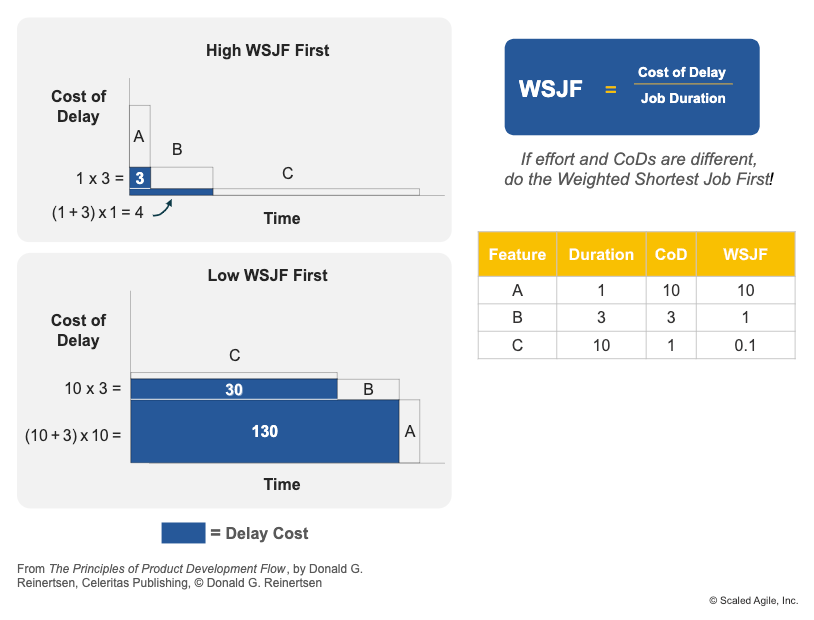
Working on the most important and most valuable things that your client and stakeholders care about is at the heart of Agile product development. SAFe encourages this practice through a methodical process called WSJF (Weighted Shortest Job First). By focusing on the cost of delay and effort required, WSJF enables program teams to focus on what matters most and what they can deliver in a relatively short period.

2. Map the Value Stream

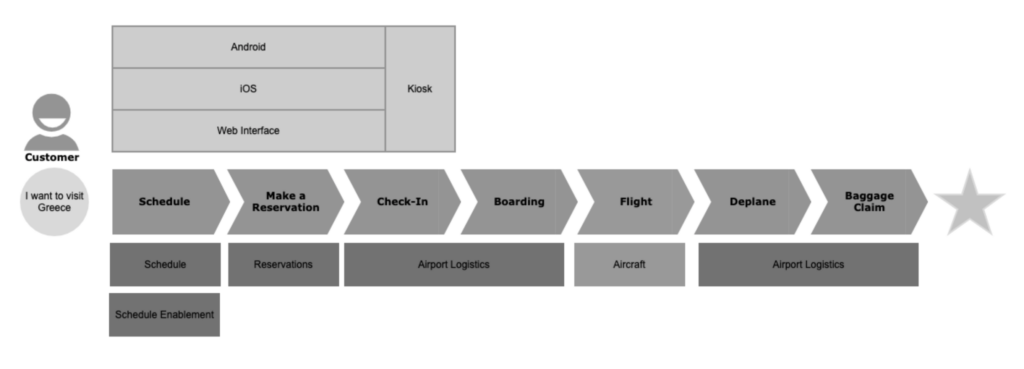
We encourage SAFe teams to organize around value, which should put emphasis on optimizing the end-to-end flow. Understanding the critical sequence of activities allows the teams to identify inefficient segments of the flow that may contribute to delays; this intelligence will inspire the team to regularly revisit what they can do differently and deliver working solutions faster.

Within SAFe, your teams can deploy a Value Stream Flow Workshop which will allow you to determine the key steps within the process, and will ultimately shed light on where your biggest bottlenecks are. This is a critical event that could alter the entire course of your project.

3. Create Flow

Flow is a necessary component of Lean practices that enables teams to create a sustainable pace and deliver value predictably. SAFe encourages flow by integration of the Innovation and Planning iteration. This practice is a unique approach which acts as a scope buffering mechanism that allows teams to optimize their throughput over multiple Program Increments.

Another method by which SAFe enables flow is the concept of architecture runway, which is supplemented by architecture enablers. By allocating time to infrastructure, teams can prepare the technical building blocks that allow consistent delivery of capabilities.

4. Create Pull

SAFe encourages pull through Kanban methods within the framework. It recommends Kanban at the Portfolio, Program, and Team levels. The pull system relies on the understanding that the people doing the work are in the best position to decide when they can introduce more work into the system.

5. Seek Perfection

Is perfection possible? Maybe, maybe not. But regardless, relentless improvement is at the core of SAFe and is built into the concept of Continuous Improvement and Continuous Innovation. Complacency has no place in the world of Agile product development, and there is an expectation that SAFe teams should consistently look for ways to increase efficiency.

6. What does all this mean?

Here are a few recommendations for your consideration:
  • Map your value stream and focus on eliminating inefficient activities that don’t add value. This seems like common sense, but often the simplest things are the easiest ones to forget about when we get preoccupied with complex issues.
  • Utilize Kanban correctly; apply WIP (Work-In-Progress) limits so that teams are not trying to do too much work at the same time. Trying to do too many things at once creates a multitude of problems such as loss of productivity, loss of focus, and reduction in quality. Avoiding these self-inflicted issues will improve your chances of success dramatically.
  • Apply a pull system; let teams choose their work when they are ready instead of pushing work to them prematurely. Pushing work to the teams is the main reason most teams have been conditioned to become “multi-tasking masters”; we all know that this puts people under excessive stress and erodes confidence and morale.
  • Apply IP Iteration and encourage personal/professional development. By skillfully implementing the IP iteration, your team can accomplish two important goals at the same time: (1) Creating a scope buffer that enables your team to throttle the work and still meet customer expectations, and (2) Enabling your team members to focus on improving their current skills in anticipation of future demands. Both activities encourage a smooth flow of work that will lead to higher overall predictability of the entire program/Agile Release Train.

Conclusion

There’s a good reason SAFe emphasizes these values and practices. These approaches improve your team’s ability to perform and achieve their goals. The key is to stay with them and have trust in your teams to do what they know is right!

SAFe and Scaled Agile Framework are registered trademarks of Scaled Agile, Inc.