
Author: Elizabeth Walsh

Validating Product Ideas Through a Startup Proof of Concept

In a new business where a lot of things are unpredictable, a startup proof of concept can be an essential tool for validating product ideas. 

In order to make your concept thrive, you will need to calculate and define its viability and feasibility. You need insights on what you need to implement in terms of technology, finance, infrastructure, etc. to bring the idea to life. You also need to prove your concept is technically feasible and desirable to investors and other stakeholders.

That’s where you will need to develop a proof of concept (POC). Join us as we explore some of the ways to write a proof of concept and how creating it can help a startup validate its product and improve the overall chances for future investment and sustainability over time. 

What is a Proof of Concept

Before implementing any startup, there is a need for solid and undeniable proof of whether the idea will work or not. A POC or proof of principle fits in here. It helps you decide whether you can proceed with the hypothesis or not. 

Basically, a POC for a startup is a presentation of the proposed product and its potential viability. POCs describe the functionality of the product, including its general design or specific features, and how feasible they are.

A POC can prove that building the proposed solution, program, product, feature, or method is achievable. POCs further allow decision-makers, investors, and even users to explore the potential of the idea, giving them a glimpse of the bigger picture or the situation once the company launches the product.

Types of Startup Proofs of Concept

POC for a startup is a type of demonstration or prototype that shows how a new technology or business model can be implemented and tested. A POC can be either technical or business-based.

Technical POCs

Technical POCs are useful for testing new technologies, evaluating feasibility, and gauging the interest of potential customers. POC in technology can also help developers learn how to build something from scratch and identify any potential problems with their designs.

There are three main types of technical POCs:

  • User Experience (UX) Proofs: UX proof is a simple demonstration that a product or service can be used by real people. This might involve testing out the design on dummy users or simulating user behavior in an analytical way.
  • Product Proofs: A product proof is a more complex demonstration that the product or service can be developed and launched successfully. This might involve building a functional prototype, completing customer interviews, or conducting market research.
  • Prototype Proofs: A prototype proof is the most complex type of proof of concept for a startup and requires the most time and investment to produce. It is typically an early version of the final product that has been simplified for testing purposes.

The developers at Cprime can help entrepreneurs who are looking to build a tech product to validate their idea and assess the technical requirements needed and define the tools and resources necessary to build the product.

Business POCs

Business POCs are especially important for testing new business models in the real world. They can help entrepreneurs determine whether their idea is viable, identify potential market niches and gain feedback from actual consumers. Furthermore, they can help entrepreneurs validate their assumptions about customer behavior and marketplace trends.

In many cases, both a Business and Technical POC may be needed. For example, to effectively test out a business model that revolves exclusively around a tech product. Imagine you want to launch the next Uber. You would want to put together a Business POC to establish that there’s room in the ride share market for a new contender, and that your concept is different enough to compete. But you’d also want to develop a Technical POC to ensure the app you’re envisioning is feasible.

Benefits of Validating Product Ideas With a Proof of Concept

While startups are all very different, 90% of them have one thing in common—they fail. One of the things startups can do to improve their chances of being in the 10% is to develop a POC. The benefits of a successful POC are long-lasting and can touch on every department within the startup, from product to sales.

To the untrained eye, a POC may feel like an extra step in the process, but developing one can help increase your odds of success. It can:

  • Help you assess risks: Creating a startup proof of concept can help you and your team identify potential risks and issues before a product goes live. You can then decide whether to make changes to the product or go back to the drawing board.
  • Get your team on the same page: Proofs of concept can help align your team and introduce them to your prospective product. For example, a POC can show your sales and marketing teams the unique selling points of your product and who your competition is. You can also use a POC to get feedback from employees who may not have been involved in developing your product.
  • See if your idea can adapt and grow: A proof of concept can help you see how scalable your idea is. As an example, would it be easy to mass produce in the future? What would you do if you needed to add additional features for new markets?
  • Get investors: Finally, a POC can be great to showcase to potential investors. Investors will want to see that you’ve done your research before they provide you with funding, and a POC is a great way to do this. 

How to Write a Proof of Concept

The goal of a startup proof of concept is to test the viability and feasibility of an idea. Once the startup POC has been completed, it can be used as part of the business plan in order to assess whether there’s potential for this idea to become a reality. If all goes well, then the next stage, which involves further development, can begin.

Basically, there are five essential stages of a startup proof of concept that teams can follow, from developing the idea to firming it up and presenting it to investors.

Stage 1: Conduct research and development

When you write a proof of concept, the first thing that comes into mind is Research and Development (R&D). The team needs to conduct extensive research around the history of similar work across the globe.

If there is none, the next step should be to analyze existing guides, PDFs, scholarly articles, or tutorials that would act as a key point of reference for the team.

If it is not available in the market, consider your idea to be a novel one that can mark you as a leading pioneer.

It may take time to build a POC. It may sometimes seem infeasible. But challenging the team’s technical abilities is the key here. Setting your own standards can lead to success when a business is still in the development phase.

Stage 2:  Specify the need for your idea

Once you are done with research around your idea, it is time to specify who needs it and why. Consider listing user personas your product will target and their pain points to understand their needs.

However, don’t just assume things. As you collect evidence at this stage, interview potential users and ask them questions regarding what they desire and need to solve the problem being addressed with your project. To make your proof of concept document look authentic, consider conducting in-depth interviews or online surveys.

Stage 3: Ideate the right solution

From the sample group’s answers, you can now start brainstorming with your team for the right solutions to customer pain points, keeping in mind that they should also be feasible and within the company’s capacity.

The team should then assess each brainstormed solution according to the likely costs, timeline, technologies needed, required operational capacities, competition, resources, and other factors.

Additionally, to firm up the proposal, you should discuss how your solution can support the fulfillment of the organization’s or stakeholders’ goals.

Stage 4: Create a prototype and test it

Once you have come up with a feasible idea, you should create a prototype based on the decided requirements, features, and solutions.

Your team must let the individuals in their sample group test the completed prototype so they can quickly determine whether the product truly addressed the pain points shared by the group.

Testing it with the same group enables you to document their feedback more easily, which is essential to the next step.

Stage 5: Gather and document feedback

During the prototype testing, you must gather and document the sample group’s feedback about their experience, their reactions, and any other valuable details, including what they think of the user interface.

The gathered feedback lets you initially verify the usability and feasibility of the solution. It also informs the team of any needed improvements to the proposed product and gives significant insight for other relevant actions moving forward.

Stage 6: Present POC for approval

With the concept tested and improved based on the feedback, you can now start the last proof of concept stage and prepare your presentation for the stakeholders.

You must present, among other things, the pain points that the product solves, features that address those problems, and technologies integrated to demonstrate the value of the idea.

You should elaborate on the product development and project management components, which you should also note in your project tracker.

These include clearly defined success criteria or project management metrics, evaluation measures, timelines, next project management plans, resources needed, and other aspects discussed earlier.

Once you’ve successfully presented the idea and persuaded the stakeholders to approve and invest, you can begin to implement it.

Wrap-up

Ultimately, startups looking to be a part of the successful minority need to do all they can to stand out and differentiate themselves from competitors—and that means proving their product has a market need and works on a large scale.

A POC helps startups see if a proposed idea is practical and attractive for the target market and achievable for the company. Through the business POC, you can explore the planned components and functionalities of the ideated product, along with the costs, resources, and capacities required to make it work.

In order to further increase the chance of success, startups should not question whether or not they should run a POC, but rather see how they can increase their capacity and create more POCs with more companies in more verticals in hopes of defying the odds.

The custom development experts at Cprime are well aware of the need for proof of concept. We also know how to create attractive prototypes to use for further user testing or attracting investors. Cprime developers can validate the product at the idea stage to see if it’s worth further developing and we can continue to collaborate to develop your product and launch it for success.

Ready to get started? Contact our experts to schedule a consultation.

How to Streamline Strategic Planning in Jira Align – Part 1

Strategic planning is essential for companies to align on priorities, establish goals, and measure performance. However, the process can often become complex and disjointed when managed through static documents and spreadsheets. Jira Align provides a powerful way to streamline strategic planning and enable real-time tracking of key initiatives.

In this post, we’ll walk through how to optimize strategic planning in Jira Align. We’ll cover:

  • Getting started with structuring objectives and initiatives
  • Developing dynamic roadmaps tied to your strategy
  • Fostering collaboration across teams
  • Tracking progress and measuring strategic impact
  • Ongoing best practices for maintaining alignment

Let’s dive in!

Getting started with strategic planning in Jira Align

The first step is structuring your strategy in Jira Align. 

Using OKRs

This involves setting up company objectives and key results (OKRs) to define measurable goals. You can then map initiatives and projects to each objective to operationalize your strategic plan.

When creating objectives, clearly define the desired outcome and how it will be measured. For example, an objective could be “Increase customer retention by 5% by Q4”.

With the objective set up, you can then establish key results—the quantifiable metrics that measure achievement of the goal. For our example, key results could be improving net promoter score to over 8.0, and decreasing churn rate below 10%.

Using Initiatives

Once your OKRs are established, you can start adding initiatives into Jira Align. Initiatives are the high-level programs and projects required to hit your objectives. 

Adding owners, estimates, and dependencies helps manage stakeholder involvement and execution.

Using permissions

You can also manage permissions in Jira Align to control who can view and edit various plans based on their role. This helps keep strategic plans visible to executives while allowing project teams to collaborate.

Developing strategic plans and roadmaps

One of the most powerful features in Jira Align is the ability to visualize strategic plans in roadmap form. This provides a high-level timeline of all initiatives mapped to objectives across planning horizons.

  • Establish milestones – Roadmaps can be structured across custom tiers to represent key milestones like quarterly goals, product releases, or project stages. 
  • Organize initiatives – Initiatives are then placed on their respective tiers based on estimated delivery dates.
  • Define dependencies – Project managers can define dependencies between initiatives to automatically sequence them. For example, an initiative to “Build CRM Integration” could be set to depend on “Complete Customer Database Migration” finishing first.
  • Experiment with scenarios – Jira Align enables scenario roadmapping with base case, aggressive, and conservative plans. This allows modeling tradeoffs to optimize investment mix and capacity planning.
  • Keep it up to date – As initiatives get underway, owners can update completion percentage to denote progress. Roadmaps auto-recalculate timelines when changes occur, keeping stakeholders aware of shifts.
  • Monitor and adjust – Different views like Gantt charts allow drilling into initiative details like assigned resources, budgets, and risks. Calendars make it easy to check for conflicts across resource utilization.
  • Share and report – Roadmaps can be shared via interactive dashboards or exported as presentation-ready slides. The visuals provide executives an end-to-end view of strategic plans, facilitating better decision making.

With Jira Align roadmapping, organizations gain a living, breathing plan that updates in real-time versus static documents. This enhances coordination across business units and teams to drive strategy execution.

Collaborating across teams in Jira Align

Strategic planning requires alignment between executives, managers, and frontline teams to be successful. Jira Align provides several ways to break down silos and improve cross-functional collaboration.

  • Interactive roadmap sharingInitiative owners can share live roadmap views with other teams or groups. This fosters transparency into how their work ties into larger company goals and interdependent initiatives. Commenting allows discussions right on roadmaps.
  • Integrations with communication toolsJira Align integrates with Confluence and Slack for real-time collaboration. Status updates made in Jira Align can automatically flow into Confluence docs or Slack channels. This keeps everyone looped in.
  • Managing stakeholders – Initiative owners can tag stakeholders from other groups. These stakeholders then receive alerts on progress updates related to their work, facilitating coordination.
  • Team progress reporting – Managers can pull progress reports filtered by team or department. This enables checking alignment across the organization and having data-driven conversations to resolve execution gaps.
  • Organization-wide access – With flexible permissions, Jira Align can provide company-wide transparency while limiting editing access as needed. This enables top-down and bottom-up visibility.

In summary, Jira Align breaks down team and departmental silos through seamless information sharing, notifications, integrations, and access controls. This leads to improved coordination and higher likelihood of successfully executing strategic plans enterprise-wide.

Tracking and measuring strategic plans

Jira Align provides robust capabilities for tracking objective progress and strategic plan KPIs in real-time.

Check out our four-part series on Jira Align reporting, starting with The Power of Team Level Reporting in Jira Align (Part 1 of 4).

Customizable dashboards offer at-a-glance views of portfolio health, budget-versus-actual costs, and completion percentage for company goals. Drilling into objectives shows up-to-date progress towards key results as well.

For a more detailed analysis, Jira Align’s reporting allows you to:

  • Monitor initiative delivery and identify late projects
  • Spot resource bottlenecks across plans
  • Analyze burn rates and forecast future progress
  • Track progress by department, product line or other dimensions
  • Export presentation-ready reports to update executives

As teams execute on initiatives, they can update progress directly on Jira Align roadmaps. This allows timelines to dynamically adjust based on real-world changes, keeping strategic plans reality-grounded.

For example, if a product launch gets delayed, initiative owners can easily drag-and-drop milestones on their roadmaps. Dependent initiatives then automatically shift based on the new timelines.

This lets organizations pivot gracefully versus rigidly sticking to outdated plans when business or market conditions change.

To maintain alignment, initiative owners can continually update key result metrics as outcomes are measured. Adding comments also enables teams to collaborate and provide context on progress changes.

With Jira Align’s robust tracking and measurement capabilities, organizations can closely monitor strategic plan effectiveness and rapidly adapt execution to drive better results. The key is maintaining up-to-date plans and making data-driven decisions based on real-time insights.

Tips for ongoing success

Here are some best practices to get continued value from Jira Align for strategic planning:

  • Review and update roadmaps quarterly – Set time on the calendar to evaluate progress and realign as needed.
  • Create templates for consistent plans – Build on templates each planning cycle rather than starting from scratch.
  • Automate data integrationsLink Jira Align to other systems to maintain up-to-date plans.
  • Assign initiative owners – Ensure every initiative has an owner responsible for execution.
  • Train all stakeholders – Provide training on Jira Align to foster adoption across the organization.

Following these tips will help ingrain Jira Align into your recurring strategic planning process.

In conclusion

Jira Align provides an optimized way to streamline strategic planning and gain organization-wide transparency. 

  • By structuring goals in Jira Align, teams gain clear line of sight into how their work ties back to company objectives.
  • With real-time roadmaps and progress tracking, organizations can dynamically adapt as business conditions change; cross-team alignment also improves through integrated planning.
  • Getting started with Jira Align involves laying out objectives, initiatives, and key results. From there, teams can develop roadmaps, collaborate across tools, and track progress towards strategic goals.
  • Following best practices around consistent reviews, updates, automation, and training will ensure continued success. 

With Jira Align, companies can connect high-level planning to execution and make strategic planning a living, breathing process. Stay tuned for Part 2, where we will consider How AI is Transforming Strategic Planning in Jira Align.

What to Consider When Moving Your CMDB Into Jira Service Management Cloud

Migration of a Configuration Management Database (CMDB) from on-prem architecture to Jira Service Management (JSM) Cloud is a topic receiving increasing attention, particularly since Atlassian Server applications will no longer be supported as of February 15, 2024. 

That aside, there’s still been a significant push towards cloud-based solutions. Whether you are considering or planning a migration, understanding the intricacies of the process is crucial. This post outlines the vital aspects of CMDB and its migration to the cloud.

(This content is based on a webinar entitled, A Pre-flight Checklist for Moving Your CMDB Onto Jira Service Management Cloud. Click to watch the full webinar with a deeper dive into the material and software demos of both Jira Service Management and Device42.)

The business value of a CMDB

As companies are trying to demonstrate mindfulness and effectiveness in the way they steward their resources and IT budget, the need for a CMDB has become increasingly apparent. A CMDB is a tool used to capture all the different components of the IT ecosystem of a company. It is a clear path to demonstrate the business value of IT investments. The rising demand for CMDB and CMDB best practices indicates its growing importance in ensuring efficiency and effectiveness in business operations.

Many companies are pushing towards the cloud to reap the benefits of scalability, accessibility, cost-effectiveness, automation, and innovation. However, migrating to a cloud-based CMDB can present challenges and risks.

Challenges of a CMDB migration

Migration of CMDB metadata is a complex and intricate task, requiring careful planning and meticulous execution. The challenges faced can be multifaceted and present serious risks if not handled with the utmost caution.

  • Data Loss: The transfer of information between different systems or versions might lead to inconsistencies or outright loss of vital data. Implementing a robust backup system and using specialized tools for migration can mitigate this risk.
  • Downtime: The migration process can lead to downtime, affecting the day-to-day operations of the business. Coordinating with all stakeholders and planning migration during non-peak hours can reduce the impact on business functionality.
  • Missing Integrations: A migration may result in missing connections or integrations with other systems. Ensuring that all necessary integrations are identified and re-established post-migration is crucial.
  • User Acceptance and Enablement: People are at the core of any system, and changes can lead to resistance or difficulties in adaptation. A clear communication strategy pre- and post-migration can help to educate users about the changes and benefits. Tailored training programs can further ensure user enablement.
  • Compliance and Security Concerns: Ensuring that all regulatory requirements are met during migration is vital. Conducting regular audits and consulting with legal teams can ensure that all compliance aspects are addressed.

The migration of CMDB metadata is a challenging task, but with careful planning, stakeholder collaboration, and adherence to industry best practices, these challenges can be transformed into opportunities for growth and innovation.

Mitigating the risks: The Discovery and Design phases in migration

To best mitigate the risks and challenges associated with migrating your CMDB, we recommend carrying out both a Discovery phase and a Design phase in preparation for the migration.

Discovery phase

A successful migration of the CMDB requires a comprehensive understanding of its current state. This stage is instrumental in recognizing what needs to be transferred and how to do it efficiently. Below is a more detailed breakdown of the key elements:

  1. Use Cases Examination: Identifying the specific use cases of the CMDB within the organization will help define what functionalities must be retained or enhanced during the migration. This ensures that the system continues to meet the unique needs of the business.
  2. Stakeholders Identification: Recognizing who is affected by the CMDB, from IT professionals to business leaders, ensures that their needs and concerns are addressed. Engaging with stakeholders during the discovery phase can foster collaboration and reduce resistance.
  3. Investigating Existing Data Models: Understanding the current data structure, including how information is stored, categorized, and accessed, is paramount. Analyzing this structure helps identify potential challenges and opportunities for improvement.
  4. Analysis of CMDB Objects: Investigating the specific objects within the CMDB (e.g., hardware, software, services) provides insights into what assets are managed and how they are interrelated.
  5. Catalogs Exploration: This involves reviewing the existing catalogs and classifications within the CMDB. Knowing what assets are categorized and how they are organized can guide a more effective migration process.
  6. Integrations Analysis: Mapping out the current integrations with other systems is critical. A clear understanding of how the CMDB interacts with other platforms ensures that these connections can be re-established post-migration without disruptions.
  7. Dependencies Mapping: Identifying the dependencies between different objects within the CMDB is crucial for maintaining the integrity of relationships post-migration. It’s important to map these connections to ensure a seamless transition.
  8. Risk Assessment: Conducting a comprehensive risk assessment at this stage helps in foreseeing potential issues and planning mitigations. By anticipating challenges, the organization can be better prepared.
  9. Regulatory Compliance Check: Ensuring that all existing compliance measures are understood will make it easier to maintain adherence to regulations during and after migration.
  10. Alignment with Business Goals: Ensuring that the migration plan aligns with overall business objectives, including Agile transformations and digital strategies, is vital for creating synergy with broader organizational initiatives.

The Discovery Phase sets the stage for a successful CMDB migration by offering a clear, well-defined understanding of the existing system. It lays the foundation for informed decisions and strategic planning, turning the complexity of migration into a manageable, step-by-step process that aligns with the needs and goals of the organization.

Design Phase

The Design Phase plays a crucial role in shaping the migration process, transforming insights gathered during the Discovery Phase into a structured plan. It ensures that the migration aligns with organizational goals and meets user expectations. Here’s an in-depth look at the key components:

  • Defining the Desired Data Model: 
      1. New Structure: Understanding the needs of the organization allows for the creation of an optimal data model that fits current and future requirements.
      2. Mapping Old to New: A crucial part of this stage involves mapping the existing data structure to the new one, ensuring no loss of essential information.
  • Assessing Target Platform Limitations:
      1. Technology Constraints: Evaluating the capabilities and constraints of the target platform ensures that it can support the newly designed data structure.
      2. Compatibility Analysis: Checking the compatibility with existing systems and integrations is vital to avoid potential conflicts or performance issues.
  • Identifying New Capabilities:
      1. Functional Enhancements: This includes outlining features that may enhance the user experience, such as improved search capabilities, analytics, or custom reporting.
      2. Alignment with Agile and Digital Strategies: Ensuring that the new design supports Agile transformations and digital strategies within the organization.
  • Establishing Acceptance Criteria:
      1. Quality Standards: Setting clear quality standards for data integrity, performance, and usability ensures that the migration meets organizational expectations.
      2. User Acceptance: Determining what will be considered a successful migration from the users’ perspective, including functional requirements and user-friendliness.
  • Creating a Detailed Migration Roadmap:
      1. Phases and Timelines: Defining a clear schedule, including milestones, dependencies, and deadlines, keeps the project on track.
      2. Resource Allocation: Planning who will be responsible for each part of the migration, from technical teams to stakeholders, ensures efficient execution.
      3. Risk Mitigation Strategies: Identifying potential risks and planning how to address them helps in avoiding unexpected challenges.
  • Enhancing User Experience and Data Organization:
      1. User Interface Design: Creating an intuitive interface that aligns with the users’ needs enhances their interaction with the system.
      2. Data Access and Permissions: Planning how data will be organized and who will have access to what ensures that the right information is available to the right people.
  • Compliance and Security Measures:
      1. Regulatory Alignment: Ensuring that the design adheres to all relevant regulations protects the organization from legal issues.
      2. Security Protocols: Implementing robust security measures protects the data during and after migration.
  • Monitoring and Feedback Mechanisms:
      1. Performance Metrics: Setting up ways to monitor the migration’s success against the defined criteria ensures continuous alignment with the goals.
      2. Feedback Loops: Incorporating mechanisms for continuous feedback from users and stakeholders fosters a more responsive and successful migration.

The Design Phase is where vision turns into strategy, crafting the blueprint for a successful migration. A thoughtful and well-structured design ensures that the migration will be carried out efficiently, meeting the goals, enhancing user experience, and aligning with the broader strategies such as Agile transformations and workforce management. It provides the road ahead, filled with clear directions and well-defined success criteria.

Migrating the CMDB to Jira Service Management (JSM) in Atlassian Cloud

Cprime’s runbooks detail the steps involved in migration, including:

  1. Deploying the Target Environment: Procuring licenses, configuring settings, and instituting a change freeze.
  2. Migrating in a Test Environment: Doing a full dry run with zero impact or disruption, just to make sure everything is functioning as expected.
  3. Migration Execution: Handling Jira issue data and CMDB metadata separately using tools like Jira Service Management Cloud migration assistant, site import, CSV, or API.
  4. Going Live: Continuous monitoring, maintaining the old environment in read-only state, and customized enablement support.

Migrating your CMDB onto Jira Service Management Cloud is a complex yet rewarding process. Understanding the business value, recognizing and overcoming challenges, reaping the benefits of the cloud, and carefully planning the discovery, design, and migration phases can set the stage for a successful transformation. 

To gain a deeper understanding and see thorough software demos of both Jira Service Management and Device42 applications, we invite you to watch the full webinar, “A Pre-flight Checklist for Moving Your CMDB Onto Jira Service Management Cloud“. Don’t miss this opportunity to explore real-life examples and insights from industry experts.

SAFe 6.0 Deep Dive – Flow Metrics (Part 2 of 2)

To quickly summarize Part One of this two-part series, we are looking into the recently released Flow Metrics within the updated Scaled Agile Framework® (V6.0) which offers interesting insights into tracking and monitoring flow of work through your Agile Release Train. 

In Part One, we covered the first three of the six metrics:

  • Flow Distribution
  • Flow Velocity
  • Flow Time 

Now, we will wrap up this series with the latter half of this collection of metrics, which will include 

  • Flow Load
  • Flow Efficiency
  • Flow Predictability

As a refresher, many Agile concepts originated from the Toyota Manufacturing / Toyota Production System (TPS), considered to be the foundation for today’s Lean manufacturing processes. Hence, we will use this comparison to help illustrate how these metrics may map to building hardware and software solutions within an Agile Release Train.

The 6 Flow Metrics

Here’s another review of the six flow metrics that SAFe® recommends.

Metric Definition
Flow Distribution Proportion of work items by type
Flow Velocity Number of completed work items over a fixed period
Flow Time Time elapsed from start to finish for a work item
Flow Load Number of work items currently in progress
Flow Efficiency Ratio of the time spent in value-added work divided by total time
Flow Predictability Level of consistency with which teams/trains/portfolios meet their objectives


Continuing where we left off in Part One, we will now focus on Flow Load. 

Flow Load

If we look at the definition of this term, we realize that this seems to resemble another popular Lean-Agile concept: Work In Progress (or WIP). In a flow-based system, often referred to as a Kanban system, the WIP limit provides a throttling mechanism to minimize over-burdening the system (or the staff) by controlling the total amount of work that an individual (or a system) can perform‌ at once. 

Flow Load is essentially the same idea; by tracking the total number of work items in play, we can glean interesting insights into the health of the system. 

Using the automobile manufacturing example, the load can represent the total number of cars currently moving through the assembly line at a time, which may vary depending on the seasonality, time of the day, etc. More than likely, we are going to need to look at multiple metrics in order to make sense of the data. We will touch on that a bit later.

Flow Efficiency

The fifth metric is Flow Efficiency, which measures the amount of value-added work (or productive work) as a function of total time spent. 

Many trains struggle to track this metric because it is often difficult to distinguish good use of time versus poor use of time. For example, is “big room planning” or any other meetings that may be perceived as administrative work considered value-added work? That may be debatable. In order for this metric to have meaning in your organization, your team may need to clarify what is actually considered “value-added work”. 

Within the car manufacturing world, any idle time is non-value added work; for example, the time it requires for a technician to walk from the car to the tool bench to retrieve a tool is usually considered “travel time”, and is not value-added. Even if each trip only requires a few seconds, over ‌millions of cars, those seconds add up and will lead to lost overall productivity that can equate to significant lost revenue.

Flow Predictability

Lastly, we have Flow Predictability, which may seem familiar. The Predictability metric has been part of SAFe for several years, even if it was not specifically referred to as a “Flow” metric. 

The concept of predictability is often difficult to grasp because very few organizations are effective at tracking this metric. The ability to produce results consistently should be the goal of any Agile Release Train, and this metric will enable trains to monitor how they are doing over time.

Putting it all together

Now that we have a better understanding of each of the six flow metrics, what are we supposed to do with them? How do we know if the train is running optimally or is in serious trouble? 

In isolation, it is difficult to make a judgment on the state of the system by looking at any single metric at a point in time. We must have a reference point against which to compare in order to determine whether your train is taking on too many work items simultaneously, or not enough. This is where we need to pair the flow metrics to draw a useful and intelligent conclusion about how your train is operating.

For example, by looking at the relationship between velocity, load, and efficiency, we can put together a picture of what is going on with your train. Is the train running effectively, or is it heading for disaster? Even if you are tracking all six metrics rigorously, you will probably need to think about what “good” looks like for your specific context. To achieve this, consider the following:

  1.     What does the customer truly care about?
  2.     What can you do differently to move the needle on those things that are important to the customer?
  3.     How can your teams use metrics to improve transparency and create a sense of purpose?

There are no right answers to these questions. You will need to think about these within your own context to decide which of the metrics make sense for you. It is possible to apply only a subset of the six metrics and still get value out of them. 

If you aren’t sure where to start, engage your train and encourage your teams to come up with their recommendations; if they are given the opportunity to define meaningful metrics, they are much more likely to provide quality data and apply them effectively.

And of course, if you need any help with this or other SAFe concepts, consider our catalog of SAFe-related learning courses and certification programs.

How to Establish Lean Budgets for Agile Success

Implementing Lean budgets is a crucial step for organizations adopting Agile practices in the context of the Scaled Agile Framework® (SAFe®). Traditional project portfolio management and budgeting approaches often inhibit delivering value.

Lean budgeting takes a different approach focused on empowering teams, decentralizing decisions, and delivering value fast. Read on to learn how to move beyond traditional budgeting to establish Lean budgets that fuel Agile success.

SAFe® and Scaled Agile Framework® are registered trademarks of Scaled Agile Inc.

Problems with traditional budgeting approaches

Many organizations rely on traditional project portfolio management approaches that create bottlenecks. Here are some of the most common challenges:

  • Project-based cost accounting – Traditional project cost accounting requires constantly moving people between projects and renegotiating budgets. It limits flexibility and causes waste.
  • Functional silos – People organized in functional silos struggle to deliver end-to-end value. Handoffs and misaligned priorities across departments inhibit flow.
  • Overly detailed business cases – Requiring big, detailed upfront business cases delays funding and forces big batch work efforts. This inhibits delivering value iteratively.
  • Waterfall phase gates – Gating funding based on completing waterfall-style phases optimizes for utilization, not flow. Teams cannot pivot quickly in response to feedback.

Embracing Lean budgeting

Transitioning to Lean budgeting is a mindset shift focused on empowering teams to deliver maximum value. Adopting Lean budgeting requires rethinking some core practices:

Fund value streams, not projects

  • Organize long-lived Agile teams around delivering value for a value stream rather than temporary project teams.
  • Provide teams a budget to cover capacity over time rather than funding project-by-project.
  • Allow teams to flexibly reprioritize work within their budget as they learn and conditions change.
  • Decentralize funding decisions and trust teams to spend funds responsibly to meet objectives.

Right-size upfront planning

  • Avoid large batches of upfront planning and estimation.
  • Plan just enough to gain commitment for the next stage of learning and feedback.
  • Use rolling wave planning to provide visibility 2-3 months ahead.
  • Re-plan frequently in smaller batches based on feedback.

Economic prioritization

  • Train teams on economic thinking and prioritization techniques like Cost of Delay.
  • Empower teams to make data-driven tradeoff decisions on what will provide the most value.
  • Let go of sunk cost bias. Pivot when the economics suggest it makes sense.

Inclusive portfolio budgeting

  • Use Participatory Budgeting sessions to transparently allocate portfolio budgets.
  • Include diverse stakeholders and facilitate inclusive decision-making.
  • Make funding criteria and guardrails clear.
  • Provide transparency into funding rationales and how budgets are spent.

Visualize flow

  • Use Kanban, Cumulative Flow Diagrams and other visuals to reveal dependencies and bottlenecks.
  • Identify wait states, handoffs, and other areas of waste in the end-to-end value flow.
  • Improve flow by addressing root causes, not just expediting.

Implementing these Lean budgeting practices reduces friction and puts funding decisions closer to teams delivering the value. This fuels faster feedback and flexibility.

Seeing the Investment Horizons

The SAFe Investment Horizon model provides a portfolio perspective on allocating funding to Solutions across multiple timeframes. This helps balance short-term and long-term investments.

Horizon 3: Evaluating (3-5 years)

This stage funds experiments and prototypes to validate new ideas that may provide future growth:

  • Conduct market research to identify potential new product or geographic opportunities.
  • Develop minimum viable products (MVPs) to test demand and usability with a small set of early evangelists.
  • Run crowdsourcing campaigns or design sprints to gather customer feedback on new technologies or features.
  • Implement small pilot projects to evaluate new partnerships, business models, or marketing approaches

Horizon 2: Emerging (1-2 years)

This stage transitions the most promising solutions from Horizon 3 closer to readiness:

  • Scale successful MVPs into wider beta releases to assess product-market fit.
  • Build out integrations and infrastructure to support scaling market-validated solutions.
  • Grow partner and early adopter communities to co-create solutions.
  • Refine business models and operational processes for solutions demonstrating value.

Horizon 1: Investing & Extracting

This stage focuses on improving existing systems while maximizing profit:

  • Fund initiatives to enhance capabilities and the competitiveness of current products.
  • Maintain solutions with stable revenue streams (cash cows) that require minimal investment.
  • Expand customer segments and acquisition channels for established offerings.
  • Improve delivery pipelines, DevOps, and automation for faster time-to-market.

Horizon 0: Retiring

This stage winds down solutions that no longer provide strategic value:

  • Develop sunset plans to transition customers off obsolete or unprofitable solutions.
  • Reassign teams from retired solutions to new initiatives.
  • Extract lessons learned from solutions being retired to apply to future efforts.
  • Prioritize divesting solutions that are cash and resource traps.


Aligning budgets and roadmaps to these horizons balances short-term returns with long-term bets.

Participatory Budgeting in action

Participatory Budgeting (PB) brings diverse stakeholders together to transparently decide how to allocate portfolio investments.

Done well, PB builds engagement, accountability, and trust. Follow these tips to maximize its impact:

Involve diverse stakeholders

  • Get better ideas by broadening your perspectives
  • Increase adoption across organization for a smoother implementation
  • Achieve higher quality decisions by tapping a wider base of knowledge and experience
  • Boost morale and inclusion by encouraging open participation

Communicate clearly

  • Improve understanding across all groups to support more effective processes
  • Increase participation by making the process accessible and engaging
  • Find better ideas and promote transparency by enabling dialogue
  • Reduce confusion and questions to create efficiencies

Foster collaboration

  • Break down silos to improve alignment
  • Leverage collective intelligence to fuel innovation
  • Encourage greater commitment by building shared ownership
  • Develop relationships and empathy for a sense of community and connection

Establish clear guidelines

  • Promote fairness by setting consistent expectations
  • Enable effective preparation and yield higher-quality proposals
  • Accelerate reviews and decisions for faster results
  • Reduce risk through improved governance and compliance

Provide support

  • Boost collaboration skills to create synergistic proposals
  • Overcome barriers to participation and promote diversity
  • Resolve issues quickly with smoother processes
  • Upskill on budgeting best practices to achieve more impactful spending

Ensure accountability

  • Improve trust and engagement by enhancing transparency
  • Facilitate lessons learned to support continuous improvement
  • Demonstrate the ROI of investments to inform better future decisions
  • Establish a positive culture and high morale by celebrating successes

Reaping the benefits

Transitioning to Lean budgeting unlocks tangible benefits:

  • Greater agility – Teams can respond quickly to learnings and new opportunities
  • Improved transparency – Stakeholders have visibility into how funds are used
  • Increased engagement – Cross-functional partners feel ownership in decisions
  • Faster value – Removing bottlenecks accelerates delivering customer value
  • Higher satisfaction – Adapting to evolving needs increases customer delight

Is your budgeting process getting in the way of Lean-Agile results? Follow these guidelines to establish Lean budgets that fuel faster flow. Empowered teams supported by participatory processes can achieve amazing things. Get out of their way and let them delight customers!

Dive deeper by reading our white paper, “Using Lean-Agile Principles to Execute Organizational Transformations”.

SAFe 6.0 Deep Dive – Flow Metrics (Part 1 of 2)

If you are applying SAFe® (Scaled Agile Framework®) or are considering doing so, you are most likely aware of at least some of the key updates to the V6.0 release. One of the most critical additions to this update is the concept of “flow”. 

What is Flow in SAFe 6.0?

Scaled Agile’s official definition of Flow is as follows:

“Flow is characterized by a smooth transition of work through the entire value stream with a minimum of handoffs, delays, and rework. In SAFe, we consider flow to be present when teams, trains, and the portfolio can quickly, continuously, and efficiently deliver quality products and services from trigger to value.” (© Scaled Agile, Inc.)

SAFe 6.0 provides a detailed account of the various flow concepts and metrics that you should consider when implementing SAFe. While this information is very thorough, many practitioners I work with expressed an interest in more specific examples related to how to deploy these metrics. Hence, I thought it might be worthwhile to illustrate the use of these metrics through a simple, everyday example that most of us should be able to relate to so we can gain a better understanding overall.

An example from manufacturing

Because of the level of detail that will be covered, it made sense to split this into a two-part series to ensure we provide adequate coverage of all six of the flow metrics that are recommended by SAFe 6.0. Let’s first go over the details of a fictitious project which we will use to clarify the flow concepts.

When I facilitate training sessions for my clients, I often think about a common example that is not specific to any industry or technology so that I can try to reach as many of my students as possible and help them connect to their own contexts. Although there may not seem to be a clear alignment to Agile principles and practices, I often use manufacturing concepts as a backdrop to explain Lean-Agile concepts. For this exploration of flow metrics, we will use the concepts of automobile manufacturing to clarify the ideas.

The Toyota Manufacturing / Toyota Production System (TPS) is considered the foundation for today’s Lean manufacturing processes. Hence, we will connect to SAFe’s flow metrics by inspecting how these may map to building hardware and software solutions within an Agile Release Train.

The 6 Flow Metrics

Let’s first look at the 6 Flow Metrics that SAFe recommends.

Metric Definition
Flow Distribution Proportion of work items by type
Flow Velocity Number of completed work items over a fixed period
Flow Time Time elapsed from start to finish for a work item
Flow Load Number of work items currently in progress
Flow Efficiency Ratio of the time spent in value-added work divided by total time
Flow Predictability Level of consistency with which teams/trains/portfolios meet their objectives

Flow Distribution

The key concept behind monitoring the distribution of different types of work is to understand how long-term and short-term objectives are being supported. For example, work may include infrastructure/enablers, sustainment/maintenance, and new capabilities/features. If one type of work is dominating the overall distribution, the risk to the overall health of the product life cycle may be elevated. 

Using an automobile manufacturing assembly as an example, the assembly line will typically contain a variety of car models that are in distinct stages of the overall assembly process. 

Within this context, we may want to see how much of the resources (human capital and technological assets) are deployed for the development of the chassis, painting, electronics, etc. 

From another perspective, at the portfolio level, it may be worthwhile to examine how funding is allocated to research and development for future car models or manufacturing of current-year models. 

By looking at the flow distribution of how work is executed for various types of work, we can assess trends (i.e. peaks, valleys, outliers, etc.) which will enable the team to make informed decisions on potential shifts in the allocation.

Flow Velocity

Using the automobile manufacturing example, flow velocity is easy to explain—it is simply the number of vehicles produced within a time horizon. For example, 1,000 cars per day, or something to that effect. In your world, depending on what type of product or service you are building, this metric may not be as simple to measure, especially if you are not shipping a physical product. However, if you are producing a service, you will probably depend on some type of technology to support that service, which I would suspect to be a digitally enabled system, in which case you can measure the number of features and/or functions that your team is deploying within a specified timeframe. That can also qualify as flow velocity.

One key thing to keep in mind is that the purpose of collecting this data is to evaluate the performance of the team in terms of productivity and efficiency. Trends will be valuable to determine whether the overall performance is improving or degrading over time.

Flow Time

In delivering products or services to the customer, nothing is more noticeable than speed; customers can often compromise on the complexity and sophistication of a solution, but they are almost always eager to receive something as quickly as possible, no matter how incomplete it might be. 

We need to keep in mind that this does not mean we can put low-quality goods into the hands of the customers and expect them to be happy. Faster delivery means we will provide a high-quality product, but possibly without all the special features that may be perceived as “nice-to-have”.

Flow time is one method of measuring how much time your team needs to put that capability into your customers’ hands. It is a trending metric that allows you to determine if your team is improving its efficiency (reduction in time), stabilizing (by a plateauing effect) or even degrading (taking more time to deliver value). 

Within the context of automobiles, flow time can be measured as the number of hours/minutes required to build a complete, functioning car that is ready to be driven.

If you need any help with this or other SAFe concepts, consider our catalog of SAFe-related learning courses and certification programs.

Perfecting Your ITSM Customer Management Using JSM

Customer Management is a vital component of a thriving ITSM practice. But what is it? Why is it vital? And how can you go about perfecting it so you see all the impressive benefits?

This is the third in a three-part series covering ITSM principles and applying them using JSM:

  • Enabling ITSM Change Management With JSM
  • Streamline Your ITSM—Service Catalog and CMDB Powered by JSM 
  • Perfecting Your ITSM Customer Management Using JSM

(This content is based in part on the webinar, “Perfecting Customer Management Using Jira Service Management”. To learn more and see an in-depth software demo showing how to practically apply this information, watch the video!)

What is customer management?

In this context, customer management refers to the process of managing and optimizing interactions with internal and/or external customers over the life cycle of the relationship.

It’s about putting the customer first

This is vital because it supports one of the key values of the popular ITIL framework for ITSM: customer-centricity. In contrast to “the technology orientation” to which many organizations default—the IT team is solely focused on handling their own tasks, and the customer’s requests are viewed as an interruption or even a burden—a customer-centric view puts the customer’s satisfaction first and foremost, prioritizing other IT tasks and updating processes accordingly.

An example of a change that reveals the adoption of a customer-centric approach could be the wording used in the form fields on a customer service portal:

Technology-oriented Customer-centric
“Hardware and peripherals” Laptop, printer, phone
“SAML/SSO validation error” Trouble logging in?
“IP address?” <blank field> “IP address?” <tool tip that links to an article on the knowledge base: “How to locate your IP address in three easy steps”>

Since many customers are not, themselves, IT professionals, adjusting the terminology to be simpler and clearer exemplifies customer-centricity.

Defining the IT value stream

This aligns well with the Agile concept of value streams. The value the IT department provides is not measured in items checked off a list, it’s measured in satisfied customers. So, an ITSM “value stream” begins with the end in mind—a satisfied customer—and identifies every point along the path from problem to solution, with the customer at the forefront.

Once value streams are identified and established for every customer request type, customer-centric processes can be standardized and (to the extent possible) automated. This allows for quick and efficient decision making and solutioning without sacrificing the customer’s satisfaction in the pursuit of speed.

Key components of Customer Management

Effective Customer Management requires three vital elements:

Understanding the customer’s needs and expectations

Logically, you can’t put the customer first in your service delivery or effectively establish value streams if you don’t fully understand what the customer wants in the first place. And, you need to understand the customer’s expectations—whether they’re realistic or not. (Sometimes, effective Customer Management will involve managing those expectations kindly but firmly.)

Capturing customer feedback

The way you come to understand the customer is by constantly soliciting feedback from them. Keep the lines of communication open before, during, and after the ticket resolution process. 

Realistically, customer needs and expectations change over time. So, feedback should be an ongoing loop. Effective Customer Management—and all other aspects of high-quality ITSM—is not just a set-it-and-forget-it proposition. It should constantly evolve with your customer.

Continually improving service delivery

If you’re focused on the customer, and you keep that communication flowing, then you will routinely uncover opportunities to improve and streamline your service delivery. Don’t put off making those changes. Continuous improvement is the key to maintaining your competitive edge.

The power of “shifting left”

In the context of ITSM, “shifting left” refers to arranging tools and processes in such a way that problem resolution occurs as close to the customer and their initial request as possible.

The ITIL framework defines five support tiers that your team can utilize to solve a customer problem:

Tier 0 Tier 1 Tier 2 Tier 3 Tier 4
What is it? Self-service Initial human contact (via phone, email, chat, or in-person) Routine technical support Expert technical support Third-party technical support
Who is involved? Self-service portal, knowledge base, Service Catalog, automated ticketing solutions, and increasingly, AI chatbots Customer service representatives with limited technical expertise IT specialists and analysts with general knowledge and proficiency  Subject-matter experts with deep experience Outsourced help desk resources, often from the manufacturer, developer, or a niche consultancy
What do they do? Answer simple, general questions and perform routine or automated tasks (password resets, how-to instruction) Triage the situation, offer a single point of contact, resolve the situation (if it falls within their scope of knowledge and experience) or escalate to Tier 2 Analyze and resolve the situation, or escalate to Tier 3 Analyze and resolve the situation, or escalate to Tier 4 Analyze and resolve the situation, or propose an alternate resolution (i.e. replacement, refund, etc.)

The IT team that focuses on building their Tier 0 capabilities will experience significant benefits, including:

  • Reducing resolution time
  • Optimizing the use of IT resources, reducing cost
  • Enhancing the customer experience

Building up the knowledge and experience of your Tier 1 support team offers all the same benefits in those more complex situations that may have previously required the help of busy (and expensive) Tier 2 staff. And the pattern goes on.

Putting Customer Management into action

Putting the theory into practice will require a tool that supports effective Customer Management. Jira Service Management (JSM) offers many features and capabilities that align with the concepts described above. 

For example:

  • Defining the IT value stream – JSM offers tremendous customization so you can build portals, workflows, a knowledge base, and integrations, all based around the value you need to deliver to your customers.
  • Capturing customer feedback – A robust Customer Satisfaction (CSAT) feedback and scoring module and other communication and collaboration tools within JSM keep the lines of communication open, supporting continuous improvement.
  • Shifting left – JSM supports self-service through customizable portals, automated ticketing, and streamlined integrations with knowledge base materials, chatbots, and AI.

For an in-depth demonstration of how to put all these concepts into practice using JSM, watch the webinar, “Perfecting Customer Management Using Jira Service Management”. And, if you’re ready to move forward with perfecting your own Customer Management practice, speak to our ITSM experts today.
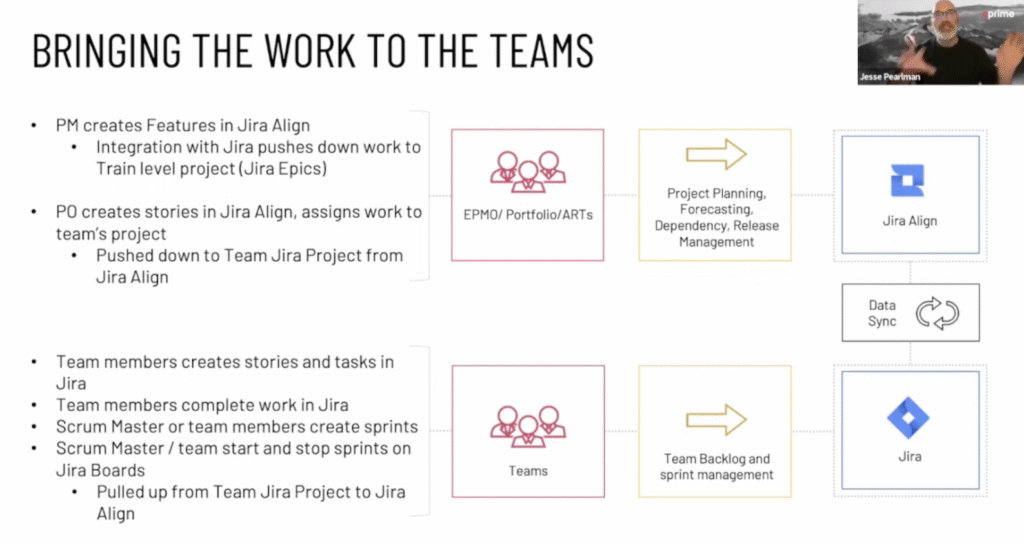

Work the Plan: Achieve Enterprise Agility With Jira Align

In the previous articles in this three-part series, we discussed facing the challenges standing in the way of Enterprise Agility, and planning for Enterprise Agility based on value. In this article, we’ll dive into some of the ways Jira Align makes it possible for organizations to effectively execute, monitor, and adjust their plans to deliver value consistently.

The following content is taken from the webinar, “Enterprise Agility with Jira Align Part 3: Executing the Plan and Pivoting for Success”

How critical is visibility at all levels of the organization?

As an entrepreneur or executive, having a clear understanding of the value your organization delivers, why, and how, is vital to long-term success. If you can’t see what’s being accomplished at all levels of the organization, you’re flying blind when it comes to creating a strategic vision. And that means you won’t necessarily know when pivots are needed or when you’d be well served to double down on a given pursuit. 

At the same time, team members with “boots on the ground” benefit greatly from having visibility into even the highest-level strategy guiding the organization. Studies have shown that a clear understanding of the high-level goals the company is striving to achieve helps improve overall employee performance, engagement, and morale. It shows them where their efforts fit into the larger picture. And when decisions are made to pivot, they understand the reasons, making it easier and more likely for them to support the change.

Why is Jira Align the perfect tool to provide this visibility?

Jira Align is a software solution from Atlassian custom-built to support organizations looking to scale their Agile practices enterprise-wide. For companies who are already using Atlassian Jira or Azure DevOps, Jira Align provides a highly customizable platform that syncs data with these systems to provide top-down and bottom-up visibility across the entire organization. 

To see if your organization is currently at an Agile maturity level to benefit from Jira Align, read our white paper, “The 5 Phases of Enterprise Agility.”

Pivot or persevere decisions

Jira Align helps leaders with “pivot or persevere” decision-making. It offers the confidence to understand how the organization is delivering value now so that the inevitable drop in productivity can be calculated and planned for when a pivot is needed. 

A large organization pivoting is like a huge ship at sea negotiating a turn. It takes a long time and a lot of energy. The further the “admiral” is from the bridge, the harder it is for them to effectively direct that movement. Jira Align puts the admiral right on the bridge with fingertip access to everything they need to make and manage that pivot effectively.

For the remainder of this article, we’ll break down how Jira Align achieves this level of enterprise-wide visibility.

Executive level visibility

Jira Align provides space for executives to define and flesh out the top-level strategy for the organization and the company’s mission, vision, and values. Once it’s recorded in the system, this strategic foundation is visible to everyone. And, each aspect of the strategy can be directly tied to broad strategic themes, which are then deposed into portfolio epics, program epics, features, and eventually stories and tasks. That way, even the smallest task at the team level can be tied directly to a broad strategic goal the enterprise is working toward.

Some examples of Jira Align modules that provide this visibility include:

  • Strategic Backlog: Create and manage broad strategic themes that outline what the company will be focusing on for the coming one to three years. These themes include sufficient detail to ensure alignment with the company’s mission, vision, and values. And, space is provided to develop the high-level OKRs that will support evaluation of the theme as feedback data comes in.
  • Work Tree: Break down strategic themes into the various epics and connected units of work to evaluate how they are progressing in relation to OKRs. Is value being delivered? And, is it sufficient to justify spend, or are adjustments warranted?
  • OKR Tree: OKRs are the “eyes and ears” leaders will use to determine the impact they are making on the market. To decide if their existing strategic themes are paying off. 
  • Strategy Room: This is one unified space where data from all the above sources and more are brought together to provide a highly-visual representation of high-level strategy and the real-time progress being made toward achieving strategic goals. This is where tuned-in executive leadership will most often live inside Jira Align.

Explore a deeper dive into the enterprise-level reporting available through Jira Align.

Portfolio level visibility

With strategic themes developed and prioritized, they can be broken down into various portfolios of work. From there, portfolio managers will create and manage epics designed to meet OKRs that indicate the company is achieving its strategic goals. Those epics will be further broken down into backlogs of epics to be pursued at the program level by established teams of teams. Because of the visibility provided by Jira Align, even two levels down, all the units of work created will directly align to the highest level of strategy.

Here are some examples of modules that provide visibility at the portfolio level:

  • Strategic Roadmap: Quickly and visually capture the strategies the portfolio is pursuing. All the items from the strategic themes are displayed with their portfolio and program epics to see how everything is connected.
  • Portfolio Epic Lifecycle: This screen offers program managers visibility into portfolio epic details, including: estimate, WSJF/priority, features, and objectives. This can be powerful when used in PI planning and monitoring.
  • Program Backlog: When features enter the backlog, program managers can further rank and refine them for delivery during the PI. The backlog allows for drag-and-drop or right-click ranking, estimating, and WSJF analysis. It’s directly connected to the portfolio epics, so all those details are also visible to portfolio managers.

Click here for more details on portfolio-level reporting available in Jira Align.

Program level visibility

As noted above, program managers are afforded visibility up into the portfolio epics and higher-level strategic themes, goals, and OKRs. Similarly, teams and portfolio managers can zero in on epics and features at the program level to monitor work in real time and use that information for decision-making across the board. 

A couple of powerful modules program managers and others find very useful include:

  • Feature Record: This module breaks each feature down with rich details including a description, target sprint and scheduling milestones, estimate, what product it’s related to, total stories, risks, dependencies, objectives, and acceptance criteria. This information can be incredibly valuable for story writing, among other things.
  • Program Room: This is another unified and highly visual means of breaking down and managing work throughout a PI in real-time. From portfolio epics down to individual stories and tasks, all the work in past, present, and future PIs can be displayed here.

Check out a more detailed treatment of program-level reporting inside Jira Align.

Team level visibility

The data sync between Jira Align and Jira or Azure DevOps is where all this comes together. It allows all of the data generated in both systems to cross-populate so that teams working in Jira or AD have constant visibility into work created or prioritized in Jira Align. This is made possible via the WHY button that appears at the top of each ticket. 

Additionally, managers and product owners working in Jira Align have constant visibility into the progress of producing against all strategic themes, portfolio epics, program epics, features, and related OKRs.

Learn more about team-level reporting you can exploit with Jira Align.

If your organization is actively pursuing Enterprise Agility, we strongly recommend exploring Jira Align. It’s a powerful tool that can help you effectively work your plan and produce value as intended.

AI-Powered Service Management: Increasing Efficiency, Enhancing Customer Experience

Every business out there is on the journey to streamline processes, optimize resource utilization, and leave customers happy. The path to efficiency is sometimes a bumpy, winding road. However, one transformative technology is revolutionizing service management: Generative Artificial Intelligence (GenAI). 

By harnessing this powerhouse alongside existing tools and workflows, businesses can unlock new levels of efficiency, personalization, and effectiveness in their service management practices. 

AI-powered service management is transforming businesses’ ability to operate and serve their customers. Organizations can automate routine tasks, harness data insights, deliver personalized experiences, optimize service routing, and drive continuous improvement by leveraging AI technologies. 

As AI continues to evolve, the possibilities for service management improvements are only bound to grow, offering exciting prospects for organizations looking to elevate their service delivery capabilities. 

Watch our free webinar on AI-powered Service Management.

First, What is Service Management? 

Simply put, Service Management is the practice of planning, implementing, and optimizing processes and strategies to deliver high-quality services to customers. Service management encompasses various disciplines, including but not limited to:

  1. IT Service Management (ITSM): Managing IT services aligned to business needs. This includes incident management, change management, problem management, and service desk operations.
  2. Customer Service Management: Delivering exceptional support and experiences to customers. This includes customer relationship management (CRM), customer support activities, customer experience design, and customer satisfaction measurement.
  3. Service Design: Designing services that meet customer needs and align with business objectives. This includes: service catalog design, service level management, and service experience mapping.
  4. Service Operations: The day-to-day management and delivery of services. This includes: service monitoring, request fulfillment, and service continuity planning.

The Impact of AI-Powered Service Management (AISM)

By adding AI as a force multiplier to the powerful potential of service management, great things happen.

Agile and DevOps enabler

AI supports ongoing service improvement efforts by providing actionable insights and data-driven recommendations, automation, and intelligent insights. By automating repetitive tasks, such as incident resolution and service requests, it allows teams to focus on more strategic activities. This enables organizations to enhance the speed, efficiency, and quality of their agile and DevOps processes and promote continuous delivery and improvement.

Automating towards efficiency

AI-powered automation frees up valuable time for service teams to focus on more complex and value-added activities. Chatbots, for instance, can handle common customer queries, provide instant responses, and even perform basic troubleshooting. This automation not only improves response times but also ensures round-the-clock availability, resulting in faster issue resolution and increased customer satisfaction.

Advanced data analytics

AI can harness vast amounts of data and extract valuable insights. By analyzing historical data, AI algorithms can identify patterns, detect anomalies, and predict potential issues before they arise. This proactive approach allows businesses to take preventive measures, optimize resource allocation, and improve service quality while minimizing downtime and disruptions.

Personalized customer experiences

AI empowers organizations to deliver highly personalized customer experiences. By leveraging customer data and AI algorithms, businesses can map customer intent, anticipate needs, and offer tailored recommendations. Recommendation engines, for example, can suggest relevant products or services based on customer behavior and past interactions, leading to increased cross-selling and customer loyalty.

Intelligent service routing and escalation

AI algorithms can intelligently route service requests to the most appropriate teams or personnel based on skill sets, availability, and workload. By automating service ticket categorization and escalation, organizations can ensure that customer inquiries are directed to the right experts promptly. This not only improves response times but also enhances first-call resolution rates, reducing customer frustration and boosting overall service efficiency.

What are some AI-powered Service Management technologies?

In addition to chatbots, there are several other types of AI technologies that you can employ in your Service Management operations to enhance efficiency, productivity, and customer satisfaction. Here are some of them:

  1. Virtual Assistants: Virtual assistants, like chatbots, can handle customer queries, provide information, and perform tasks, enabling seamless and instant support for customers and employees.
  2. Natural Language Processing (NLP): NLP allows AI systems to understand and interpret human language, making interactions more conversational and enabling more advanced and context-aware responses from chatbots and virtual assistants.
  3. Machine Learning (ML) for Predictive Maintenance: ML algorithms can analyze historical maintenance data to predict equipment failures or service issues before they occur, allowing for proactive maintenance and minimizing downtime.
  4. Knowledge Management Systems: AI-powered knowledge management systems can organize and optimize knowledge bases, making it easier for agents and customers to find relevant information and solutions quickly.
  5. Robotic Process Automation (RPA): RPA can automate repetitive and rule-based tasks in service management, such as data entry, ticket routing, and follow-up actions, freeing up human agents for more complex tasks.
  6. Sentiment Analysis: AI-driven sentiment analysis can analyze customer feedback and interactions to gauge customer satisfaction levels, helping you identify areas for improvement and tailor your service approach accordingly.
  7. Predictive Analytics: Utilize AI-powered predictive analytics to forecast service demand, resource requirements, and customer behavior, enabling better resource allocation and planning.
  8. Service Ticket Prioritization: AI algorithms can prioritize service tickets based on urgency and complexity, ensuring that critical issues receive immediate attention and resolution.
  9. Image and Video Analysis: If your service management involves visual inspections or maintenance tasks, AI-powered image and video analysis can help detect equipment issues or anomalies.
  10. Intelligent Routing and Escalation: AI can intelligently route and escalate service tickets based on various factors, such as issue type, customer status, and historical data, ensuring efficient ticket handling and resolution.
  11. Self-Healing Systems: Implement AI-driven self-healing systems that can automatically detect and resolve service issues without human intervention, reducing downtime and improving service reliability.
  12. Speech Recognition: Integrate speech recognition technology to allow customers to interact with your service management system using voice commands, providing a more intuitive and hands-free experience.

By leveraging these AI technologies in your Service Management operations, you can optimize workflows, enhance customer support, improve service delivery, and achieve higher levels of operational efficiency. Integrating AI into your service management strategy will help you stay ahead in the competitive landscape and deliver exceptional service experiences to your customers.

Streamline IT Service Management with Jira Service Management’s Service Catalog and CMDB

Effective IT service management (ITSM) is critical for modern enterprises. Two key components of a mature practice are the ITSM service catalog and configuration management database (CMDB). In this post, we’ll explore how Jira Service Management (JSM) provides powerful native tools to implement service catalogs and CMDBs, enabling teams to deliver streamlined, high-value services.

For an example of the impact of a scaled ITSM practice, read about a major JSM implementation at an iconic luxury retailer.

This is the second in a three-part series covering ITSM principles and applying them using JSM:

  • Enabling ITSM Change Management With JSM
  • Streamline Your ITSM—Service Catalog and CMDB Powered by JSM
  • Perfecting Customer Management Using JSM

The role and importance of ITSM service catalogs

A service catalog is a centralized list of all the services and solutions IT provides to the business. Well-defined service catalogs offer many benefits:

  • Streamlined request creation and fulfillment. Categorizing requests into services simplifies triage and handling for service agents.
  • Enhanced value to the business. Efficient request management frees up resources to work on higher-value initiatives.
  • Foundational for ITSM accountability and governance. The service catalog links requests and changes to defined services with owners.
  • Facilitates SLAs monitoring. The service catalog can define unique SLAs per service like time to first response.
  • Integrates with change, incident, and problem management. Problems, changes, and incidents are associated with affected services in the catalog.

Within the ITIL framework, the service catalog is critical for mature service management. It is the central repository detailing the services IT provides.

Examples of services

ITSM service catalogs categorize requests at a high level. Examples include:

  • Hardware provisioning: laptops, workstations, printer setup
  • Software provisioning: installs, upgrades, licensing
  • Network services: VPN, WiFi, access provisioning
  • Business application support: Jira, Salesforce, custom apps
  • Cloud services: AWS, Azure, VM provisioning and management
  • Data services: reporting, analytics, business intelligence
  • Disaster recovery: backups, redundancy planning and testing

The specifics will vary across organizations based on size, industry, and technology landscape. Larger entities will have more extensive catalogs. The key is balancing detail while maintaining usability.

Defining and refining the ITSM service catalog

Developing an optimal service catalog requires discovery, planning, and refinement. Starting from a basic list, teams should:

  • Identify value streams from the customer perspective
  • Map request types to service categories
  • Define service tiers like L1, L2, L3
  • Assign owners and points of contact
  • Outline the scope covered for each service

This exercise enables organizations to right-size their catalogs. Too few categories creates gaps; too many becomes unwieldy. The goal is partitioning requests into logical groupings that make fulfillment straightforward.

Periodic reevaluation of the catalog ensures it evolves appropriately as the business and technology landscape changes. The service catalog is a living framework that guides daily operations.

For more context around building an ITSM practice using the ITIL framework, download our white paper, The Key to Unlocking Optimized ITSM.

Leveraging Jira Service Management’s service catalog

JSM provides built-in functionality to define and manage catalogs. The “Services” section enables teams to:

  • Create and categorize services
  • Define service tiers like L1, L2, L3
  • Assign service owners and points of contact
  • Set up SLAs per service (like response time)
  • Link services to changes, incidents, and problems
  • Integrate with OpsGenie for on-call scheduling

This service catalog capability streamlines request fulfillment. Customers easily submit requests for defined services. Agents can quickly triage and resolve based on established workflows.

JSM also connects services to broader ITSM processes through its native integration with the Insight Asset Management app. Teams can build extensive CMDBs linking all IT assets and configurations to defined services and owners.

The role and value of a CMDB

A configuration management database provides a centralized repository of all IT infrastructure and assets. It tracks relationships between components to provide a single source of truth.

CMDBs deliver several benefits:

  • Effective asset management: inventory hardware, lifecycles, utilization
  • Streamlined incident resolution: understand downstream impacts of outages
  • Informed change management: identify risks and affected services/users
  • Continuous improvement: optimize costs based on utilization data

Within ITSM, the CMDB is the definitive record of your IT environment configuration. It integrates tightly with incident, problem, and change management processes.

Types of configuration items (CIs)

CMDBs track various types of CIs including:

  • Hardware: computers, mobile devices, network gear
  • Software: operating systems, applications, licenses
  • Cloud services: AWS instances, Azure VMs, custom cloud platforms
  • Organizational: users, departments, locations

CMDB best practices

Effective CMDB management involves:

  • Federated data integration from multiple sources
  • Automation to keep CIs updated in real-time
  • Intuitive interfaces tailored to user needs
  • Scheduled audits and reconciliation

Proactive data management is key. Allowing the CMDB to become outdated severely reduces its value. Integrations and workflows should ensure accuracy and completeness at all times.

Larger organizations will often manage multiple federated CMDBs integrated into a single system. JSM’s native integration makes consolidating data easy.

Integrate ITSM service catalogs and CMDBs using JSM

Jira Service Management brings CMDBs and service catalogs together into a single intuitive interface.

The asset management capabilities provided by Insight Asset Management integrate directly with JSM’s service catalog. Teams can easily build extensive records of all IT components and map them to defined services and owners.

Key features include:

  • Customizable asset schemas: Build CMDBs tailored to your environment
  • Federated data integration: Sync data from multiple sources
  • CMDB-driven request forms: Assets assigned to users prepopulate
  • Automation to update CIs: Changes can trigger CMDB updates

These capabilities enable mature ITSM practices. With JSM, you get powerful service catalog and CMDB functionalities built right into a single trusted platform designed for enterprise service delivery.

Real-world use case

Imagine a help desk agent receives a request to replace a broken laptop. The user simply selects the hardware asset assigned to them when submitting the ticket.

Behind the scenes, the integrated CMDB automatically attaches all relevant details like serial number, warranty status, specs, etc. The agent has all the info they need to rapidly resolve the issue.

Upon resolution, automation can update the asset’s status. The CMDB self-maintains with no manual effort required.

Realize the potential of mature ITSM

Mature IT service management, guided by frameworks like ITIL, requires extensive use of service catalogs and CMDBs. ITSM powered by Jira Service Management provides innovative native tools specially designed to help IT teams leverage these best practices.

With simplified service offering definitions, comprehensive configuration data, and the latest service management technology, teams can deliver efficient, business-focused services. 

Don’t miss the thorough demo of how to leverage JSM to optimize your service catalog and CMDB. Watch the second half of the webinar here!